


















How to Get Snapchat Unblocked at School (7 Safe & Working Methods)
You sit down at lunch, open Snapchat, and… nothing loads. 😤 Sound familiar?
Many school Wi-Fi networks strictly block social media platforms like Snapchat, TikTok, and Instagram. School administrators install heavy firewalls to keep students from getting distracted during lectures. However, completely blocking communication channels cuts you off from your friends during your actual free time.
This guide breaks down exactly why schools block Snapchat, the 7 most reliable methods to get Snapchat unblocked at school, and which risks to avoid. Whether you're on an iPhone, Android, Chromebook, or a school-issued laptop — we have a solution for you.
Why Do Schools Block Snapchat?
School IT teams don't block apps just to be difficult. There are real institutional reasons behind every firewall rule.
① Bandwidth Protection
Snapchat is a heavy multimedia platform. HD videos, auto-playing Stories, and real-time camera filters eat bandwidth fast. When hundreds of students load Snaps simultaneously, the entire school network slows down — making learning tools unusable. Blocking social platforms keeps bandwidth available for online tests, research portals, and video lessons.
② Classroom Focus
Notification pings, group chats, and viral filters are highly addictive by design. Schools use firewall rules to reduce classroom distractions and keep students engaged during lessons. It's a blunt instrument, but it works during class hours.
③ Legal Compliance (CIPA)
In the US, schools receiving federal internet funding must comply with the Children's Internet Protection Act (CIPA). This law requires filtering access to platforms where unmoderated content — including explicit material — can appear. Snapchat's open messaging features make it a common target. Schools use deep-packet inspection (DPI) and DNS blacklists to automatically block any connection attempt to Snapchat's servers.
7 Working Methods to Get Snapchat Unblocked at School
These methods are ranked from the simplest quick-fix to more advanced technical workarounds.
📶 Method 1: Switch to Cellular Data — The Safest & Fastest Fix
This is the #1 recommended method. It's 100% effective and takes 10 seconds.
Here's how:
- Open your phone's Settings.
- Turn Wi-Fi OFF.
- Confirm Cellular Data (4G/5G) is enabled.
- Open Snapchat. Done. ✅
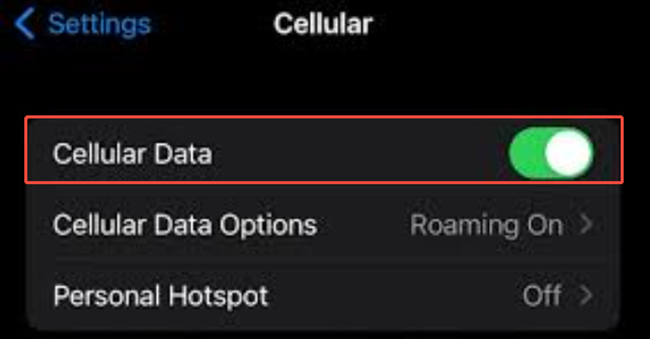
Your traffic now routes through your carrier's network — completely outside the school firewall. No app needed, no configuration required.
🔴 Downside: Thick concrete school walls can weaken your signal. Snapchat video messages also consume data quickly. Watch your monthly data cap.
📱 On a Chromebook? Enable your phone's Personal Hotspot, then connect your Chromebook to that hotspot network. It works exactly the same way.
💻 Method 2: Use Snapchat Web
Snapchat has an official browser version. Open any browser and go to web.snapchat.com. Log in with your credentials to view Stories and send messages — no app required.
⚠️ Limitations to know:
- You'll need to confirm your login with a swipe on your phone app the first time.
- Some strict IT departments also blacklist
web.snapchat.comby domain. If it doesn't load, try another method. - Camera and AR filter features are limited in the browser version.
✅ Best for: Basic schools with simple app-level blocks only.
🎮 Method 3: Use Now.GG (Cloud Browser Streaming)
Now.GG is a cloud gaming platform that streams mobile apps directly inside a web browser from remote servers. Your school firewall only sees traffic from a gaming domain — it has no idea you're running Snapchat.
Steps:
- Open a browser on your device.
- Go to
now.ggand search for Snapchat. - Click "Play in Browser".
- Log in to your Snapchat account inside the cloud environment.
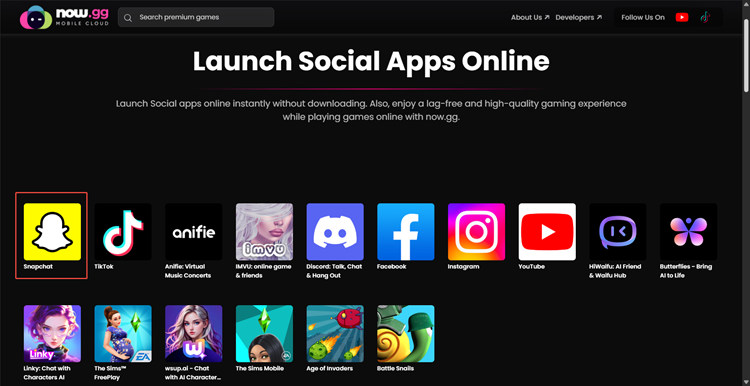
🎯 Bonus: Now.GG also has a huge catalog of mobile games for your study breaks.
🔴 Downside: Response time can lag depending on server load. Not ideal for video calls.
⚙️ Method 4: Change Your DNS Settings
Many schools use basic DNS filtering to block websites. When you request Snapchat's domain, the school DNS server checks a blacklist and drops the connection. Switch to a public DNS provider and that blacklist no longer applies to you.
How to change DNS on your phone:
- Go to Settings → Wi-Fi.
- Tap the ℹ️ icon next to your school network.
- Scroll to Configure DNS and set it to Manual.
- Delete the school's DNS entries. Add these instead:
- Cloudflare:
1.1.1.1and1.0.0.1 - Google:
8.8.8.8and8.8.4.4
- Save and relaunch Snapchat.
✅ Best for: Schools using DNS-only filtering without deep-packet inspection.
🔴 Downside: Won't work against advanced firewalls that use DPI or IP-level blocking.
🛡️ Method 5: Use a Reputable VPN
A Virtual Private Network (VPN) wraps your traffic in strong encryption and routes it through a remote server. Your school's firewall can only see an encrypted connection to an anonymous IP — it cannot tell you're using Snapchat.
How to use a VPN at school:
- Download a reputable VPN app at home (App Store / Google Play). Look for a no-logs policy.
- At school, open the VPN app and connect to a nearby server.
- Once connected, open Snapchat normally.
✅ Best for: Moderate school firewalls on personal devices.
🔴 Downside: Advanced school firewalls can detect and block known VPN server IP ranges. Running a VPN also drains battery faster. Always use on your personal device only — never install VPN software on school-owned equipment.
🏡 Method 6: Use a Residential Proxy
This is the most powerful method for bypassing strict school firewalls that block standard VPN IPs.
Here's the key difference:
- Regular VPNs route traffic through data center IPs — easily detected and blocked.
- Residential proxies route your traffic through real household IP addresses assigned by home ISPs — indistinguishable from normal home internet traffic.
Advanced firewalls cannot flag what they cannot identify.

OkeyProxy is one of the top residential proxy solutions for this use case. Here's why students and professionals trust it:
- 🌍 150M+ real residential IPs across 200+ countries
- ⚡ Supports HTTP, HTTPS, and SOCKS5 protocols for fast, stable connections
- 🔒 End-to-end encryption — your traffic is fully private
- 🏠 Traffic appears as a normal home network connection — zero firewall flags
- 📱 Works on phones, laptops, and Chromebooks
💥 Stop fighting your school firewall. OkeyProxy gives you a clean residential IP that no automated filter will block. Try OkeyProxy now →
🌐 Method 7: Use a Self-Hosted Web Proxy
Public proxy sites listed on Google get blocked by IT departments within days. But a private, self-hosted proxy has a unique domain your school has never seen — it sails right through automated filters.
How to set one up:
- Deploy an open-source proxy script (e.g., Ultraviolet, Corrosion) on a cloud host like Heroku or a home PC.
- You get a private URL that only you know.
- Access it from any school browser — your traffic tunnels through your private server.
✅ Best for: Tech-savvy students who want a long-term private solution.
🔴 Downside: Requires technical setup time and some basic server knowledge.
🔢 Quick Comparison: Which Method is Right for You?
| Method | Difficulty | Works on Chromebook | Bypass Strength | Safety |
|---|---|---|---|---|
| Cellular Data / Hotspot | ⭐ Very Easy | ✅ (via hotspot) | 🔥 100% | ✅ Fully Safe |
| Snapchat Web | ⭐ Very Easy | ✅ | 🌡️ Basic | ✅ Safe |
| Now.GG | ⭐⭐ Easy | ✅ | 🌡️ Moderate | ✅ Safe |
| DNS Change | ⭐⭐ Easy | ⚠️ Limited | 🌡️ Moderate | ✅ Safe |
| VPN | ⭐⭐ Easy | ⚠️ Limited | 🔥 Strong | ✅ Safe (reputable only) |
| Residential Proxy (OkeyProxy) | ⭐⭐⭐ Medium | ✅ | 🔥🔥 Strongest | ✅ Fully Safe |
| Self-Hosted Proxy | ⭐⭐⭐⭐ Advanced | ✅ | 🔥🔥 Very Strong | ✅ Safe |
📱 Special Case: School-Issued Devices with MDM Restrictions
Some schools go beyond network-level blocks. They install Mobile Device Management (MDM) software directly on school-issued iPhones, iPads, and Chromebooks. MDM locks down app installations, browser access, and system settings at the device level — not just the network.
If you're on a school-issued device with MDM, network-based methods (VPN, DNS changes) may not be enough. Here's what you can do:
- 📶 Use your personal phone instead. Your personal device has no MDM. Switch to cellular data and use Snapchat freely.
- 🌐 Try browser-based tools. Now.GG and Snapchat Web run in a browser, which MDM often cannot fully restrict.
- 🏡 Connect to a personal hotspot. Even on a school Chromebook, connecting to your phone's hotspot bypasses the school Wi-Fi network entirely.
⚠️ Important: Never attempt to remove or bypass MDM software on a school-owned device. This can permanently damage the device and result in serious disciplinary consequences.
🚫 Why You Must Avoid "Free Web Proxies"
A quick Google search for "Snapchat unblocked mirror" will throw up dozens of free proxy sites. Avoid them. Here's why:
① Malware Risk
Free proxy sites can't afford legitimate ad networks. They monetize through malicious pop-up scripts and drive-by download packages. A single misclick can infect your device with spyware or adware.
② Credential Theft
When you type your Snapchat username and password into an unencrypted free proxy, the site operator can read every keystroke in plain text. Rogue admins set these sites up specifically to harvest login credentials. If you reuse that password on email, Discord, or banking — your entire digital life is at risk.
③ Terrible Performance
Free proxies are overloaded with thousands of simultaneous users. Expect laggy connections, broken image loading, and constant pop-up interruptions. You'll waste your entire lunch break dealing with broken pages instead of actually chatting.
| Method | Speed | Malware Risk | Privacy Protection |
|---|---|---|---|
| Free Public Proxies | 🐢 Extremely Slow | 🔴 Very High | ❌ None (data logged) |
| Cellular Data / Hotspot | 🚀 Fast | ✅ Zero | ✅ Excellent |
| OkeyProxy Residential Proxy | 🚀 Very Fast & Stable | ✅ Zero | ✅ End-to-End Encrypted |
⚠️ Risks to Know Before You Start
Getting Snapchat unblocked is possible — but it comes with real-world consequences worth understanding first.
① Acceptable Use Policy (AUP) Violations
Almost every school requires students to sign an Acceptable Use Policy at enrollment. This document explicitly prohibits unauthorized network bypass tools on campus equipment. Getting caught using a VPN or proxy on school Wi-Fi can result in:
- Official warnings or detentions
- Phone confiscation
- Parent-teacher conferences
- Revoked network privileges
👉 Always use bypass tools on your personal device, never on school-owned computers.
② Device Security on School Equipment
Never install third-party extensions or unverified configuration files on school computers. School machines run monitoring software that alerts IT admins the moment unauthorized system changes are detected. Keep all proxy apps and VPN tools strictly on your personal phone or tablet.
③ Time Management
School firewalls exist partly to help you focus. Use these unblocking methods during your actual free time — lunch breaks, study hall, or the bus ride home. Snapchatting during class puts your grades at risk, which defeats the whole point.
💡 Pro tip: Toggle your VPN or proxy OFF as soon as you leave school. It saves battery, and your device will reconnect to your home Wi-Fi automatically at full speed.
❓ FAQ: Snapchat Unblocked at School
Q: Is it illegal to bypass a school firewall?
A: In most countries — including the US — using a VPN or proxy is completely legal. However, it almost certainly violates your school's Acceptable Use Policy. You won't face criminal charges, but you can face school-level disciplinary action. The legal risk is low; the school policy risk is real.
Q: Can the school see what I'm doing on my personal phone's cellular data?
A: No. When you're on cellular data (not the school Wi-Fi), your traffic routes through your carrier's network. The school has zero visibility into it.
Q: Why does Snapchat Web not work at my school?
A: Stricter IT departments also blacklist web.snapchat.com by domain name. If the web version doesn't load, try cellular data, Now.GG, or a residential proxy like OkeyProxy instead.
Q: Will a free VPN work to unblock Snapchat at school?
A: Free VPNs come with serious downsides. They often log and sell your data, have slow speeds, and their server IPs are publicly known and easily blocked by school firewalls. If you use a VPN, choose a paid provider with a verified no-logs policy.
Q: What's the best method for a school Chromebook?
A: The most reliable method for a school Chromebook is connecting to your personal phone's mobile hotspot. This bypasses the school network entirely without installing anything on the Chromebook. Browser-based tools like Now.GG and Snapchat Web are solid backups.
Q: What is the strongest method if my school has an advanced firewall?
A: A residential proxy like OkeyProxy is the most effective solution against advanced deep-packet inspection firewalls. Because your traffic appears to originate from a real home IP address, automated school filters have no basis to block it.
✅ Final Verdict
Getting Snapchat unblocked at school in 2026 is easier than most students think. Here's the quick summary:
- 📶 Fastest fix? Switch to cellular data or enable a personal hotspot.
- 🌐 On a Chromebook? Use Now.GG or connect to your phone's hotspot.
- 🛡️ Need something more powerful? Use a reputable VPN or change your DNS settings.
- 🔥 Strict firewall blocking everything? A residential proxy like OkeyProxy is your strongest option — real household IPs that no automated filter can detect.
Whatever method you choose, keep it on your personal device, use it during your free time, and stay on top of your grades. 🎓
