


















Best Proxy for Video Streaming: The Guide to Geo-Free Viewing
We have all been there. You sit down to watch a new title on Netflix or catch a live game on a sports platform, and the screen reads: "This content is not available in your region." In 2026, geo-restrictions on platforms like Disney+, Hulu, and YouTube are more aggressive than ever — and they are not getting easier. But there is a proven, simple solution.
A high-quality proxy for video streaming acts as a bridge between your device and the content you want. It hides your real IP address, masks your location, and optimizes the data path to the server — so you get smooth, buffer-free playback in 4K or even 8K, no matter where you are in the world. This guide covers everything: what streaming proxies are, which type is right for you, how to set one up, and the top providers to consider in 2026.
What Is a Streaming Proxy?
A streaming proxy is a specialized intermediary server that sits between your device and the internet. When you connect through one, your traffic is first routed to the proxy server, which then forwards it to the streaming platform. The result: the platform sees the proxy server's IP address — not yours.
In 2026, streaming proxies are essential infrastructure for anyone who wants unrestricted access to global content. Whether you are watching films, live sports, or Twitch broadcasts, a quality proxy does three things simultaneously: it unlocks geo-blocked libraries, protects your privacy, and in many cases reduces buffering by routing traffic through faster, less-congested network paths. Think of it as the invisible key that opens every locked door on the internet.
Why You Need a Proxy for Video Streaming
Your standard home connection is not enough for serious global viewing. Here are five reasons why a dedicated streaming proxy has become a necessity in 2026.
1. Bypassing Geo-Restrictions 🌍
Content licensing is fragmented by country. The US Netflix library contains thousands of titles unavailable in Germany or Japan, and vice versa. Iceland and Slovakia, for example, are known to have some of the largest Netflix libraries globally. A proxy lets you "teleport" your connection to any country, instantly unlocking those regional libraries as if you were physically sitting there.
2. Defeating ISP Throttling ⚡
Your Internet Service Provider (ISP) can detect video traffic patterns and deliberately slow your connection during peak hours — a practice known as bandwidth throttling. This is the real cause of that spinning loading circle that has nothing to do with your plan speed. A proxy masks your traffic type, making it impossible for your ISP to identify and throttle video streams. The result is consistently lower latency and higher sustained bitrates.
3. Privacy and Security 🔒
Third-party streaming sites and piracy-adjacent platforms often embed malicious trackers. Connecting directly exposes your home IP address — which can be tied to your identity and physical location. A streaming proxy acts as a shield, preventing trackers, advertisers, and malicious actors from monitoring your viewing habits or identifying your device.
4. Accessing Home Content While Traveling ✈️
A UK resident traveling through Southeast Asia will quickly find that BBC iPlayer, local sports broadcasts, and even some subscription services become inaccessible abroad. A proxy lets you maintain a stable "home" connection, keeping all your existing subscriptions and regional content working seamlessly regardless of where you land.
5. Recovering Banned or Blocked Accounts 🚫
Platforms like Twitch frequently enforce IP-based bans. If you share an IP range with a flagged user — for example, through a shared apartment building or corporate network — you can be blocked without having done anything wrong. A fresh residential proxy provides a clean, trusted IP address, restoring your access to accounts and creators instantly. For platform-specific guidance, see our dedicated resource on proxies for Twitch.
Types of Streaming Proxies Explained
Proxy technology is not one-size-fits-all. Each type offers a different trade-off between speed, stealth, stability, and cost. Here is what you need to know before choosing.
1. Residential Proxies — The Stealth Choice
Residential proxies use IP addresses assigned by real ISPs to real home users. Because they look exactly like ordinary household traffic, platforms such as Netflix, Hulu, and Disney+ rarely block them. If you need to break through the toughest geo-blocks, residential proxies offer the highest success rate and the strongest anonymity. The trade-off is that IPs may rotate periodically, which is fine for most on-demand content.
2. ISP Proxies (Static Residential) — The Gold Standard
ISP proxies combine the trust level of a residential IP with the raw speed of a datacenter connection. They are static — your IP does not change mid-session — making them ideal for long 4K or 8K movie marathons where a sudden IP switch would interrupt playback. For serious streaming, this is widely regarded as the best proxy type available: fast, stable, and practically indistinguishable from a legitimate home connection.
3. Datacenter Proxies — The Budget Option
Datacenter proxies originate from commercial server farms rather than ISPs. They are extremely fast and affordable, but major platforms maintain blocklists of known datacenter IP ranges. Success rates against services like Disney+ or Netflix are low. Datacenter proxies work well for less-restricted platforms — think YouTube in corporate networks, niche streaming sites, or general browsing.
4. Mobile Proxies — The Last Resort
Mobile proxies route your traffic through real 4G/5G cellular connections. Because mobile IPs are dynamically assigned and shared among millions of legitimate users, they are virtually impossible for platforms to block without collateral damage. The downside is cost and moderate speeds. Most users reserve mobile proxies for extreme cases where every other option has failed.
Critical Technical Note: Always Require SOCKS5 Support
Standard HTTP proxies are built for web page traffic. For video streaming, you need SOCKS5. Unlike HTTP proxies, SOCKS5 operates at a lower network level and natively supports UDP — the protocol that streaming platforms use for delivering video packets efficiently. For live broadcasts in particular, SOCKS5 over UDP delivers faster transmission, lower latency, and fewer stutters compared to TCP-only connections. Always verify your provider supports SOCKS5 before subscribing.
Proxy Performance Comparison for Video Streaming
Use this comparison to match your needs, budget, and target platforms to the right proxy type.
| Proxy Type | Bypass Success Rate | Streaming Speed | IP Stability | Best Use Case |
|---|---|---|---|---|
| Residential | 99% — Excellent | High | Rotating (Changes) | Hard blocks: Netflix, Hulu, Disney+ |
| ISP / Static Residential | 95% — Great | Ultra High | Fixed (Static) | Long 4K/8K movie sessions |
| Datacenter | 40% — Poor | Ultra High | Fixed (Static) | YouTube, niche streaming, web browsing |
| Mobile (4G/5G) | 100% — Perfect | Moderate | Rotating (Changes) | Extreme cases; high-budget scenarios |
Top Proxy Recommendations for Video Streaming in 2026
OkeyProxy — Best Overall for Streaming ⭐⭐⭐⭐⭐
At OkeyProxy, we prioritize your viewing experience. Our specialized streaming proxies are optimized to ensure that whether you are a casual viewer or a power user, you can enjoy seamless 4K playback without the frustration of buffering or regional blocks.
- 150 Million+ Residential IPs across 200+ Countries: With one of the largest IP pools available, you will always find a clean, unblocked connection in any target region — including niche markets like specific US states or Japanese cities.
- Full SOCKS5 Support: OkeyProxy is fully optimized for high-bandwidth video data and live streaming via SOCKS5 over UDP, ensuring stable delivery even during peak hours.
- Static ISP Proxies Available: For long movie sessions or sports events, OkeyProxy's static ISP proxies keep your IP fixed for the entire session — no mid-stream interruptions.
- Easy-to-Use Dashboard: Generate a new IP in seconds, switch regions on the fly, and monitor usage — no technical background required.
Whether you are a casual viewer wanting to unlock Netflix US from abroad, or a content creator who needs uninterrupted access to global platforms, OkeyProxy delivers the performance, scale, and reliability to match.
Bright Data / Oxylabs — Enterprise Alternatives
Bright Data and Oxylabs are industry heavyweights with massive IP pools and robust infrastructure. Bright Data manages over 4 million US residential IPs alone and is particularly well-suited for large-scale video data extraction or business-grade content verification. Oxylabs offers over 100 million residential proxies and more than 20 million mobile proxies, making it a strong choice for teams requiring advanced geo-targeting and scraping pipelines. Both are excellent enterprise options, but their pricing and complexity make OkeyProxy the more practical and cost-effective choice for individual streamers and small teams.
Step-by-Step Guide: How to Set Up Your Streaming Proxy
Getting started is easier than you think. No technical expertise is required — just follow these four steps.
Step 1 — Get Your Proxy Credentials
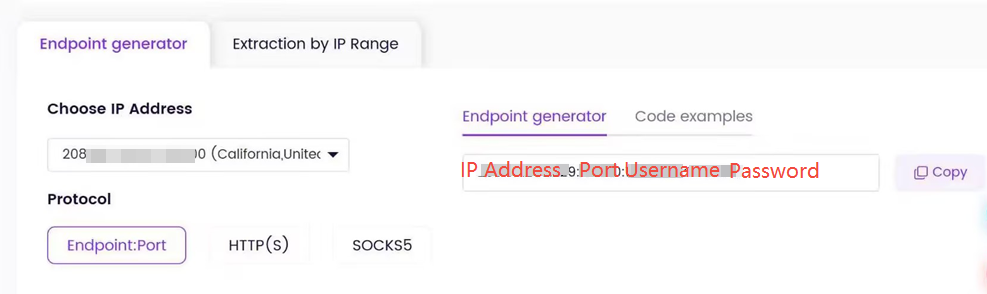
Log in to your OkeyProxy dashboard. Select the country or city you want to appear in (for example, "California, USA" for US Netflix). Copy the four pieces of information you will need: IP address (or hostname), port number, username, and password.
Step 2 — Configure Your Device
You can configure a proxy on virtually any device or browser:
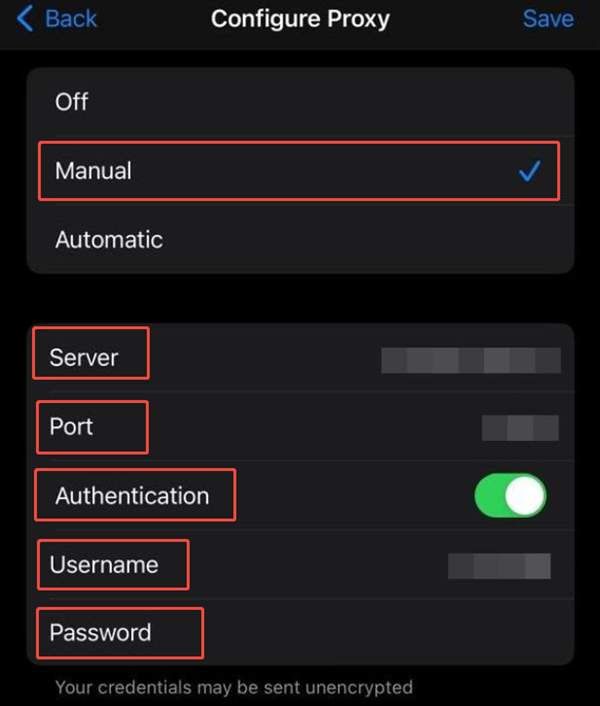
- Windows / macOS: Open Settings → Network → Proxy. Enter the credentials you copied and save.
- Chrome / Edge / Firefox: Install a browser extension such as "Proxy SwitchyOmega" (Chrome/Edge) to quickly toggle the proxy on and off without changing system settings.
- Android / iOS: Go to Wi-Fi settings, long-press your connected network, and select "Modify Network" → "Manual Proxy." Enter the host and port.
- Smart TV / Streaming Device: Configure at the router level. Most home routers support proxy settings under the WAN or Advanced Networking section, which will apply to all devices on the network including Apple TV, Fire Stick, and Chromecast.
Step 3 — Verify Your Connection
Before opening any streaming app, visit a site such as whoer.net or ipleak.net. Confirm that the displayed IP address and country match the proxy location you configured. If it shows "United States — California" and that is what you selected, you are ready to stream. Also run a quick DNS leak test at dnsleaktest.com to make sure your DNS queries are not bypassing the proxy and revealing your real location to your ISP.
Step 4 — Open Your Streaming Platform and Enjoy
Launch Netflix, YouTube, Twitch, BBC iPlayer, or any other platform. You will now see the regional content library corresponding to your proxy's location. If a platform asks you to clear cookies or sign in again, that is normal — it has detected a new geographic location for your account.
Pro Tips for Lag-Free 4K and 8K Streaming
💡 Choose Geographic Proximity to the Content Source
Always select a proxy server that is physically located as close as possible to the streaming platform's origin server. If you want to watch a Japanese broadcast, use a Tokyo-based proxy. The shorter the data path, the lower the latency, and the smoother your playback will be.
💡 Protect Against WebRTC Leaks
WebRTC is a browser technology that enables peer-to-peer audio and video communication — but it can inadvertently expose your real IP address by sending STUN requests that bypass your proxy tunnel entirely. Even with a proxy active, platforms can detect your real location through WebRTC. To block this, install a dedicated browser extension such as uBlock Origin (which includes WebRTC blocking), or in Firefox navigate to about:config and set media.peerconnection.enabled to false. After applying a fix, verify it worked at browserleaks.com/webrtc before streaming.
💡 Prevent DNS Leaks
A DNS leak occurs when your device sends domain name lookup requests through your regular ISP connection instead of through the proxy, effectively telling your ISP every site you visit. SOCKS5 proxies, by default, only forward TCP/UDP traffic — DNS resolution can still happen locally. Use a proxy provider that offers remote DNS resolution, or configure your system to use an encrypted DNS-over-HTTPS (DoH) resolver such as Cloudflare (1.1.1.1) or Google (8.8.8.8). Confirm no leaks exist at dnsleaktest.com.
💡 Use Incognito Mode When Switching Regions
Streaming platforms cache your location in browser cookies and local storage. If you switch from a UK proxy to a US proxy, the platform may still serve the UK library. Always open a fresh private/incognito window — or clear cookies and cache — when changing regions to ensure you get the correct content library.
💡 Use SOCKS5 over UDP for Live Streams
For live events on Twitch, YouTube Live, or sports platforms, SOCKS5 with UDP enabled outperforms HTTP proxies significantly. Live streaming sends a continuous stream of small data packets rather than downloading a finished file, and UDP handles this packet flow more efficiently than TCP — reducing stutters and latency spikes during critical moments.
Troubleshooting Common Streaming Issues
- "Proxy Detected" or "VPN/Proxy Detected" Error: The specific IP you are using has been flagged and added to the platform's blocklist. Go back to your OkeyProxy dashboard and generate a new residential IP. With a pool of 150M+ IPs, a clean replacement is available in seconds. If the error persists, switch to a different city or state within the same country.
- Constant Buffering or Quality Drops: The proxy server may be geographically distant, overloaded, or on a congested network route. Try connecting to a different server in the same target country. Also check that you have sticky sessions enabled, as frequent IP rotations can cause mid-stream interruptions that manifest as buffering.
- Black Screen or "Content Unavailable": Your browser is likely serving cached location data from a previous session. Clear all cookies and browser cache, then reopen the platform in a fresh incognito window. If the issue persists, verify with
whoer.netthat your proxy is still active and showing the correct region. - Wrong Content Library (Still Showing Home Region): This is almost always a cookie or DNS cache issue. Clear cookies, run a fresh DNS leak test, and ensure your WebRTC is blocked. If you use a browser extension proxy manager, confirm it is set to "all traffic" mode rather than just HTTP.
- Slow Speeds Despite a Quality Proxy: Check whether your chosen proxy server is geographically close to the content source (not just close to you). Also ensure you are using SOCKS5 rather than HTTP, and that your ISP is not throttling the proxy connection port — try switching to a different port in your proxy dashboard settings.
Frequently Asked Questions
Q: Is it legal to use a proxy for video streaming?
A: In the vast majority of countries, using a proxy is entirely legal. It is a standard privacy and network tool used by individuals and enterprises worldwide. However, using a proxy to access content may technically violate the Terms of Service of certain streaming platforms (not law — their contractual rules). The typical consequence is that the platform may block the IP address in question, not any legal action against the user. Always review the terms of any platform you use.
Q: Will a proxy reduce my video quality?
A: A low-quality proxy will — slow servers, distant locations, and shared bandwidth all degrade performance. However, a high-quality residential or ISP proxy from a provider like OkeyProxy is fast enough to sustain 4K and even 8K streams without quality drops. In fact, if your ISP has been throttling your video traffic, switching to a proxy can increase your effective streaming quality by bypassing that throttling entirely.
Q: Can I use a free proxy for video streaming?
A: We strongly advise against it. Free proxies are slow, unstable, and almost universally blocked by major platforms. More critically, many free proxy services log your traffic, inject unwanted advertisements, or harvest personal data — posing serious privacy and security risks. For anything beyond basic casual browsing, a paid residential or ISP proxy is the only reliable option.
Q: Should I use a proxy or a VPN for streaming?
A: Both serve similar purposes, but they differ in important ways. A VPN encrypts all your traffic at the OS level, which adds security but can also reduce speed and is easier for platforms to detect as a VPN connection. A residential or ISP proxy mimics legitimate home user traffic, making it far harder for platforms to flag and block. For pure streaming access with maximum bypass rates, a residential proxy is typically more effective; for full system-level privacy, a VPN may be preferable. Some advanced users combine both.
Conclusion: Never See "Not Available in Your Region" Again
In 2026, the internet is divided by walls — regional licensing, ISP throttling, platform bans, and location-based restrictions. But a quality proxy for video streaming is the master key that bypasses all of them. Whether your goal is unlocking a foreign content library, stopping your ISP from degrading your stream, protecting your privacy, or recovering a banned account, the right proxy makes it effortless and transparent.
For most users, the ideal starting point is a Static ISP Proxy for long movie sessions, or a Residential Proxy for the broadest platform compatibility. Both are available through OkeyProxy, which offers the largest IP pool, full SOCKS5 support, and unlimited bandwidth options at competitive pricing.
