Instagram has emerged as a dominant force in the world of social media, with over a billion users sharing photos, videos, and stories daily. While Instagram offers a dynamic platform for personal expression and business promotion, users often encounter challenges that can hinder their experience.
In 2026, as social media platforms become more integrated into our lives—and as network filters become more aggressive—finding a reliable unblocker for instagram is no longer just a luxury; it is a necessity for staying connected.
This guide will walk you through the mechanics of why these blocks exist and, more importantly, how to use an instagram unblock proxy to reclaim your digital freedom safely and effectively.
Why Is Instagram Blocked in the First Place?
In 2026, Instagram blocks aren’t just simple “off” switches; they are sophisticated filters designed to keep you out. 🛡️
Generally, these blocks fall into three frustrating categories. Understanding which one you are facing is the secret to picking the right unblocker for instagram.
🏫 Network Restrictions (Schools and Workplaces)
Most local blocks happen at the router level. Schools and offices use advanced firewalls (like Fortinet or Cisco) to boost productivity and save bandwidth. These systems perform “Deep Packet Inspection” (DPI) to identify and drop any traffic heading toward Instagram’s servers. To the network admin, you aren’t just a student; you are a “bandwidth consumer” they want to limit.
🌏 Geo-Blocking and National Policy
Some countries have introduced strict social media regulations. For instance, in early 2026, several regions (including Australia) implemented age-gated social media bans or full regional blocks. In these cases, Instagram themselves must block access based on your IP address location to comply with local laws.
🚫 IP-Level Bans and the “Shadow” Block
Sometimes the block isn’t from your network, but from Instagram itself. If you use a low-quality VPN or a “dirty” shared IP address, Instagram’s security AI might flag you as a bot. This leads to the dreaded “Challenge Required” screen or a flat-out IP ban, where your entire device is barred from the platform regardless of which network you use.
Summary of Instagram Block Types
| Block Type | Primary Cause | Why It Happens | Best Solution |
|---|---|---|---|
| Local Network | School/Work Firewall | To boost productivity and save data. | Instagram Unblock Proxy (Bypasses local filters). |
| Geo-Block | National Laws/Policy | Government regulations in specific regions. | Residential Proxy (Provides a regional virtual presence). |
| IP-Level Ban | “Bot-like” Behavior | Using low-quality VPNs or shared IPs. | Dedicated/Mobile Proxy (Provides a clean, trusted IP). |
What Are Instagram Proxies?
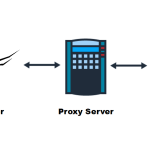
Before we dive into the “how,” let’s define the “what.” An unblock instagram proxy acts as a sophisticated middleman between your device and the Instagram servers.
Instagram proxy are intermediary servers that serve as a bridge between your device and Instagram’s servers. They play a vital role in optimizing your Instagram experience by routing your traffic through a different IP address. This process enhances privacy, security, and accessibility.

How Do Instagram Proxies Work
Instagram proxies intercept and forward your connection requests to Instagram. When you access Instagram through a proxy, Instagram sees the proxy’s IP address instead of your own, effectively masking your identity and location.
Benefits of Using Instagram Proxies
Instagram proxy servers offer a multitude of advantages, including:
- Bypassing Instagram Restrictions: Overcome geographical or network restrictions that may limit access to specific Instagram content or features.
- Ensuring Anonymity: Keep your true IP address hidden, preserving your anonymity and privacy while engaging on the platform.
- Enhancing Security: Protect your Instagram account from potential threats, such as hacking attempts or unauthorized access.
⚠️ Note: While an unblocker for instagram provides the technical means to bypass filters, it is essential to use these tools ethically. Always ensure your online activities comply with local regulations and respect Instagram’s Terms of Service.
How to Choose the Right Instagram Proxy
Transitioning from a blocked state to a free one is easy, but only if you choose the right tool. Not all proxies are built to handle Instagram’s 2026 security protocols. Choosing the wrong type is the quickest way to get your account flagged.
Type A: Residential Proxies (The Gold Standard)
These are the most recommended for a reason. Residential proxies use IP addresses assigned by real Internet Service Providers (ISPs) to actual homeowners. To Instagram’s AI, you look like a normal person browsing from their living room on a Sunday afternoon.
Editor’s Choice: If you are looking for a reliable unblocker for instagram, OkeyProxy stands out in 2026. With a pool of over 150 million clean residential IPs and support for 200+ countries, they provide the stealth required to navigate even the most complex national network filters. Their IPs are sourced from real devices, ensuring that your “digital footprint” is indistinguishable from a legitimate user, facilitating a stable and uninterrupted connection.
Type B: Mobile Proxies (4G/5G/6G)
In 2026, Mobile Proxies are the “ultimate weapon.” Since Instagram is primarily a mobile app, it grants the highest trust level to mobile carrier IPs. Even if hundreds of people use the same mobile IP, Instagram rarely blocks them because doing so would “mis-fire” and block thousands of innocent real users on the same tower.
How to Use an Instagram Unblock Proxy
Ready to get back on the “Gram”? Follow this simple, professional configuration guide.
Selecting the Right Instagram Proxy Provider
Choosing the right Instagram proxy provider is crucial for a seamless experience. Consider the following factors when making your selection:
- Reliability: Ensure the provider offers reliable proxy services with minimal downtime.
- Speed: Opt for a provider with fast proxy servers to enhance your Instagram experience.
- Location Coverage: Choose a provider that offers proxy servers in locations relevant to your Instagram usage.
- Pricing: Evaluate the pricing plans and choose one that aligns with your budget and needs.
Some of the top Instagram proxy providers in the market include MacroProxy, Smartproxy, Oxylabs and OkeyProxy.
Setting Up Instagram Proxy Servers
After choosing a ideal Instagram proxy depended on the specific needs and scale of operations, configuring a Instagram proxy is essential for managing multiple accounts, automating interactions, or simply enhancing privacy. A properly configured proxy server can help avoid IP bans and ensure smooth operation on Instagram. Here’s a step-by-step guide to setting up and configuring Instagram proxy servers effectively:
Getting a Free Trail of Excellent Instagram Proxy!
- Access the settings or configuration options in your Instagram app or web client.
- Input the proxy details provided by your chosen proxy provider, including the IP address and port number.e.g.

- Configure your proxy authentication settings if required.
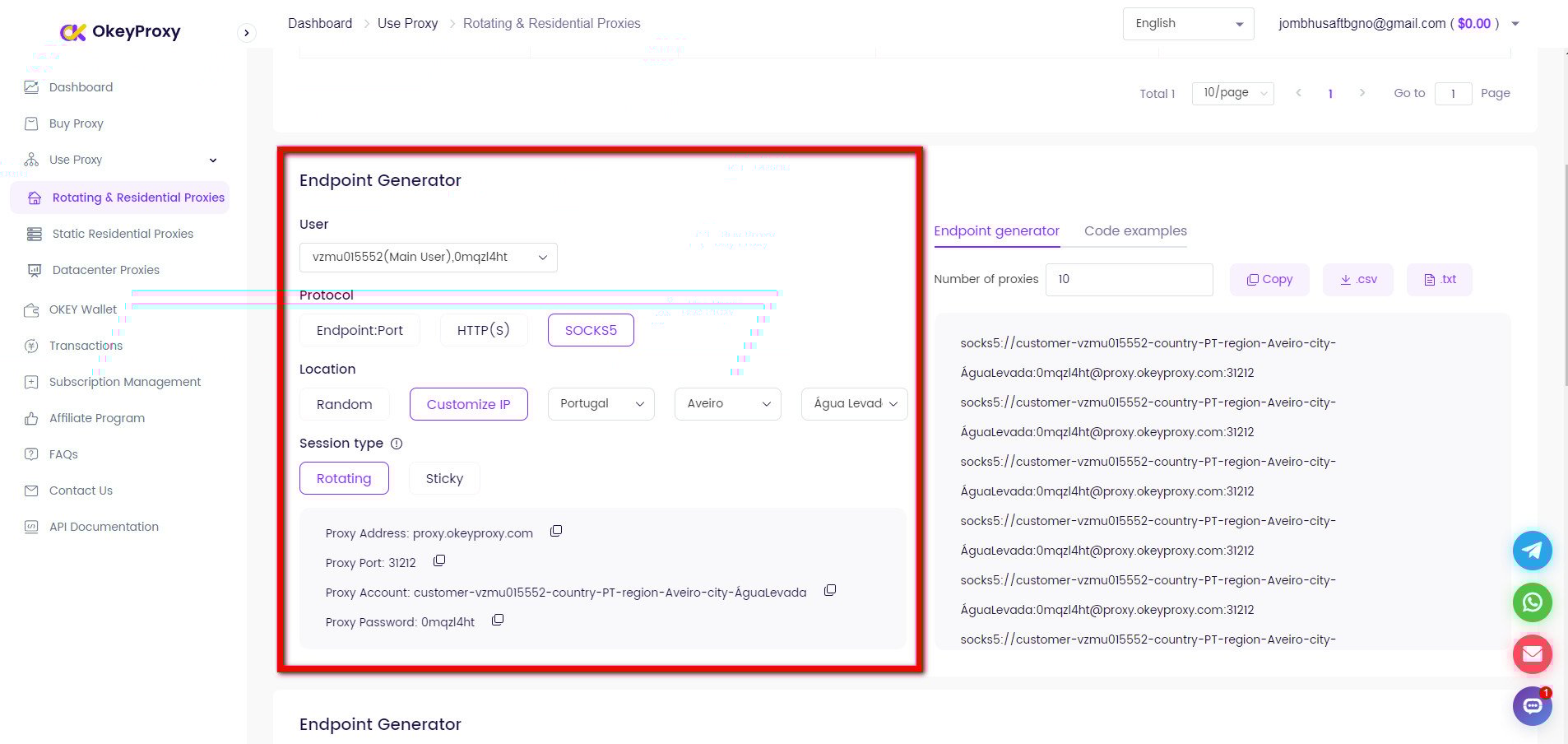
Note: Depending on your chosen proxy type, you may need to handle authentication and implement proxy rotation strategies to maintain a secure and efficient connection.
Tips When Get A Instagram Proxy
- Monitor your proxy performance regularly to ensure consistent connectivity.
- Implement rate limiting and throttling to prevent overuse of your proxies.
- Employ error handling techniques to address any issues that may arise during your Instagram sessions.
- Avoid any activities that may violate Instagram’s terms of service or infringe upon the rights of other users.
How to Avoid Ban on Instagram With Proxy?
Instagram is vigilant in detecting suspicious activities, especially when it comes to using proxies for automation, multiple account management, or data scraping. Here are key strategies to avoid getting banned when using proxies for Instagram.
- Use High-Quality Proxies:
- Prefer residential proxies over data center proxies as they provide IP addresses that appear to come from real households. This reduces the likelihood of detection by Instagram.
- For even higher security, use mobile proxies that mimic traffic from mobile devices, offering a more natural browsing pattern.
- Use dedicated proxies to ensure that the IP addresses are not shared with other users. Shared proxies increase the risk of bans due to overlapping usage patterns.
- Limit the Number of Accounts Per Proxy:
- Stick to a low number of accounts per proxy. Ideally, use one proxy per Instagram account, especially for accounts that are critical or have high engagement. This minimizes the risk of linking accounts together.
- If managing multiple accounts, group them by niche or behavior and assign each group to separate proxies to prevent cross-contamination of activities.
- Mimic Human Behavior:
- Avoid aggressive actions such as excessive liking, following, or commenting. Instagram sets limits on these activities, and exceeding them can trigger flags.
- Schedule activities to mimic normal usage patterns. Spread actions throughout the day rather than performing them in quick succession.
- Engage in a variety of activities like posting, commenting, liking, and direct messaging to create a balanced activity profile.
- Avoid Sudden Changes:
- When scaling activities or increasing account actions, do so gradually. Sudden spikes in activity can lead to suspicion and potential bans.
- If you’re using a static proxy, avoid switching IPs too frequently. Consistent IP usage that matches your usual behavior is less likely to trigger security checks.
- Monitor Account Activity:
- Use monitoring tools to keep track of account activities and any unusual patterns that could lead to bans. Early detection of anomalies can prevent issues before they escalate.
- Regularly log into accounts manually to check for warnings, verification requests, or other signs of potential issues.
- Rotate IP Addresss Carefully:
- If using rotating proxies, set the rotation interval to a reasonable time. Rapid IP changes can signal automated behavior, leading to bans.
- Ensure that sessions are maintained when rotating IPs. Losing session cookies or having inconsistent sessions can raise red flags.
- Revoke Public or Free Proxies:
- Public or free proxies are often shared by many users and can have compromised IP addresses that are already flagged by Instagram.
- Instagram is more likely to flag activities coming from IP addresses known to be used by public proxies, leading to a higher risk of bans for your account.
- Authenticate Your Proxies:
- Make sure that your proxies are properly authenticated with Instagram. This includes setting up proxy authentication within the Instagram client or bot to avoid login issues.
- Where possible, whitelist your proxy IP addresses with Instagram to reduce the risk of login issues or security checks.
- Implement Two-Factor Authentication (2FA):
- Enabling two-factor authentication adds an extra layer of security. While it can be an extra step when managing multiple accounts, it reduces the chances of unauthorized access and subsequent bans.
- Stay Updated on Instagram’s Policies:
- Keep up with Instagram’s terms of service and policies. Instagram frequently updates its algorithms and policies, and staying informed can help you adjust your strategies to remain compliant.
- Be ready to adapt your proxy usage and automation strategies in response to changes in Instagram’s detection methods.
By following these strategies, users can effectively manage multiple accounts or automate tasks on Instagram without raising red flags or risking account bans.
Alternative Methods: Understanding the Risks & Limitations
In your search for an unblocker for instagram, you will encounter many “free” or “easy” fixes. Most of these are traps in 2026.
- Free Proxies: If you aren’t paying for the product, you are the product. Free proxies often steal your login cookies or inject ads into your browsing. They are also incredibly slow and almost always blacklisted by Instagram.
- Standard VPNs: While great for Netflix, standard VPNs use “Datacenter IPs.” Instagram’s AI knows these IPs belong to servers, not people. Using a VPN for heavy automation or managing multiple accounts is a fast track to a “Shadowban.”
- DNS/Smart DNS: These only change your “address book,” not your “location.” Most modern firewalls use Deep Packet Inspection, which looks past DNS changes. In short: they don’t work for Instagram in 2026.
- Tor Browser: Tor is for extreme anonymity, not social media. Its entry/exit nodes are widely blacklisted by Meta. Plus, the speed is too slow to load even a simple photo.
Conclusion
At the end of the day, restoring access to your social media is about more than just finding a quick fix; it’s about choosing a reliable, long-term solution. In 2026, the secret to a smooth experience with an unblocker for instagram lies in using Residential and Mobile Proxies. By matching the behavior of real users through trusted providers like OkeyProxy, you can comfortably navigate school, work, or regional filters without putting your account’s safety at risk.
FAQ about Instagram Unblock Proxy
Q: How do I unblock Instagram at school?
A: The most effective way is to use a residential instagram unblock proxy. Configure it in your phone’s Wi-Fi settings or use a browser that supports proxy integration. This hides your traffic from the school’s firewall.
Q: Can I use a VPN instead of a proxy?
A: You can, but it is risky for Instagram. VPNs use server-based IPs that are easily detected. For long-term account safety and bypassing tough filters, an instagram unblock proxy using residential IPs is much safer.
Q: Is using an Instagram unblocker legal?
A: In most countries, using a proxy to access social media is legal. However, it may violate your school or workplace’s “Acceptable Use Policy.” Always use these tools responsibly and prioritize your privacy.
Q: Why are my Instagram Reels not loading on a proxy?
A: This usually happens if you are using a slow “Free Proxy” or a “Datacenter IP.” Switching to a high-speed unblock instagram proxy from a reputable provider will solve this, as they provide the bandwidth necessary for video streaming.