


















How to Use Google Translate as a Proxy: Step-by-Step Guide
Imagine this typical situation. You are sitting in your school library or your corporate office desk. You need to open a specific website to gather research or read an important article. You type the URL, hit enter, and wait. Suddenly, your screen flashes a cold, rigid warning: "Access Denied: Blocked by Network Administrator." This instant wall immediately halts your productivity. Almost everyone working on shared networks has faced this exact frustration.
Do not give up just yet. You might not know it, but a tool you use every single day hides a powerful secret feature. The standard platform known as Google Translate can actually serve as a free, temporary web proxy server. It is a quick, clever trick to load blocked content on demand. This guide covers exactly how to use Google Translate as a proxy, two different methods to do it, how the trick actually works under the hood, its hard limits, and when you genuinely need a professional proxy instead. Let's get into it. 👇
Method 1: Use Google Translate's Website Interface 🖥️
This is the most popular method. No installs. No sign-up. Just a browser and Google.
- Go to translate.google.com.
Open your browser and navigate to the official Google Translate page. - Set the source language to any foreign language.
Good choices: Spanish, French, Japanese, or German. ⚠️ Do not select "Detect language" — it may not generate a clickable link reliably. - Set the target language to your native language (e.g., English).
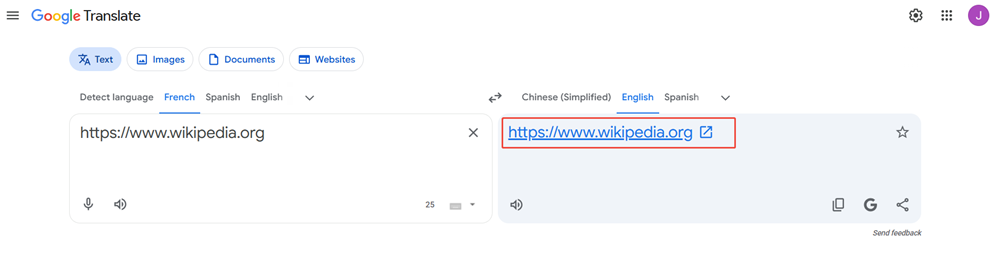
- Paste the full URL of the blocked site into the left input box.
Example:https://www.wikipedia.org - Click the blue hyperlink that appears in the right output box.
Google will process the URL and display a clickable translated link. - The blocked website loads inside Google's frame. ✅
Your local network only sees a connection totranslate.google.com— a universally whitelisted domain.
💡 Tip: If the page text looks garbled or doubled up, click the "Original" button in the top-right corner of the Google Translate frame to restore the native language view.
Method 2: Use the Direct Proxy URL 🔗
This is the faster method. No manual steps — just construct a URL and go.
Google's translation infrastructure uses a special domain format: translate.goog. When a page is accessed through Google Translate, the URL structure looks like this:
https://www-example-com.translate.goog/?_x_tr_sl=auto&_x_tr_tl=en&_x_tr_hl=enHere's what each part means:
www-example-com— the target domain with dots replaced by hyphens.translate.goog— Google's proxy domain suffix_x_tr_sl=auto— auto-detect source language_x_tr_tl=en— translate to English
How to use it: Replace www-example-com with your target domain (dots become hyphens). For example, to access www.reddit.com:
https://www-reddit-com.translate.goog/?_x_tr_sl=auto&_x_tr_tl=en&_x_tr_hl=enYou can also use the classic query parameter format:
https://translate.google.com/translate?langpair=ja|en&u=https://www.example.comJust swap https://www.example.com with your target URL. Quick and reusable. ⚡
Bonus: Google Web Light as an Alternative 📱
If Google Translate doesn't load your target page correctly, try Google Web Light (also called Google Mobilizer). Google built this tool to compress heavy pages for slow mobile connections — but it also routes traffic through Google's servers, making it work similarly to a proxy.
To use it, paste your target URL like this:
https://googleweblight.com/i?u=https://example.com⚠️ Note: Google Web Light renders a stripped-down, text-only version of the page. It's great for reading articles. It's not ideal for interactive sites.
How the Google Translate Proxy Trick Actually Works 🔍
How Normal Network Filters Work
Standard corporate or school firewalls operate on a simple blacklist. When you request Site A, the router checks the domain against its blocked list. Match found? Connection cut instantly. Your device never reaches the target server.
Why Google Translate Bypasses the Filter
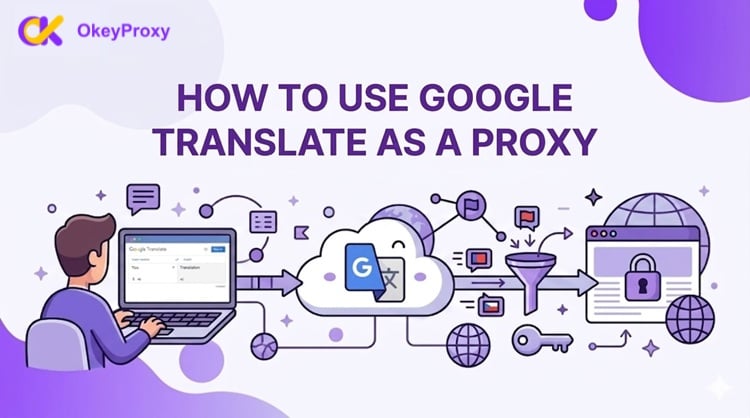
Here's where it gets clever. When you paste a URL into Google Translate, your browser never contacts the blocked site directly. Instead, it sends one connection to translate.google.com — which sits on virtually every administrator's whitelist because it's an essential productivity tool.
Your local firewall sees: "User is using Google Translate." ✅
What's actually happening: Google is fetching the blocked page on your behalf.
What Google Does Behind the Scenes
Once your request hits Google's servers, their system acts as the middleman:
- Google's servers send a request to the blocked site using Google's own IP addresses.
- The target site responds normally — it just sees Google, not you.
- Google downloads the HTML, translates the text, and wraps it in an interactive iframe.
- That packaged page gets delivered back to your screen. 📦
Your real IP address is never exposed to the destination site. From the target server's perspective, the visitor is Google — not you.
Important scope note: This method bypasses local network-level blocks (school routers, office firewalls). It cannot bypass ISP-level censorship or government-mandated restrictions, where Google Translate itself may also be blocked.
5 Major Limitations of Using Google Translate as a Proxy ⚠️
This trick is clever. But it has real, serious weaknesses. Don't go in blind.
❌ Limitation 1: No Login Support
The Google Translate frame operates in a sandboxed environment. Session cookies and authentication tokens don't transfer correctly. Try to log into Facebook, Reddit, Gmail, or any private portal — and the login script will either crash or loop back to the blank login page. You cannot access anything behind a login wall.
❌ Limitation 2: Broken Pages on JavaScript-Heavy Sites
Google's system is optimized for plain text translation — not for running complex client-side code. Modern websites depend on JavaScript frameworks (React, Vue, Angular) and advanced CSS. Inside a translation frame, these scripts frequently break. Expect broken menus, missing images, unclickable buttons, and overlapping layouts on most dynamic sites.
❌ Limitation 3: Slow Speeds — No Video Streaming
Every request has to travel: your device → Google's servers → target site → Google's servers → back to you. That multi-hop relay adds significant latency. Speeds drop noticeably. Live audio, embedded video, and YouTube streams almost always fail or throw errors. This is not a tool for media consumption.
❌ Limitation 4: Poor Privacy — Google Logs Everything
Using this method means handing your entire data stream to Google. Every URL you access through Translate is logged. There's no encryption between you and the content beyond Google's standard HTTPS. Never use this for sensitive documents, banking, or any confidential data.
❌ Limitation 5: Rate Limiting & Easy to Block
Google applies its own rate limits. Use this trick too frequently and Google itself may throttle or block your access. On the admin side, any network administrator can instantly disable this workaround simply by adding translate.google.com to the blacklist. There's no reliability guarantee — Google can also change its URL format or proxy behavior at any time.
Why Serious Users Need a Professional Proxy 🚀
The Google Translate trick is a handy emergency tool. But if you need reliable, fast, private access — for streaming, scraping, managing accounts, or cross-border business — it falls apart quickly.
That's where OkeyProxy comes in.
What OkeyProxy Delivers
- 🌍 150M+ Residential IPs Worldwide
Authentic home-network IP addresses sourced from real ISP contracts. Websites and platforms treat them as genuine local users — no blocks, no bans. - 🔒 Enterprise-Grade Security (HTTP / HTTPS / SOCKS5)
Full protocol support across every browser, script, and automation tool. Your traffic is encrypted and your real IP is completely hidden — unlike the Google Translate workaround. - ⚡ High-Speed Gigabit Bandwidth
Stream 4K video. Run multi-threaded scrapers. Manage international e-commerce stores. No lag, no loading circles. - ✅ Full Login & Cookie Support
Access any account behind a login wall. Session persistence works natively — the way a real proxy should. - 🔄 Rotating & Static Options
Choose dynamic residential IPs for large-scale scraping or static residential/datacenter proxies for consistent identity management.
🎯 Ready to Stop Fighting Broken Pages?
Don't waste time with translation frames that break on half the web. Visit OkeyProxy now and register your account. Contact the support team to activate your free proxy testing nodes — and experience what unrestricted, high-speed browsing actually feels like.
👉 Get Your Free Trial at OkeyProxy →
Comparison Table: Google Translate Proxy vs. Professional Proxies 📊
| Feature | Google Translate Proxy | OkeyProxy (Professional) |
|---|---|---|
| Cost | Free | Paid plans (free trial available) |
| Setup | Zero — browser only | Simple — minutes to configure |
| Privacy & Encryption | ❌ Low — Google logs your activity | ✅ Enterprise-grade HTTPS/SOCKS5 |
| Page Rendering Quality | ❌ Poor — JS and CSS often broken | ✅ Native full-page rendering |
| Login / Cookie Support | ❌ Not supported | ✅ Fully supported |
| Video & Streaming | ❌ Fails on most streams | ✅ 4K streaming supported |
| Speed | ❌ Slow (multi-hop relay) | ✅ Gigabit bandwidth |
| ISP-Level Block Bypass | ❌ Cannot bypass | ✅ Supported via residential IPs |
| Rate Limiting | ❌ Google throttles heavy use | ✅ High-concurrency, no throttling |
| Reliability | ❌ Google can change it anytime | ✅ Stable SLA-backed service |
| Best For | Quick emergency article access | Scraping, streaming, business use |
Frequently Asked Questions ❓
Q: Does Google Translate proxy work on mobile?
A: Yes. Both methods work on mobile browsers. Simply visit translate.google.com on your phone's browser and follow the same steps as on desktop.
Q: Can Google Translate bypass country-level censorship?
A: No. This method only works against local network filters (school/office routers). If your ISP or government has blocked a site — or if Google Translate itself is blocked in your country — this trick will not work. You need a dedicated residential proxy or VPN for that level of access.
Q: Is using Google Translate as a proxy legal?
A: In most jurisdictions, accessing publicly available websites through a proxy is not illegal. However, bypassing employer or institutional network restrictions may violate your organization's policies. Always check your local laws and acceptable use policies before using any proxy method.
Q: Can administrators detect that I'm using Google Translate as a proxy?
A: Basic firewalls won't detect it — they just see Google Translate traffic. However, advanced network monitoring tools can flag unusual volumes of data going to translate.google.com, and a savvy administrator can simply block the domain to shut the workaround down.
Q: Why does the translated page look broken?
A: Modern websites rely heavily on JavaScript for layout and interaction. Google Translate's frame is built for text extraction, not full JavaScript execution. Pages with complex front-end frameworks (React, Vue, Angular) will almost always render incorrectly. This is a fundamental limitation of the tool — not a configuration error.
Q: What's the best free alternative if Google Translate is also blocked?
A: Try Google Web Light: https://googleweblight.com/i?u=https://yoursite.com. It uses a different Google domain and may not be on the same blocklist. That said, for reliable access, a professional proxy service is always the stronger long-term choice.
Conclusion
Learning how to use Google Translate as a proxy is a genuinely useful trick to have ready. It's free, instant, and works well for reading blocked articles or text-heavy pages on a local network. No installs, no accounts, no cost.
But its ceiling is low. ❌ No logins. ❌ No video. ❌ Broken JavaScript. ❌ Google can log what you view. ❌ One admin rule change and it's gone.
For anything beyond a quick text-read emergency, you need a real solution. A professional proxy service like OkeyProxy gives you consistent speed, full page rendering, secure encryption, and 150M+ residential IPs — everything the Google Translate workaround can't deliver.
