


















How to Use Facebook with Proxy: Step-by-Step Safety Guide
Managing multiple Facebook accounts is essential for modern businesses — but it comes with serious risks. 🚨 Facebook runs some of the world's strictest anti-fraud algorithms. Log into several accounts from the same IP address, and Meta will flag you instantly. The result? Account suspensions, checkpoint verifications, or permanent bans on your most valuable ad assets.
To scale your operations safely, you must master how to use Facebook with proxy setups correctly. A proxy hides your real location and gives each account a unique digital identity. This guide covers everything: the right proxy types, the best tools to pair them with, and a full step-by-step configuration — so your Business Managers stay safe and your ad campaigns keep running.
What Is a Facebook Proxy?
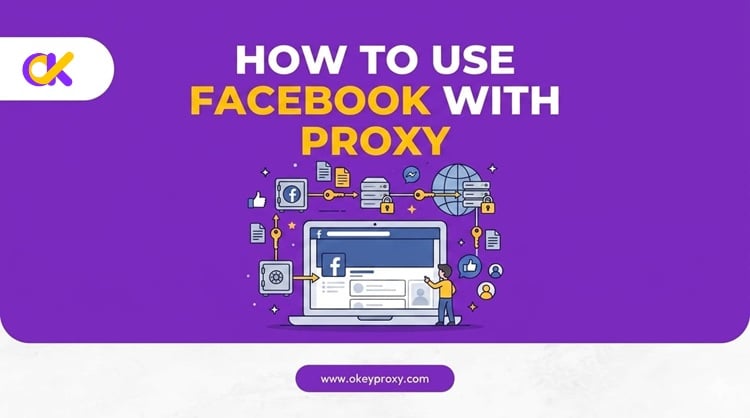
A Facebook proxy is a server that sits between your device and Facebook. Your requests route through the proxy, and Facebook sees the proxy's IP — not yours. It's the foundation of any serious multi-account or marketing setup.
In simple terms: one proxy = one clean digital identity. 🛡️
Why Do You Need a Proxy for Facebook?
Many users wonder why they cannot just log in normally using their standard home broadband. The answer lies in how Meta tracks user data. Facebook monitors every single connection to ensure users follow their strict terms of service. If you operate as a professional digital marketer, using a premium proxy network is mandatory for several critical reasons.
① Multi-Account Management
Facebook's core policy allows each person only one personal profile. But agencies and cross-border sellers routinely manage dozens of accounts for different clients. When multiple accounts share a single IP address, Facebook treats it as coordinated, unnatural behavior. It links those accounts together. And when one gets flagged, a cascading ban takes down every profile on that IP — instantly.
② Meta Ads & Business Manager (BM) Safety
Your ad accounts and Business Managers represent major financial investments. 💰 Meta's automated systems continuously calculate risk scores for active IP addresses. If a shared IP gets blacklisted because of another user's violation, your high-value BM assets can be wiped out overnight. A dedicated proxy builds a firewall around each account — so one suspension never destroys your entire business structure.
③ Geo-Targeting & Ad Verification
Running campaigns in global markets like the US or Europe requires accurate local data. You need to see exactly what local users see. A geo-targeted proxy lets you view real-time localized feeds, verify live ad placements, and research competitors inside the Meta Ads Library — all without revealing your real location.
④ Web Scraping & Automation
Market intelligence often requires automated tools like Phantombuster to collect public data at scale. Rapid requests from a single IP trigger Meta's rate-limiting and CAPTCHA walls fast. Routing automation through a reliable proxy pool distributes the request load naturally — keeping your data extraction stable and uninterrupted.
⑤ Bypassing Regional Restrictions
Facebook is blocked or throttled in several countries and ISP networks. 🌐 If you travel frequently or operate across borders, a proxy in a permitted region is simply the only way to access the platform at all.
How to Use Facebook with Proxy: Step-by-Step Configuration Guide
You can technically set a proxy directly in your OS settings. But for multiple accounts, this is both inefficient and unsafe. The professional approach pairs a premium proxy with an anti-detect browser. Here's the full setup.
Step 1: Choose the Right Proxy Type
Choosing the wrong proxy type is the number one reason accounts get banned. Different proxy types carry very different trust scores in Facebook's eyes. Here's how they compare:
| Proxy Type | Trust Level | Best Use Case | Facebook Ban Risk |
|---|---|---|---|
| Residential Proxies | ⭐⭐⭐⭐ Very High | Daily account management, running ads, page cultivation | 🟢 Very Low |
| Mobile Proxies (4G/5G) | ⭐⭐⭐⭐⭐ Highest | High-risk tasks, new account creation, checkpoint recovery | 🟢 Almost Zero |
| Static ISP Proxies | ⭐⭐⭐⭐ Very High | Business Manager admin, long-term account identity consistency | 🟢 Very Low |
| Datacenter Proxies | ⭐ Very Low | Light public data scraping only — never for Facebook accounts | 🔴 Extremely High |
Analyzing Network IP Types:
- 🏠 Residential Proxies: IP addresses sourced directly from real home internet providers. Facebook views these connections with high trust because they look exactly like genuine residential users. Perfect for managing ongoing marketing pages, running ads, and daily profile activity.
- 📱 Mobile Proxies (4G/5G): The highest trust level available. Mobile carriers use CGNAT technology, meaning thousands of everyday users share the same cellular IP ranges. Facebook cannot block these ranges without accidentally banning thousands of real consumers — making mobile proxies ideal for high-risk tasks like new account creation and checkpoint unlocks.
- 🏢 Static ISP Proxies: Static ISP proxies combine the residential trust score of home IPs with the stability of a fixed, dedicated address. The same IP stays assigned to your account for days or weeks — no surprise rotations. They're the best choice for Business Manager admins and accounts that require long-term identity consistency. Never rotate your IP during logins, billing changes, or role updates.
- 🌐 Datacenter Proxies: These IPs hosted on massive cloud data servers. Facebook's security algorithms easily recognize these data centers and block them immediately. Using a datacenter IP to log into a core Facebook account will trigger an instant security checkpoint ban.
Analyzing Session Duration Types:
- Sticky Sessions: Hold the same IP for 30 minutes up to 24 hours. Essential for any live account management. Changing IP mid-session triggers instant security alerts.
- Rotating Sessions: Switch to a new IP with every request. Great for large-scale scraping. Never use these to log into a Facebook account.
Step 2: Acquire Your Proxy Credentials
Before configuring anything, log into your proxy provider (OkeyProxy) dashboard and generate your proxy line. Save these four data points:
- 🔌 Protocol: HTTP, HTTPS, or SOCKS5 — SOCKS5 is strongly recommended for maximum security
- 🌐 IP Address / Hostname: The specific server address string
- 🔢 Port Number: The designated connection port
- 🔐 Username & Password: Your authentication credentials
Step 3: Configure Your Setup
How you apply your credentials depends on how many accounts you need to manage.
Option A: Single Facebook Profile
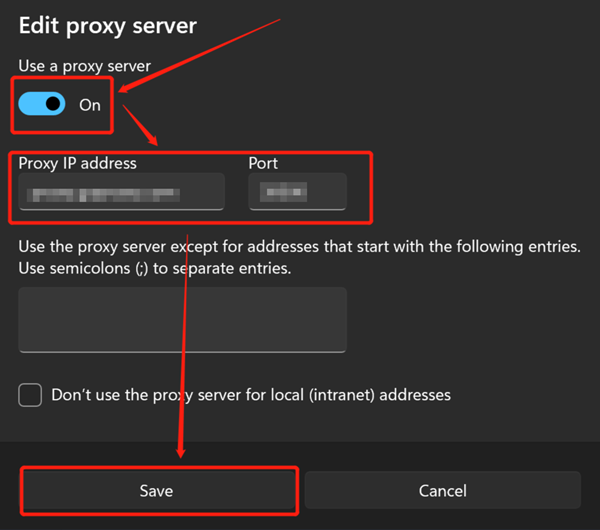
Facebook has no internal proxy settings. You must configure the connection at the OS or browser level. On Windows, go to Settings → Network & Internet → Proxy. Toggle manual proxy setup to "On," enter your IP and port, and save. On macOS, go to System Settings → Network → [Your Connection] → Proxies.
Option B: Multiple Accounts — The Premium Setup ⚡
Using a proxy alone is no longer sufficient. Facebook now tracks over 50 unique system signals: Canvas Hash, WebGL signatures, local timezone, AudioContext fingerprint, device language, and more. If these signals don't match your proxy's location, the account gets flagged — no matter how clean your IP is.
The fix: pair your proxy with an anti-detect browser like AdsPower or GoLogin. Each browser profile becomes a completely isolated virtual machine with its own fingerprint.
Here's the setup flow:
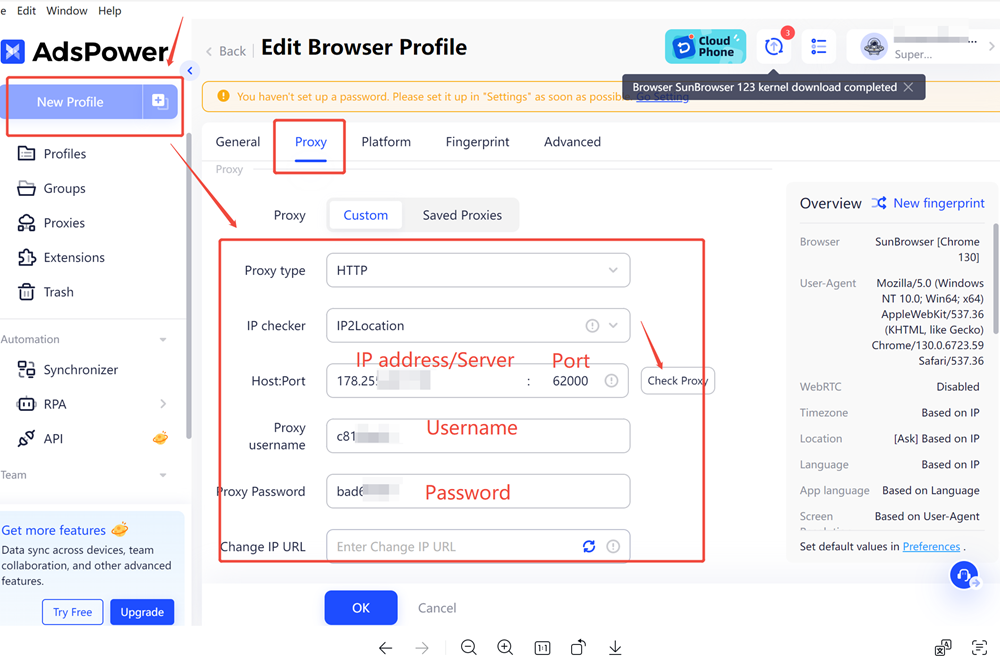
- Download and install your chosen anti-detect browser
- Create a new browser profile — this acts as a separate virtual computer
- Go to the Proxy Settings section inside that profile
- Select SOCKS5 or HTTP from the protocol dropdown
- Paste your OkeyProxy credentials (IP, Port, Username, Password) and save
- Set the profile timezone and language to match your proxy's geographic location
🔑 Pro Rule: One Facebook account = one isolated browser profile = one dedicated proxy IP. This is non-negotiable. Sharing a proxy line between two accounts destroys your isolation and triggers cross-contamination bans immediately.
Step 4: Test Before You Log In
Never skip this step. Launch your configured browser profile and open a clean tab.
Visit IPinfo.io or BrowserLeaks.com and check the following:
- ✅ Displayed city and country match your proxy location exactly
- ✅ Browser timezone aligns with the proxy's geographic region
- ✅ Language settings are consistent with the target locale
- ✅ WebRTC is disabled (prevents your real ISP from leaking through)
A timezone mismatch or WebRTC leak is a major red flag. Fix these before touching Facebook.
Step 5: Log In and Start Operating
Once your checks come back clean, type facebook.com into the address bar. The login page loads on your clean proxy IP. Enter your credentials. You're now managing your Business Manager, ad accounts, and client pages inside a fully isolated and secure environment. ✅
OkeyProxy: The Recommended Residential Proxy for Facebook
Not all proxy providers are built for the demands of Facebook management. You need infrastructure that's stable, trusted, and built for long-term connections. That's exactly what OkeyProxy delivers.
Here's what makes OkeyProxy stand out for Facebook marketers:
- 🏠 Static Residential Proxies: Dedicated long-term ISP connections. The same clean IP stays with your account for weeks — no sudden rotations that trigger security alerts.
- 🔄 150M+ Rotating Residential IPs: For large-scale data scraping and broad-network campaigns, OkeyProxy's massive rotating pool prevents rate limits and keeps extraction running smoothly.
- 🌍 200+ Region Targeting: Target exact cities to verify local ad placements and run hyper-localized campaigns with precision.
- ⚡ SOCKS5 Support: Full protocol flexibility for anti-detect browser configurations and automation tools.
👉 Ready to protect your Facebook assets? Try OkeyProxy today and get your accounts running in a fully secure, isolated environment — before your next campaign goes live.
Best Practices to Avoid Facebook Bans
Setting up the right tools is only half the battle. Long-term account safety comes from clean operational habits. Follow these rules consistently.
🔒 The One-to-One Rule
The most important rule of multi-account management:
1 Account = 1 Browser Profile = 1 Dedicated Proxy IP
Never mix. Logging into Account A and Account B from the same proxy line — even once — links them together and creates instant cross-contamination. When one falls, they all fall.
🌡️ The Account Warming Protocol
Whether you're connecting an older profile to a new proxy or launching a brand-new account, always warm it up first. Don't rush to run ads. Follow this schedule:
- Days 1–3: Light activity only. Scroll the News Feed naturally, watch a few Reels, let the system log your new connection footprint quietly.
- Days 4–6: Increase gradually. Like 5–10 posts daily, join 1–2 industry groups. Stay relaxed and human.
- Days 7–10: Post your first text or image update. Once you have a consistent natural activity history, connect to your Business Manager safely.
🤖 Mimic Real Human Behavior
Avoid opening 10 profiles within a 2-minute window. When using automation tools, set a random delay of 60–120 seconds between actions. Match your activity to the local timezone of your proxy — posting at 3:00 AM local time looks highly suspicious to Meta's automated review systems.
📵 Never Use Free or Shared Proxies
Free web proxies and shared proxy pools are the fastest route to a ban. They've been flagged repeatedly, carry terrible trust scores, and expose your accounts to other users' policy violations. Never use them for any Facebook account you care about.
Troubleshooting Common Proxy Issues
Even with premium tools, you may occasionally run into minor connection issues. Use this quick guide to diagnose and resolve common configuration errors.
❓ Why does Facebook show "Suspicious Login Detected"?
Your real location data is leaking past the proxy tunnel. First, disable WebRTC in your browser — it can expose your true local ISP even through a proxy. Second, avoid switching proxy locations between cities too quickly. Rapid geographic jumps trigger automatic security blocks.
❓ Why does my proxy connection keep dropping?
Unstable connections usually come from low-quality providers or overloaded shared pools. Switch to a dedicated static residential proxy from OkeyProxy. Stable, long-hold connections are far less likely to disconnect mid-session — and far less likely to attract Facebook's attention.
❓ Can I use datacenter proxies for Facebook at all?
Only for light public scraping, and with caution. Never use datacenter IPs to log into any Facebook account — Meta's algorithms flag them immediately, and the ban risk is extremely high.
Frequently Asked Questions
Q: Can Facebook detect proxies?
A: Yes — but quality matters enormously. Facebook can easily detect datacenter proxies and low-quality shared IPs. High-quality residential and ISP proxies from trusted providers like OkeyProxy are designed to appear as normal user traffic. Combined with an anti-detect browser, detection risk drops dramatically.
Q: How many accounts can one proxy handle?
A: Ideally: one account per proxy. If you must consolidate, two to three accounts per IP is the maximum before risk escalates significantly. Never exceed five on a single IP, and always use different browser profiles for each.
Q: Is using a proxy for Facebook legal?
A: Using a proxy to protect your privacy and manage legitimate business accounts is legal in most jurisdictions. However, it may conflict with Facebook's Terms of Service depending on how it's used. Always ensure your activities comply with Meta's advertising and platform policies.
Conclusion
Learning how to use Facebook with proxy setups correctly is a core skill for any serious digital marketer, agency, or cross-border business. The combination of high-quality residential proxies with an anti-detect browser creates a fully isolated environment — keeping your accounts separate, your fingerprints clean, and your Business Managers protected.
Long-term safety requires two things: premium tools and disciplined habits. A trusted provider like OkeyProxy gives you the clean, high-trust IPs that Facebook's algorithms accept without suspicion. Pair those IPs with a careful warm-up routine and the one-to-one account isolation rule — and you can scale your global campaigns with confidence.
