


















Public IP vs Private IP Address: Understanding the Key Differences
Every single day, you use the internet to complete various tasks. 📡 Every time you enter a web address into your browser, watch a high-definition streaming video, or print a document for a coworker over your office network, thousands of tiny data packets travel back and forth. These packets find their destinations with perfect accuracy across many devices. The core technology that supports this entire digital communication system is the IP address, which stands for Internet Protocol address.
When you browse tech forums or check your network connection settings, you will frequently encounter two specific terms: the public IP address and private IP address. This setup often causes confusion for beginners. For example, why does your office laptop show an address like 192.168.1.5 in your internal settings, but when you visit a website that displays your location, it shows a completely different string of numbers?
This guide provides a straightforward, easy-to-understand breakdown of the public ip vs private ip address topic. We will look closely at their definitions, examine their key differences, and explain how they work together behind the scenes. We also include a clear comparison table to help you master the basics of network addressing in just a couple of minutes.
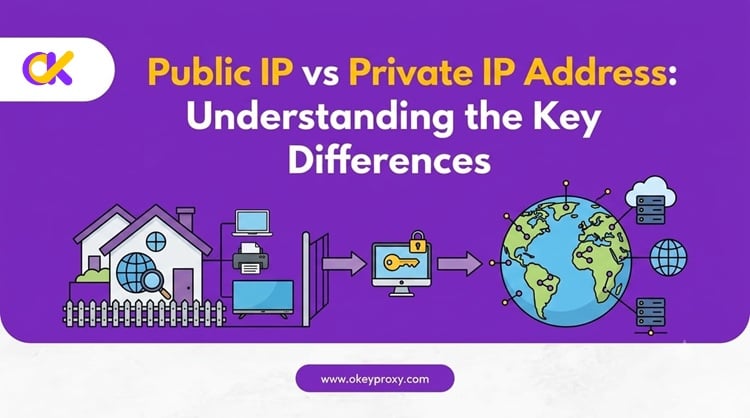
First Things First: Breaking Down the Core Concepts
Before diving into the technical definitions of the public ip address and private ip address, let us clarify how they coexist. The easiest way to understand global network routing is to compare it to a real-world mail delivery system. Think of your home router and your individual electronic gadgets as real properties inside a massive international city.
Public IP: The Global Postal Address
A public IP address works exactly like the official, globally recognized mailing address of your entire apartment building. For example, think of a physical address like 100 Broadway Avenue, Manhattan, New York. Mail carriers anywhere in the world can look at that address string and route a package directly to the building's front door. Because it faces the outside world, this external identity must be completely unique across the global internet infrastructure.
Private IP: The Internal Apartment Room Number
A private IP address works like an internal room number inside that building, such as Apartment 302. Inside your specific building, Apartment 302 is completely unique. However, if you walk down the street to a neighboring building, that property will also have its own Apartment 302. This internal address only carries meaning inside your local network. External mail delivery drivers cannot drop a package straight into your living room using just the label "Apartment 302" without knowing the main building address first.
Answering a Common Reddit Community Question
A user on the Reddit forums once asked an interesting question regarding this technical setup:
"If a public IP address consists of network parts and host parts, doesn't that mean everyone already has their own unique IP address? If so, does that mean private IPs are completely useless?"
This is a common point of confusion for beginners. The short answer is no — private IPs are definitely not useless. In fact, the modern internet would crash without them. 🚫 While a public IP address does contain network and host segments, the total number of available addresses under the older IPv4 standard is limited to roughly 4.3 billion (4,294,967,296, to be exact).
Since the world now has tens of billions of internet-connected smartphones, laptops, smart TVs, and IoT devices, we would have run out of addresses years ago if every single device required its own unique public IP. Private IPs solve this problem beautifully. They allow millions of private households and corporate offices to reuse the exact same local address numbers internally, while sharing just a single public IP to communicate with the wider web.
What is a Public IP Address?
A public IP address is a unique numerical label assigned to your internet-connected hardware by your Internet Service Provider (ISP). It serves as the official public face of your entire household or corporate office network when connecting to the global digital landscape, known as the Wide Area Network (WAN).
The Core Features of Public IP Addresses
Public IP links stand out due to several distinct operational characteristics:
- 🌍 Global Uniqueness: At any given moment in time, no two active devices anywhere on Earth can share the exact same public IP address. Every address path must remain fully distinct to avoid data conflicts.
- 🔗 Direct External Routability: Public IP addresses are fully visible to external servers across the globe. Any remote web server can interact with and trace data back to a public address block.
- 🏛️ Centralized Distribution Management: These address blocks are strictly regulated and distributed by a global non-profit organization called the Internet Assigned Numbers Authority (IANA), along with various regional internet registries (RIRs).
- 🔄 Static or Dynamic: A public IP can be dynamic (it changes periodically, which is standard for most home connections) or static (it stays fixed, usually as a paid upgrade). Businesses hosting servers or needing reliable remote access typically prefer a static public IP.
What is a Private IP Address?
A private IP address, often called a local area network (LAN) IP, is a number that your home or office router automatically assigns to every device that connects to its signal. This includes your smartphone, laptop, tablet, smart television, and wireless office printer.
The Core Features of Private IP Addresses
Private IP allocations operate under a different set of rules than public connections:
- 🔒 Local Area Network Isolation: Private IP addresses only exist and carry meaning inside your private household, school lab, or corporate office space. They cannot communicate on the open web without assistance.
- ♻️ Universal Reusability: Because these networks are physically isolated from one another, millions of different home routers across the globe can use the exact same private address strings simultaneously without causing any data clashes.
Standard Reserved Local Network Ranges
To keep local networking organized, IANA permanently reserved three specific sets of numbers (defined in RFC 1918) exclusively for private local area networks. These numbers are never routed on the open public internet:
- Class A Range:
10.0.0.0–10.255.255.255(typically used for massive corporate networks) - Class B Range:
172.16.0.0–172.31.255.255(used for medium-sized corporate deployments) - Class C Range:
192.168.0.0–192.168.255.255(the standard range used by almost all home internet routers)
Bonus: Other Special IP Ranges You Might Spot 🔍
Beyond the three private ranges above, you may occasionally run into a few other reserved address blocks:
- Loopback (
127.0.0.1): This always points back to your own device. It never leaves your computer, so no outside website can ever see it. - APIPA (
169.254.0.0/16): Your device assigns itself an address in this range automatically when it can't reach a DHCP server. Seeing this usually means your Wi-Fi or Ethernet connection is broken. - CGNAT Shared Space (
100.64.0.0/10): Reserved under RFC 6598, this range sits between your router and your ISP. More on this below — it's the piece most beginner guides leave out. 👇
The 2026 Twist: What Is CGNAT, and Why Does It Matter to You?
Because the world's pool of IPv4 addresses ran dry years ago, many ISPs — especially mobile carriers — now use Carrier-Grade NAT (CGNAT). This adds a third layer on top of the public/private setup you already know. 🧩
Under CGNAT, your router doesn't actually get a true public IP from your ISP. Instead, it receives an address from the shared 100.64.0.0/10 range, and your ISP groups you together with dozens — sometimes hundreds — of other households behind a single real public IP. In practice this means:
- Port forwarding and self-hosting a home server often stop working.
- Remote access to devices on your home network becomes unreliable.
- If another customer sharing your IP misbehaves, your whole group can get flagged or blocked by websites.
💡 Quick check: Log into your router's admin page and find the WAN/Internet IP. If it falls between 100.64.0.0 and 100.127.255.255, you're behind CGNAT. You can also compare that number to what an online "what is my IP" tool shows — if they don't match, CGNAT (or an extra layer of NAT) is in play.
Does IPv6 Make Private IPs Obsolete?
Not exactly — but it does change the picture. IPv6 uses 128-bit addresses, offering approximately 340 undecillion possible combinations, so address scarcity essentially disappears. Under IPv6, most devices can get their own globally unique address, and heavy NAT usage becomes unnecessary. However, IPv6 still uses "link-local" addresses (starting with fe80::) for local-only communication, which serve a similar role to today's private IPv4 ranges. Since global IPv6 adoption is still incomplete in 2026, the public/private IPv4 system covered in this guide remains essential knowledge for most users. 🌐
Summary Table: Difference Between Public IP Address and Private IP Address
To help you see the whole picture clearly, let's look at the difference between public IP address and private IP address side by side. This table outlines the primary differences across key technical categories.
| Comparison Metric | Public IP Address | Private IP Address |
|---|---|---|
| Network Scope | Wide Area Network (WAN) / the open global internet | Local Area Network (LAN) / internal home or business space |
| Global Uniqueness | Absolutely unique — no duplicates exist worldwide | Only unique inside the local network; can be reused elsewhere |
| Direct Web Accessibility | Yes — accessible by any web server across the globe | No — external servers cannot look past your local router |
| Primary Allocator | Your Internet Service Provider (ISP) | Your local router (via DHCP) |
| Typical Examples | 8.8.8.8, 172.217.7.14 |
192.168.1.1, 10.0.0.5 |
| Cost | Included in your broadband bill; static IPs often cost extra | Free — generated automatically by your router |
| Baseline Security | Lower — exposed to open internet traffic and scanning bots | Higher — shielded behind NAT and your router's firewall |
How Do They Work Together? The Magic of NAT
Since private IP addresses cannot interact with the open internet on their own, you might wonder how your smartphone manages to load a Google search result when connected to your home Wi-Fi. This process runs smoothly thanks to an intermediate translation technology built into your router. 🔀
Network Address Translation (NAT)
Your local router acts as a smart bilingual translator between your private internal network and the public internet. This conversion method is called Network Address Translation, or NAT.
When you look up a website on your smartphone (which might have a private IP like 192.168.1.10), your phone sends that request to your home router. The router strips away your phone's private IP, replaces it with your household's public IP address, and sends the request out to Google's public servers.
When Google sends back the search results, it addresses them to your router's public IP. Your router checks its internal translation logs, maps the incoming data back to your phone's specific room number, and delivers the web page directly to your screen. This smart NAT process allows dozens of separate household devices to share a single public IP address, which has significantly delayed the exhaustion of the world's limited pool of IPv4 addresses.
How to Find Your Public and Private IP Addresses
Checking your own network numbers is an easy task. You can find both your public and private IP designations within a few seconds by following these simple diagnostic steps. ✅
How to Find Your Public IP Address
Finding your public IP is straightforward because it's fully visible to the outside web. Open any standard internet browser, go to Google, and search for the phrase "What is my IP." Alternatively, you can visit free network verification tools like ipinfo.io to see your current public IP address along with your ISP details immediately.
How to Find Your Private IP Address
Because private IP addresses sit safely inside your local network, you have to find them through your device's internal operating system settings:
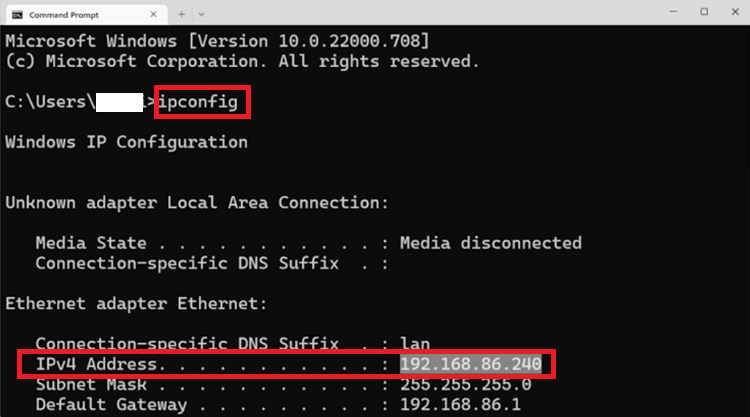
- For Windows Users: Press the Windows Key + R, type
cmdto open the Command Prompt, typeipconfig, and hit Enter. Look at the line labeled "IPv4 Address" to find your local number (usually starting with 192.168).
- For Mac Users: Open System Settings, click "Network," select your active Wi-Fi connection, and view the status details to see your current local IP address.
- For iPhone/Android Users: Tap the (i) icon next to your connected Wi-Fi network name to see your private IP listed instantly. 📱
Cybersecurity Perspective: Why You Need to Protect and Manage Your Public IP
While your private IP remains safe from outside eyes behind your router's firewall, your public IP address acts as a permanent digital fingerprint visible to the entire web. 🕵️ Every website you open logs this public address. This visibility allows third-party platforms, competitors, and major online services (such as TikTok, Instagram, and Amazon) to track your approximate city location, analyze your browsing habits, enforce regional restrictions, or launch targeted network blocks.
For businesses conducting international market research, managing multi-account marketing campaigns, running automated web scrapers, or verifying ad placements, exposing your real public IP is highly risky. If an online platform flags your public IP for making too many fast requests, it can instantly block access for your entire office network — and if you're behind CGNAT, you might even get blocked for something a stranger sharing your IP did. This is where using a high-quality proxy service becomes essential to mask your public footprint.
🚀 Why OkeyProxy Is Your Ultimate Public IP Management Partner
If you want to protect your digital assets or grow your business internationally, you need a smart way to manage your public online presence. OkeyProxy provides an enterprise-grade solution that lets you mask your real public IP and swap it with premium addresses across the globe.
- 🌎 Seamless Public IP Masking: OkeyProxy lets you easily hide your actual home or office location. Route your traffic through clean residential connections in over 200 regions for a completely secure international presence.
- 💎 Massive Residential IP Network (150M+ IPs): Managing international e-commerce storefronts long-term? Use our Static Residential Proxies to maintain a single, trusted location. Running high-volume data scrapers? Use our Rotating Residential Proxies to swap IPs automatically and avoid anti-bot blocks.
- ⚡ Excellent Performance, Full Protocol Support: Full support for both HTTP and SOCKS5 protocols. Seamless integration with anti-detect fingerprint browsers and custom automation scripts, keeping your international operations stable and secure.
⏱️ Take control of your connection today. Don't let a flagged or shared public IP slow your business down. Register your OkeyProxy account now and get instant access to a global residential IP pool — or contact our support team to build a custom plan and scale your international operations safely, without limits! 🌟
Frequently Asked Questions ❓
Q: Can two devices have the same private IP address?
A: Yes, as long as they're on different, physically separated networks. Your neighbor's router can assign 192.168.1.5 to their laptop while your router assigns the same number to yours — the two never conflict because private IPs are invisible outside their own local network.
Q: Can someone hack me using just my public IP address?
A: A public IP alone doesn't give an attacker access to your devices. But it can reveal your approximate location and become a target for scanning, DDoS attempts, or tracking, which is why masking it with a proxy or VPN adds a meaningful layer of protection.
Q: Why does my public IP keep changing?
A: Most home connections use a dynamic IP assigned via DHCP lease from your ISP. It can change when you restart your router, after your lease expires, or when your ISP reallocates addresses. A static IP, usually a paid add-on, stays fixed.
Q: Is a private IP address more secure than a public IP?
A: Generally yes. Private IPs sit behind your router's NAT and firewall, which blocks most unsolicited inbound traffic by default. Public IPs are directly reachable from the internet, making them more exposed to scanning and probing.
Final Summary
Understanding the core differences when analyzing the public IP vs private IP address topic is foundational knowledge for anyone navigating the modern digital space. Your private IP address works quietly behind the scenes to link your personal gadgets within your local network, while your public IP address serves as your official identity to the global web — and in 2026, CGNAT adds one more layer worth knowing about. 🧭
When running a global business or handling sensitive data scraping tasks, exposing your real public connection can slow down your operations. Using OkeyProxy to manage and protect your public IP allows you to bypass regional restrictions, secure your data from tracking, and ensure your online systems run smoothly anywhere in the world. Start your free trial today and see the difference a clean IP makes. 🚀
