










Why Am I Shadowbanned on TikTok? Signs, Causes & How to Fix It
Your videos used to pull in tens of thousands of views. 📉 Or maybe you just spent hours editing a video you were sure would go viral. You hit publish, checked back a few hours later, and felt your stomach drop. The view counter is frozen. It won't budge past 0, or it's stuck somewhere around 200 views.
No warning. No community guideline strike. No email. Just... silence. Your reach vanished into thin air overnight. Is TikTok secretly restricting your profile? 🤔
This guide breaks down exactly why am I shadowbanned on TikTok in plain language. You'll learn how TikTok's algorithm actually flags accounts in 2026, how to test your profile in the next 10 minutes, and a step-by-step recovery plan to get your videos back on the For You Page (FYP).
What Is a TikTok Shadowban? 👻
A TikTok shadowban is an invisible penalty. The platform quietly limits your account's reach and visibility — without ever telling you it happened. It's usually triggered when TikTok's automated moderation system suspects a community guidelines violation or spots suspicious account behavior.
Here's the catch: TikTok has never officially used the word "shadowban." Instead, the company describes it as making content "ineligible for the For You feed" or applying "reduced visibility." Different name, same painful result. When it hits, you'll notice:
- Your new videos stop appearing in the FYP recommendation pool entirely.
- Your profile, videos, and hashtags stop showing up in other users' search results.
- Your uploads are only visible to you and a small slice of your existing followers.
TikTok's enforcement system now runs on multiple layers at once — automated content scanning, behavioral pattern analysis, user reports, and periodic human review. That's why a shadowban can feel random even when it isn't. 🎯
Shadowban vs. Full Account Ban: What's the Difference?
It helps to know exactly how a silent penalty differs from a full account termination:
| Feature / Metric | TikTok Shadowban (Invisible Penalty) | Full Account Ban (Total Suspension) |
|---|---|---|
| Official Notification | None. You're left completely in the dark. | Yes — an explicit alert appears when you try to log in. |
| Profile Accessibility | Stays online. You can still log in and post. | Login blocked. Public profile disappears entirely. |
| Traffic Channels | FYP traffic drops near 0%. Views come only from direct link clicks or existing followers. | All traffic channels are cut off permanently. |
| Duration | Usually temporary — anywhere from a few days to about a month. | Permanent, unless an appeal succeeds. |
How to Test If You're Actually Shadowbanned 🔍
Not every slow video is a shadowban. TikTok's algorithm is naturally volatile — one underperforming post is normal. A real shadowban shows up as a consistent, account-wide collapse across several posts in a row, not a single quiet video.
Underperformance vs. Active Shadowban
| Account Symptom | Normal Underperformance | Active Shadowban |
|---|---|---|
| FYP Traffic Share | Still 40%–60% of views, just a smaller total. | Falls to near 0% across multiple new videos. |
| Hashtag Search Results | Ranks lower under relevant tags. | Missing entirely from the "Latest" tab. |
| Follower Growth | Slows down but keeps trickling in. | Freezes completely, or even drops. |
| Upload Processing | Uploads and processes normally. | Stuck "under review" for hours, or fails to load. |
Your Step-by-Step Diagnostic Checklist ✅
Beyond a gut feeling that your numbers look wrong, run these four checks to confirm the diagnosis:
- 1. Check your traffic source in analytics. Open TikTok Studio → Analytics → Content → Traffic Source. If "For You" has plummeted from its usual 70–90% share down to near 0%, that's the strongest single signal you're suppressed.
- 2. Run a hashtag search test. Post a video with a low-competition hashtag (aim for one used 10,000–100,000 times). After 30 minutes, search that hashtag from a second, unrelated account and sort by "Latest." If your video doesn't appear, you're being hidden from discovery.
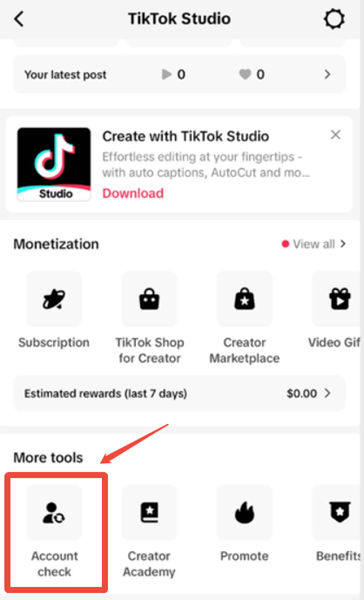
- 3. Use TikTok's own Account Check tool. This is the most reliable diagnosis method — and most creators never open it. Go to Profile → ☰ menu → TikTok Studio → More Tools → Account Check. It shows any active warnings, violations, or content restrictions on your account, straight from TikTok itself.
- 4. Search your own username from a logged-out device. Ask a friend, or use a secondary account that doesn't follow you, to search your exact handle. If your profile or recent videos don't turn up, search visibility is restricted too.
💡 Quick tip: If your Account Check comes back completely clean but your views are still flat, the problem usually isn't a shadowban at all — it's weak hooks, low watch time, or poor retention. Worth ruling out before you panic.
Top Reasons: Why Am I Shadowbanned on TikTok? 🚫
TikTok's safety engine builds a behavioral trust score for every account on the platform. It tracks interaction speed, device signals, and network signatures around the clock. Here are the reasons that most commonly trigger a silent penalty.
1. Posting Unoriginal or Reposted Content
TikTok's detection is sharp enough to spot reused pixel structures and audio hashes. Downloading clips from other apps, reposting watermarked videos, or stitching together unedited footage all get flagged as low-effort — and low-effort gets suppressed fast.
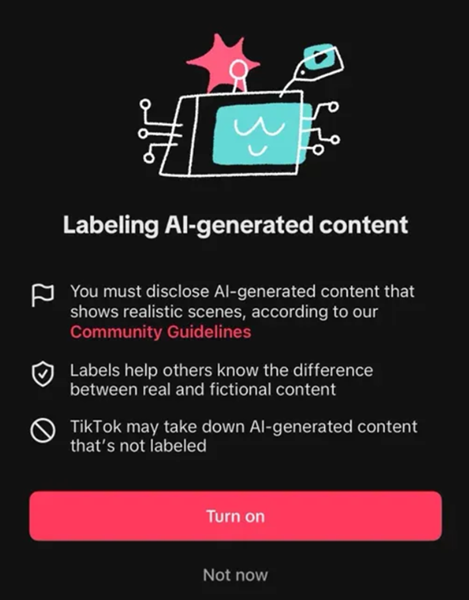
2. Undisclosed AI-Generated Content (New in 2026) 🤖
This one catches a lot of creators off guard. TikTok's synthetic media policy now actively suppresses AI-generated videos, AI voiceovers, or synthetic faces that aren't labeled as such. Even fully legitimate AI-assisted content can get quietly throttled if you skip the "AI-generated content" disclosure toggle when uploading.
3. Community Guidelines Infractions
Banned keywords, sensitive visuals, or aggressive commercial pitches in your captions or voiceovers trip automated safety filters. Content touching on violence, suggestive imagery, hate speech, bullying, or dangerous challenges is an almost guaranteed shadowban trigger.
4. Spammy Behavioral Patterns
Rapid follow/unfollow loops, mass-liking, copy-pasted comments, or uploading more than 5–6 low-effort videos in a single day all read as bot behavior to TikTok's automation-detection layer — and the response is usually a quiet visibility cut.
5. Using Banned or Restricted Hashtags
Chasing viral traffic with overused or flagged hashtags can backfire. When a tag gets overrun with spam, TikTok flags the entire hashtag — and every account using it takes the hit.
6. A High Volume of User Reports
If several viewers flag your videos for spam, harassment, or misinformation, TikTok's moderation engine pushes your profile into a defensive review state, suppressing reach while your history is re-screened.
7. A Flagged Device Fingerprint
Logging into more than three separate profiles on one device creates a shared hardware fingerprint — including Canvas and WebGL signatures. If one account on that device gets flagged, every other account sharing that fingerprint can face a joint restriction.
8. Cheap or Shared VPN and Proxy IPs (The #1 Overlooked Cause) ⚠️
This is, by far, the most common reason behind an unexpected shadowban that creators can't explain. Free VPNs and cheap data-center proxies route your traffic through server blocks that spam networks abuse constantly. TikTok's fraud-detection system sees that same flagged IP behind thousands of accounts and treats your traffic exactly the same way — as a bot farm. Your views get capped at 0–200, no matter how good your content is.
Step-by-Step Guide: How to Lift a TikTok Shadowban 🛠️
Most shadowbans now run anywhere from about a week to a month, depending on severity — a big shift from the shorter 3–10 day windows creators saw in past years. Minor, first-time issues can still clear in a few days if you act fast. Here's the recovery sequence that works.
Step 1: Run the Account Check First
Before changing anything, open TikTok Studio → More Tools → Account Check to see exactly what TikTok flagged. This tells you whether you're dealing with a real restriction or just a content-performance issue, so you don't waste days fixing the wrong thing.
Step 2: Stop Posting Immediately
The first 24–48 hours matter most. Don't post new content, and don't spam different hashtags hoping something sticks — extra posting during an active restriction can actually extend the penalty.
Step 3: Remove or Hide Flagged Videos
Find any videos stuck at 0 views or carrying a policy warning. Delete them, or switch them to "Only Me." This clears the technical flags attached to your public grid.
Step 4: Revoke Unsafe Third-Party App Access
Check your connected apps. Remove any unauthorized follower-tracking tools, auto-download extensions, or unapproved analytics platforms running background scripts on your account.
Step 5: Take a 3–5 Day Account Break
Let the account rest. No uploads, no captions, no DMs. Log in occasionally, scroll the FYP naturally, watch a few livestreams, drop the odd organic like. This tells TikTok you're a real human, not a script.
Step 6: Fix Your Network Environment Permanently
This is the step most guides skip — and it's the one that actually prevents the next shadowban. Ditch free, shared VPN lines that expose flagged IPs. Pair a dedicated anti-detect browser with a clean, isolated residential connection for every account you run.
Network Quality vs. Shadowban Risk: The Real Numbers 📊
Your connection environment plays a bigger role than most creators realize. Here's how different setups stack up:
| Connection Type | Shadowban Trigger Risk | Chance of Crossing 200 Views | Trust Evaluation |
|---|---|---|---|
| Free VPN / Shared Data-Center IPs | 🔴 > 85% — Extremely high risk | < 5% — Stuck at 0–200 views | Critical risk. These IP blocks are widely blacklisted for spam abuse. |
| Rotating Residential Proxies | 🟠 40%–60% — Unstable | ~40% — Inconsistent spikes | Moderate risk. Constant IP shifts during uploads look like account sharing. |
| Static Residential Proxies | 🟢 < 2% — Maximum safety | > 90% — Normal distribution | Excellent trust. Mirrors a real household ISP connection. |
Why OkeyProxy Is the Fix Serious Creators Use 🚀
Professional social media teams rarely deal with shadowbans — not because they're lucky, but because they never let their network environment become the problem in the first place. They route every profile through a dedicated, clean residential connection from day one.
OkeyProxy's Static Residential Proxies give you exactly that setup, built specifically to keep TikTok's fraud-detection systems from ever flagging your account:
- 🌍 Real Household ISP IPs, 200+ Regions: Access genuine residential IP addresses matched to your target market — US, UK, or anywhere else — so the algorithm reads you as a native local user, not a proxy.
- 📌 Static Residential Lines: Your IP stays fixed. No random location-switching, no security flags, no accidental shadowban from an IP that jumps countries mid-session.
- ⚡ High-Speed Infrastructure Built for Video: Full SOCKS5 and HTTP support, integrated with top anti-detect browsers like AdsPower and GoLogin, for fast, stable HD uploads with zero processing delays.
👉 Sign up with OkeyProxy today and claim 1 free Static Residential Proxy trial node from our support team. Get your accounts out of the shadowban loop — for good. ✅
Frequently Asked Questions ❓
Q: How long does a TikTok shadowban typically last?
A: Most cases now run anywhere from about a week to a month, with minor first-time issues sometimes clearing in as little as 3–5 days. Continued violations or repeated use of a flagged VPN/proxy during that window can reset the clock and stretch the restriction even longer.
Q: Do only small accounts with few followers get shadowbanned?
A: No. Even verified accounts with millions of followers can get shadowbanned for guideline violations, reposted content, or suspicious login locations. Larger accounts often recover faster, though, thanks to a stronger baseline of platform trust.
Q: How can I be sure my account is actually shadowbanned?
A: Look for two or more signals together: your For You traffic share collapsing to near 0% across several videos, your content missing from hashtag searches, and your username failing to appear when searched from a secondary account. One quiet video isn't a shadowban — a consistent, account-wide pattern is.
Q: Will reinstalling the TikTok app fix a shadowban?
A: Reinstalling clears corrupt cache data and refreshes your session cookies, which can fix minor glitches. But it won't lift a shadowban tied to your content history or a blacklisted IP address — you'll need to address the actual cause.
Final Takeaway
Figuring out why you're shadowbanned on TikTok is the first real step toward getting your reach back. Original, guideline-safe content matters — but a clean, stable network environment is what protects you long-term.
Clear out risky third-party apps, isolate your profiles with an anti-detect browser, and run every account through a trusted static residential connection like OkeyProxy. Fix the technical triggers once, and your content gets a fair shot at the FYP again — no more guessing games. 🎬