Instagram Automated Behavior: What It Is, Why It Happens & How to Fix It
You open Instagram. Everything looks normal — until a warning pops up out of nowhere:
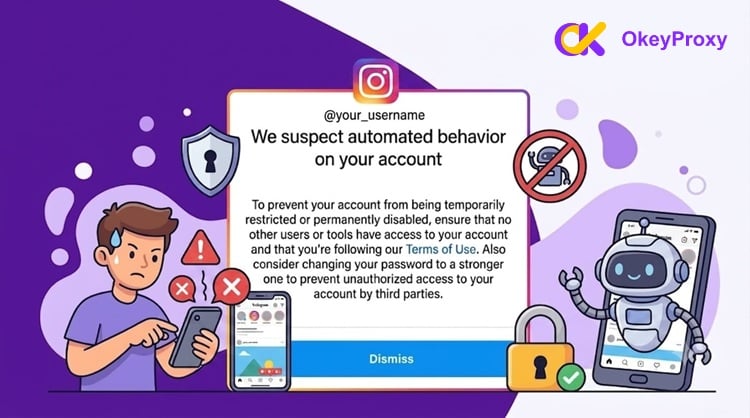
"We Suspect Automated Behavior on Your Account."
Frustrating? Absolutely. Confusing? Even more so — especially if you've never used a bot or third-party automation tool in your life.
You're not alone. Scroll through Reddit or any social media forum and you'll find thousands of everyday users reporting the exact same issue. The warning appears because Instagram's detection algorithms are highly sensitive — and they don't always get it right.
This guide covers everything you need to know about Instagram automated behavior: what triggers the warning, what happens to your account if you ignore it, how to fix it step by step, and the best practices to prevent it from happening again.
What Is Instagram Automated Behavior? 🤖
Instagram flags your account for "automated behavior" when your activity patterns look more like a bot or script than a real human being.
The platform uses an AI-powered security system to protect its 2+ billion monthly active users from spam networks, fake engagement farms, and data scrapers. When that system suspects your account, it displays this warning:
"We Suspect Automated Behavior on Your Account"
"To prevent your account from being temporarily restricted or permanently disabled, ensure that no other users or tools have access to your account and that you're following our Terms of Use. Also consider changing your password to a stronger one to prevent unauthorized access to your account by third parties."
The key thing to understand? You don't have to be using a bot to get flagged. Overly fast manual activity, an unstable network, or a previously connected third-party app can all trigger this warning.
How Instagram Detects Automated Behavior 🔍
Instagram's anti-fraud engine doesn't react to a single action. It builds a behavioral fingerprint for every account over time — and flags you when your pattern deviates from what it expects.
The system analyzes three core technical areas:
① Action Frequency and Cadence
Humans don't move like clockwork. Bots do. If you like posts or send DMs at perfectly regular intervals — or exceed hidden hourly limits — the algorithm notices. Real users scroll unevenly, pause, get distracted, and come back. Scripts don't.
② Behavioral Biometrics
The app tracks how you physically interact with it. Real users scroll at varying speeds, move their fingers randomly, and tap imprecisely. Automated scripts execute actions instantly with zero natural hesitation. That "inhuman" precision is a dead giveaway.
③ Network and Device Environment
Instagram inspects your IP address, device fingerprint, and login history. If you're using a shared public network, a VPN flagged by bot farms, or switching between multiple IPs mid-session, the system treats your behavior as suspicious — even if you're doing nothing wrong.
⚠️ Important: Instagram doesn't forget. Each warning or block lowers your account's internal trust score. A lower trust score means the algorithm becomes more sensitive to your future activity. You can get flagged again for doing far less than what triggered the first warning.
Common Triggers: Why Instagram Flags Your Account ⚡
The platform's security algorithms build a unique behavioral profile for every user on the network. This file tracks your daily interaction speeds, API calls, and historical session logs. The system usually flags your profile due to the following common issues.
① Excessive or High-Speed Activity
Liking, following, or unfollowing dozens of accounts within minutes looks artificial. Even if you're doing it manually — rushing through profiles to gain followers back — the algorithm can't tell the difference between your fast clicking and a running script.
② Generic and Copy-Pasted Comments
Leaving identical comments like "Great post!", "Nice pic!", or "Follow for follow" across multiple profiles is a major spam signal. Instagram's engine treats repetitive single-phrase comments as signs of an automated bot farm.
③ Third-Party Application Access
Connecting your account to external apps is one of the highest-risk behaviors. Free follower trackers, unofficial growth services, grid planners, and bulk download tools all use unapproved connection methods. They communicate poorly with Instagram's API — and they get your account flagged fast.
④ Inconsistent Login Behavior
Logging in from an unusual location, a new device, or an unstable proxy that breaks your typical usage pattern triggers immediate security concerns. The system flags these shifts as potential account hijacking or unauthorized automation.
⑤ Unstable Network Connections
Here's one most users miss: when your internet drops mid-session, the app queues up your clicks, likes, and messages. When your connection returns? It sends all of them at once. That sudden burst of data looks exactly like a bot script to Instagram's servers.
⑥ Mass Tagging and DM Blasting
Tagging unrelated users in bulk comments, or sending the same DM to dozens of people in a short window, trips Instagram's spam filters immediately. Only message users who have opted in or interacted with you first.
⑦ Unsanctioned Data Scraping
Using background browser scripts to collect user bios, comments, or images without official API approval triggers heavy automated behavior flags. This also potentially violates privacy laws beyond just Instagram's terms.
⑧ Low-Grade or Unapproved Automation Tools
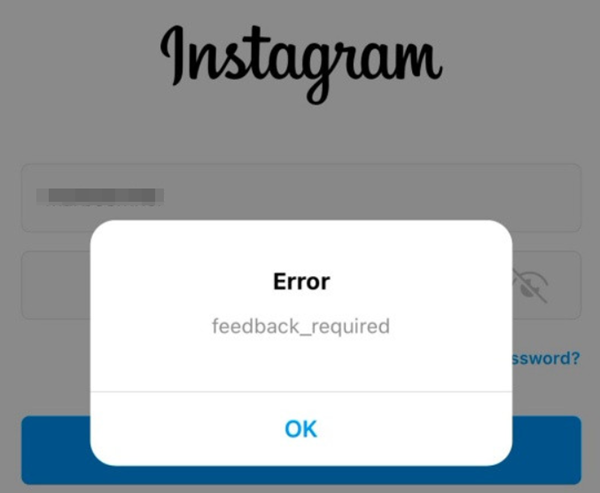
While Meta allows verified AI chatbots for business customer service, unapproved bots carry extreme risks. Users running unauthorized scripts often also encounter the painful feedback_required block. If that's happening alongside this warning, review our guide on resolving the Instagram feedback_required error.
What Happens If You Ignore the Warning? 🚨
This is where many users make a costly mistake — they dismiss the warning and keep scrolling. Don't.
Instagram's response escalates in stages:
Stage 1: The Warning ⚠️
The pop-up appears. Your account still works normally. Think of it as Instagram saying: "We're watching you — and you're on thin ice." This is your easiest window to fix things.
Stage 2: Temporary Action Blocks 🔒
Instagram blocks specific actions — liking, following, commenting, or sending DMs — for anywhere from 2 hours to 48 hours. Each block further lowers your trust score, making future flags easier to trigger.
Stage 3: Shadowban 👻
This is the sneaky one. You can still use your account — but Instagram silently suppresses your content. Your Reels stop getting reach. You disappear from the Explore page. Hashtags don't surface your posts. Engagement tanks. And most users never even realize it's happening.
Shadowbans typically last 3–14 days, but repeat offenders can stay suppressed for weeks.
Stage 4: Account Restrictions 📉
More severe limitations kick in. Your content may be hidden from non-followers. Hashtag feeds stop showing your posts. Growth flatlines.
Stage 5: Permanent Ban ❌
For repeat or severe violations, Instagram disables your account entirely. In 2026, Meta's aggressive AI moderation wave resulted in many permanent bans — some of which affected innocent users who were wrongly flagged. Appeals became harder to win, and automated denials increased.
The takeaway: act on the warning immediately. Every hour you wait makes recovery harder.
How to Fix the Instagram Automated Behavior Warning 🛠️
Follow these steps carefully. Don't rush — and don't skip steps.
Step 1: Stop All Account Activity Immediately ✋
Give your account a complete rest. No liking. No commenting. No following or unfollowing. No DMs.
Pause for at least 24 to 48 hours. Some users in serious cases benefit from going fully dark for 72 hours. Continuing activity right after receiving the warning signals to the system that you're ignoring its limits — and escalates the response.
Step 2: Revoke All Third-Party App Permissions 🔑
This is the most important technical step.
- Open Instagram → tap your Profile icon
- Go to Settings → Accounts Center → Password and Security
- Tap Apps and Websites
- Review every app in the "Active" tab
- Remove anything you don't fully recognize or no longer use — especially follower trackers, growth services, or analytics tools that required your login
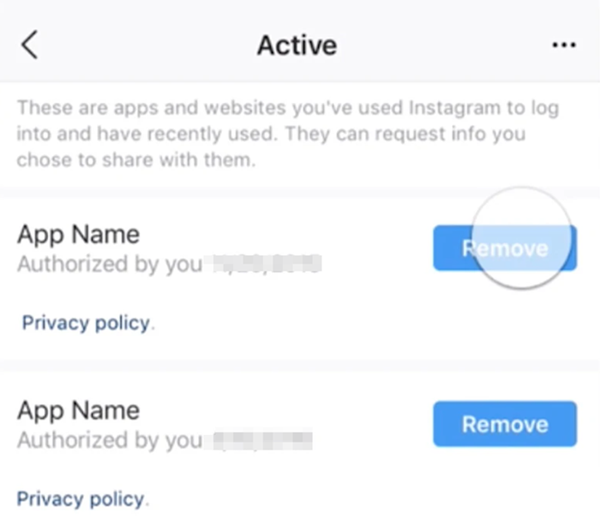
When in doubt, remove it. You can always reconnect trusted tools later.
Step 3: Update Your Password 🔐
Change your password to a strong, completely new combination. This action instantly terminates all active sessions across every device in the world. It cuts off any hidden background scripts, malicious apps, or unauthorized connections to your account.
Go to Settings → Accounts Center → Password and Security → Change Password.
Step 4: Review and Clean Up Active Sessions 📱
Check where your account is currently logged in.
- Go to Settings → Accounts Center → Password and Security → Where You're Logged In
- Review all active sessions
- Log out of any device or location you don't recognize
During the recovery period, avoid switching between public Wi-Fi zones, cellular networks, or VPN tools. Keep your connection environment as stable and consistent as possible.
Step 5: Check Your Account Status 📊
Instagram has an official Account Status tool that shows whether any of your content has been flagged or restricted. Go to Profile → Settings → Account Status to see your current standing and whether any posts have been flagged.
Step 6: File a Manual Review Request 📝
Still seeing the warning after following all the above steps? Your account may be stuck in an algorithmic loop.
Use the "Report a Problem" feature inside Help Settings to request a human review. Be clear and factual in your report — explain that you're a real user who has taken corrective steps. Avoid emotional language; stick to the facts.
Best Practices to Prevent Future Warnings ✅
To avoid getting flagged by security algorithms in the future, you must adjust your daily browsing habits to make your connection look entirely human. Use these proactive guidelines to protect your social assets.
Control Your Daily Action Pace 🐢
Even with a strong account history, keep your daily activity within safe limits:
- Follows/unfollows: 100–150 per day maximum, spread across several hours
- Likes: keep them spread naturally throughout the day — not all in one session
- Comments: no more than 20–30 per hour, and always unique
- DMs: only to users who've interacted with you first, or who've opted in
Vary Your Community Interactions 💬
Never copy-paste the same comment twice. Take a moment to write something genuine and relevant to the post. Natural variation is one of the clearest signals that a real human is behind the account.
Stick to Official Meta Tools 🛡️
For scheduling content or managing business messages, use Meta Business Suite or Instagram-approved partners like Later, Buffer, Hootsuite, or Tailwind. These tools are designed to work within Instagram's API rules. Never use cheap browser extensions that promise automated growth or bulk message blasting.
Avoid Banned Hashtags 🏷️
Using even one banned or spam-flagged hashtag can suppress your content's visibility. Research your hashtags before using them. Vary them across posts — never recycle the same set repeatedly.
Maintain Login Consistency 📍
Log in from the same device and network whenever possible. Sudden location jumps, device switches, or unstable proxy connections all look suspicious to Instagram's system — even if your content and behavior are perfectly fine.
Mimic Human Behavior in Approved Automation 🔄
If your business uses officially approved automation for customer communications, design your workflows to feel human. Mix up activity types. Add natural pauses. Browse a feed, save a post, view a Reel, wait a few minutes — then comment. Breaking up predictable patterns prevents AI bot detection.
Why Your Network Environment Is the Hidden Key 🌐
Here's what most guides miss: even perfectly normal behavior can get flagged if your network environment looks suspicious.
Instagram cross-references your IP address against databases of known spam networks, VPN exit nodes, and shared data center IPs. If your connection matches one of those profiles — even accidentally — you're at risk.
This becomes especially critical when:
- You manage multiple business accounts from one location
- You operate in multiple geographic markets
- You run approved automation for customer service or scheduling
- You're scaling social media campaigns across accounts
The safest solution? Assign each profile its own dedicated, geo-matched residential IP — one that looks exactly like a real household internet connection, not a data center or VPN.
🏆 Our Recommended Solution: OkeyProxy Static Residential Proxies
When it comes to keeping Instagram accounts clean and flag-free, OkeyProxy's Static Residential Proxies are built for exactly this challenge.
Here's why they work where other solutions fail:
- ✅ Real ISP-issued IP addresses — not data center IPs that Instagram already has on a blocklist
- ✅ Static assignment — your IP stays fixed across sessions, so Instagram sees consistent login behavior
- ✅ Geo-matched locations — appear to browse from the same city or region every time
- ✅ High stability — no random drops or IP rotations that create suspicious activity bursts
- ✅ Multi-account safe — assign one dedicated IP per profile to avoid cross-account flags
Pair OkeyProxy with an anti-detect browser and you remove the two core technical triggers behind most automated behavior warnings: inconsistent IPs and device fingerprint collisions.
👉 Get a free trial of a static residential IP at OkeyProxy → Protect your accounts before the next warning hits.
Frequently Asked Questions ❓
Q: How long does an Instagram automated behavior block last?
A: Temporary action blocks typically last 2 to 48 hours. However, if you continue triggering warnings, each block tends to get longer as your trust score drops. Some users in repeat-offense situations face restrictions lasting several weeks.
Q: Can I get flagged even if I've never used a bot?
A: Yes. Moving too fast manually, using an unstable or shared network, or having a previously connected third-party app still sending API calls in the background can all trigger the warning — even without intentional automation.
Q: What's the difference between the automated behavior warning and a shadowban?
A: The warning is a visible alert — Instagram is telling you there's a problem. A shadowban is silent — Instagram suppresses your content without notifying you. Ignoring the warning can lead directly to a shadowban.
Q: Will changing my password really help?
A: Yes — significantly. Changing your password terminates all active sessions worldwide and cuts off any third-party apps, scripts, or unauthorized connections that may still have access to your account.
Q: Can a VPN cause automated behavior warnings?
A: It can. Many VPN exit nodes are shared by thousands of users, and Instagram may associate those IPs with known bot traffic. If you need an alternative IP environment, a static residential proxy (like OkeyProxy) is a much safer choice than a VPN for Instagram use.
Final Thoughts 💡
Resolving the Instagram automated behavior warning comes down to two things: cleaning up your account's connected apps and cleaning up your network environment.
Stop all activity. Revoke third-party access. Change your password. Stabilize your connection. Then go back to behaving like a real human — varied, natural, unhurried.
For individual users, that's usually enough. For businesses managing multiple accounts or running approved automation at scale, you also need a clean, stable, geo-matched IP for each profile. That's where OkeyProxy Static Residential Proxies make the difference — removing the network-level triggers that cause most automated behavior flags in the first place.
Stay human. Stay consistent. And stay ahead of the algorithm. 🚀