


















How to Fix Error Code 429 Roblox: Proven Solutions
You are all set for a long gaming session. You open Roblox, try to join your favorite server, and suddenly a gray box pops up. It says: "Error Code: 429." Just like that, your plans are ruined. It is frustrating, but don't worry. This error does not mean you are banned. It just means the connection is blocked for a short time.
In this guide, we will show you exactly how to fix error code 429 Roblox. We will cover everything from quick 5-minute fixes to deeper network settings. Whether you are playing on a PC, a mobile phone, or a school Chromebook, these steps will get you back into the game. Let's get started.
What Is Roblox Error Code 429?
Roblox Error Code 429 is the standard HTTP status code for "Too Many Requests." It usually appears alongside the message: "An error was encountered during authentication. Please try again."
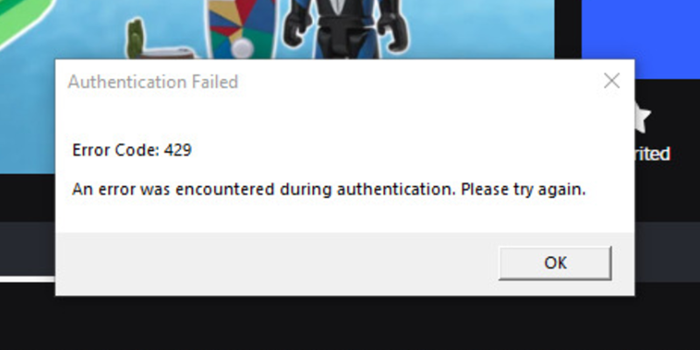
When your device, browser, or IP address sends more requests to Roblox's servers than their rate limit allows in a short window, the server temporarily blocks further connections. This affects players on PC, mobile, and console alike. It is a server-side protection measure against bot traffic and DDoS attacks — your account, Robux, and progress are completely safe.
Error 429 most commonly appears when you are trying to launch a game from the website, log in repeatedly, or when a browser extension is silently hammering Roblox's API in the background.
Why Does Error Code 429 Happen?
Understanding the root cause helps you pick the right fix. The most common triggers are:
- Spam refreshing or repeated login attempts: Hitting F5 or the login button multiple times in quick succession flags your client as a bot.
- Browser extensions interfering: Extensions like BTRoblox, RoPro, or "Unblocked Games" tools often send background API requests that accumulate fast.
- Shared or flagged public IP: School, library, or apartment Wi-Fi routes hundreds of users through one IP. If anyone on that network trips the rate limit, everyone is blocked.
- Corrupted local cache or log files: Stale cookies or corrupted Roblox log files can trigger authentication loops that look like repeated requests.
- DNS misconfiguration: A slow or misconfigured DNS server can cause repeated failed lookups that appear to Roblox as a flood of requests.
- Roblox server-side issues: During large events or platform outages, Roblox's own servers can return 429 errors to everyone, regardless of client behavior.
Basic Fixes: Start Here First
Work through these steps in order. Most players resolve Error 429 before ever reaching the advanced section.
Fix 1: Check Roblox Server Status
Before changing anything on your end, confirm whether the problem is Roblox's fault. Visit status.roblox.com and look for "Service Disruption" or "Degraded Performance" under the User or Website categories. If there is an active incident, no local fix will help — wait for Roblox to resolve it.
Fix 2: Stop and Wait 15–30 Minutes
Because Error 429 is a rate-limit cooldown, the single most reliable fix is to stop all Roblox activity entirely. Close every Roblox tab and the client application. Wait at least 15 minutes — ideally 30. Every time you attempt to log in or refresh during the cooldown, you risk resetting the timer and extending the block. This resolves the majority of cases without any further action.
Fix 3: Switch Between Web and App (or Vice Versa)
If you are launching Roblox from a browser, try the Windows desktop app or the Microsoft Store version instead. The rate limit is often tied to a specific request path. Switching the client can bypass the blocked path entirely. Conversely, if you are already using the app and seeing the error, try launching from the website.
Fix 4: Sign Out, Clear Browser Cache and Cookies, Sign Back In
Corrupted or stale session cookies can trigger authentication loops that continuously fire requests to Roblox. Clearing them gives you a clean session.
In Chrome or Edge:
- Click the three-dot menu in the top-right corner.
- Go to Settings > Privacy and Security > Clear browsing data.
- Check Cookies and other site data and Cached images and files.
- Set the time range to All time and click Clear data.
- Sign back into Roblox and try launching a game.
Fix 5: Disable All Browser Extensions
Extensions — especially ad-blockers, Roblox enhancement tools (BTRoblox, RoPro), and anything labeled "Unblocked Games" — can send hundreds of background requests to Roblox APIs. Disable all extensions, then attempt to launch Roblox. If the error disappears, re-enable extensions one at a time to identify the culprit.
Advanced Fixes: Network and System-Level Solutions
If the basic steps did not resolve the error, the problem is likely tied to your IP address, local cache files, or network configuration.
Fix 6: Clear Roblox Log Files (Windows)
Corrupted temporary files stored by the Roblox app can cause persistent authentication errors. Deleting them is safe — it removes only temporary data, not your games or account.
- Press Windows + R to open the Run dialog.
- Type
%localappdata%and press Enter. - Open the Roblox folder.
- Open the logs folder.
- Press Ctrl + A to select all files, then delete them.
- Restart Roblox and try again.
Fix 7: Flush DNS Cache and Reset Network (Windows)
A stale DNS cache can cause repeated failed lookups that mimic excessive requests. Running the following commands refreshes your network state and can also assign you a new IP address from your router, clearing any short-term IP-based blocks.
- Open the Start menu, type cmd, right-click Command Prompt, and select Run as administrator.
- Type each command below, pressing Enter after each one:
ipconfig /flushdns
ipconfig /release
ipconfig /renew
netsh winsock reset- Restart your PC after running all four commands.
- Relaunch Roblox.
Fix 8: Change Your DNS Server to a Public Resolver
Switching from your ISP's default DNS to a faster, more reliable public DNS server (such as Google's or Cloudflare's) can resolve authentication failures caused by slow or misconfigured DNS lookups.
- Press Windows + R, type
ncpa.cpl, and press Enter. - Right-click your active network connection and select Properties.
- Select Internet Protocol Version 4 (TCP/IPv4) and click Properties.
- Select Use the following DNS server addresses.
- Set Preferred DNS to
8.8.8.8(Google) or1.1.1.1(Cloudflare), and Alternate DNS to8.8.4.4or1.0.0.1. - Click OK, then relaunch Roblox.
Fix 9: Restart Your Router to Get a Fresh IP
Rebooting your router or modem forces your ISP to assign a new public IP address. Since Error 429 is often an IP-level block, a new IP can immediately clear the restriction. Unplug the power from your router, wait 60 seconds, then plug it back in. Once the connection is restored, try Roblox again.
Fix 10: Switch to a Different Network (Mobile Hotspot)
If you are on school, library, or shared apartment Wi-Fi, your IP may be blocked because of other users on the same network. Enable your phone's mobile hotspot and connect your PC or Chromebook to it. Your phone uses a cellular network with an independent IP that Roblox has not flagged.
Fix 11: Use a VPN or Residential Proxy
A VPN or proxy service replaces your flagged IP with a clean one. However, the quality of the IP matters significantly:
- Free or data-center VPNs (e.g., Hola, Hotspot Shield free tier) are often already blacklisted by Roblox because thousands of users share those IPs. They can make the problem worse.
- Reputable paid VPNs such as Proton VPN or ExpressVPN are available for PC and mobile and are a reliable option. If one server is blocked, try connecting to a different country.
- Residential proxies (such as OkeyProxy) use IP addresses tied to real households, making them significantly harder for Roblox's systems to detect and block. This makes them the most durable solution for persistent IP bans.
🚀 Ready to fix Error 429 for good?
Don't let a bad IP keep you out of the game. Use a professional tool that works.
Get started with OkeyProxy today and enjoy a lag-free, unblocked Roblox experience!
👉 1GB free trial of residential proxies available to new users, just contact support.
Fix 12: Reinstall Roblox
If the error appears only in the desktop app and none of the above steps have worked, the client installation itself may be corrupted. Uninstall Roblox completely, restart your PC, then download and install a fresh copy from the official Roblox download page. For the Microsoft Store version, try Repair or Reset first via Settings > Apps > Roblox before doing a full reinstall.
Device-Specific Steps
| Device | Recommended Action | How To Do It |
|---|---|---|
| PC (Windows) | Clear log files + flush DNS | Delete files in %localappdata%\Roblox\logs, then run ipconfig /flushdns and netsh winsock reset in an elevated Command Prompt. |
| Mobile (iOS / Android) | Reinstall the Roblox app | Uninstall the Roblox app, restart your phone, and reinstall it from the App Store or Google Play. You can also try a VPN app or proxy before reinstalling. |
| Chromebook | Clear browser data + switch to mobile hotspot | In Chrome, go to Settings > Privacy and Security > Clear browsing data and clear cookies and cache. If the school network is flagged, connect to your phone's hotspot instead. |
| Console (Xbox / PlayStation) | Use a VPN via router or PC | Consoles cannot install VPN apps directly. Share a VPN connection from a PC using Windows' hotspot feature, or configure the VPN on your router so all connected devices benefit. |
How to Prevent Roblox Error 429 in the Future
- Do not spam-refresh or repeatedly click Join: If a game is not loading, wait 30 seconds before trying again. Multiple rapid attempts are the fastest way to trigger a rate limit.
- Audit your browser extensions regularly: Remove or disable extensions that interact with Roblox — especially anything that auto-updates prices, server lists, or game data in the background.
- Avoid free or shared proxies: Their IPs are already flagged by Roblox. Using them sets you up for Error 429 every session.
- Turn off auto-refresh features: Some browsers and extensions automatically reload inactive tabs. Ensure this is disabled for Roblox tabs.
- Keep Roblox updated: An outdated client can send malformed authentication requests. Keep the app updated to avoid known bugs that trigger rate limiting.
Related Roblox Errors to Know
- Error Code 403 (Forbidden): Often appears alongside 429. It typically means Roblox detected and blocked a VPN or proxy. Try a different VPN server or use a residential proxy IP instead of a data-center one.
- Error Code 279 (Connection Failure): A general connection failure, usually caused by a firewall blocking Roblox's required ports or a slow internet connection preventing you from joining a game server.
- Error Code 268 (Unexpected Client Behavior): Triggered when Roblox detects a script or exploit tool modifying the client. Uninstall any third-party Roblox tools and reinstall the official client.
Frequently Asked Questions
Does Error Code 429 mean my Roblox account is banned?
No. Error 429 is a network-level rate limit, not an account action. Your account, Robux balance, inventory, and game progress are completely unaffected. Once the IP block clears, you log in normally.
How long does the Roblox 429 block last?
Typically between 5 and 60 minutes. The cooldown resets every time you make another request during the block, so the fastest resolution is to stop all Roblox activity and wait at least 30 minutes.
Why am I getting Error 429 when I only tried to log in once?
You are most likely on a shared network. A school, library, or apartment building routes dozens or hundreds of users through a single public IP. If any of those users triggered the rate limit, every device on that IP — including yours — is blocked until the cooldown expires.
Can a browser extension cause Error 429 even when I am not doing anything?
Yes. Extensions that display live Roblox data (item prices, server populations, friend activity) send background API requests continuously. These can accumulate to hundreds of requests per minute without any visible action on your part.
Does Error 429 happen in Roblox Studio too?
Yes. Developers encounter it when scripts make excessive API calls — for example, looping calls to MarketplaceService:GetProductInfo() or external HTTPService endpoints. The fix for developers is to implement exponential backoff and caching to reduce request frequency.
Final Word
Fixing Roblox Error Code 429 is mostly about patience and managing your IP address. Start with the "wait and see" approach for 15 minutes. If that fails, clear your cache and move to a more reliable network solution.
As Roblox gets more popular, their security will only get stricter. Using high-quality residential proxies like OkeyProxy is the most reliable way to ensure you never have to deal with these annoying "Error Code: 429" pop-ups again. Stay safe, don't spam the refresh button, and enjoy your time in the metaverse!
