















OnlyFans Not Loading? Top Causes and Quick Fixes for Users
You just paid for a subscription to your favorite creator. 💔 Or you're getting ready to check today's updates. You load the site, but the page stays blank. Images show up as broken icons. Videos buffer forever. The login button doesn't respond at all. Frustrating, right?
Encountering the OnlyFans not loading issue is a common headache for subscribers and creators worldwide. Because the platform operates entirely through web browsers with no official mobile app, it's highly sensitive to your network setup, device configuration, and IP reputation.
This troubleshooting guide gives you the technical answers you need. We'll explain why the platform fails to load ⚡ and walk through a complete checklist to restore your streaming access fast.
First Things First: Is OnlyFans Down or Is It Just You? 🔍
Before you touch a single device setting, figure out whether the problem is on your end or on theirs. OnlyFans occasionally experiences brief service disruptions, database errors, or scheduled maintenance.
To check the platform's status:
- Official platform:
status.onlyfans.com - Visit a reliable third-party tracker such as IsItDownRightNow.
- Go to X (formerly Twitter) and search the hashtag #OnlyFansDown.
- Check community threads on Reddit for recent reports matching your exact symptoms.
Hundreds of reports from other users? The servers are down. Just wait for their engineering team to ship a fix. No outages showing? Then the error sits on your side — browser settings, hardware, or network IP reputation. Let's dig into why.
Top Reasons Why OnlyFans Is Not Loading Properly 🧩
When the platform's servers are running normally, loading errors are usually triggered by specific local or network-level roadblocks. Here are the most common culprits.
1. Unstable or Weak Network Connection
The platform is media-heavy. It needs a stable connection with solid bandwidth. Even a brief signal drop can stop heavy media assets from loading, leaving you with blank placeholders or endless loading loops. 📶
2. Browser Compatibility Issues
Outdated browser software often struggles to process modern web scripts. Missing security patches can break the page's rendering entirely.
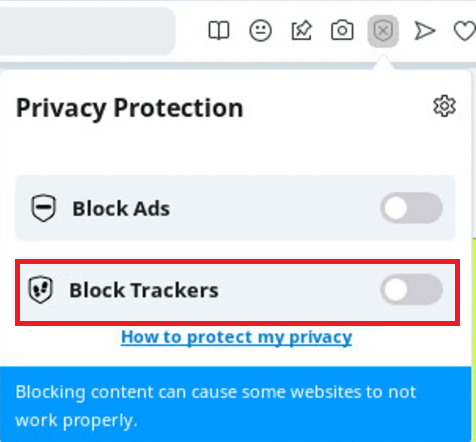
Tip for Opera users: Opera's built-in security features can block the site. Click the small shield icon in the search bar and disable "block trackers." Reddit users report this fixes the loading problem instantly.
3. Cache and Cookie Conflicts
As you browse, your device saves copy files to help pages load faster. Over time, these files corrupt. Outdated data then clashes with the live site, breaking scripts and freezing login buttons. 🍪
4. Incompatible Browser Extensions
Aggressive ad-blockers or privacy tools frequently interfere with the scripts that verify subscriptions and render media. Extensions like uBlock Origin or Ghostery can flag media delivery channels as marketing trackers and block them outright.
5. New Security Checks: CAPTCHA and Device Fingerprinting 🛡️
OnlyFans rolled out tougher anti-bot protection in 2026, including Turnstile CAPTCHA challenges and device fingerprinting. These checks are designed to keep bots out, but they can also misfire on legitimate users — especially anyone browsing through a VPN, a shared network, or an unfamiliar device. If a page hangs on a "verifying you are human" screen and never resolves, this is often the cause.
6. Strict Geo-Restrictions
The platform is restricted or fully banned by national ISP firewalls in several regions. Try to log in from a location that restricts adult content, and the site simply won't load. 🌍
7. Flagged or Low-Quality VPN IP Addresses
To prevent credit card chargebacks, spam networks, and automated scraping, the platform runs a strict cloud security firewall. Connect through a cheap datacenter IP or a free VPN, and the security system flags your connection as an automated risk. Instead of an obvious error message, it often silently blocks media streams — leaving you staring at a broken interface with no explanation.
8. Account, Payment, or Session Issues
Sometimes it isn't a loading problem at all. An expired session, a failed card charge, a pending account verification, or two-factor authentication can all masquerade as content that "won't load." Worth ruling out before you touch your browser settings.
How to Fix the "OnlyFans Not Loading" Issue: A Step-by-Step Guide ✅
Servers active but the site still won't load? Work through this checklist in order.
Step 1: Verify and Reset Your Network Connection
Always start by confirming your basic internet connection works:
- Disconnect your current VPN: Temporarily disable your proxy or VPN tool, then reload the page.
- Power cycle your router: Unplug it for 30 seconds, plug it back in, and wait for the signal to restore.
- Test an alternate network: Switch from Wi-Fi to mobile data (or vice versa) to see if your home internet is the bottleneck.
Step 2: Clear Browser Cache and Hard Refresh
Force your browser to fetch fresh data instead of stale local files:
- Windows: Press
Ctrl + F5(orCtrl + Shift + R) for a hard reload. - Mac: Press
Cmd + Shift + Rin Safari or Chrome. - Mobile: Open your browser's privacy settings, tap "Clear Browsing Data," check "Cookies" and "Cached Images," then restart the browser.
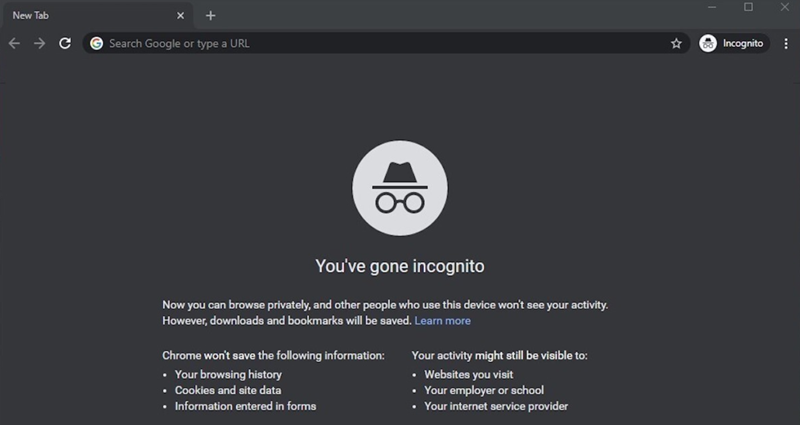
Step 3: Test Access in Incognito Mode
Open a private browsing window and try logging in. No active extensions, no saved cookies, no tracking data — a quick way to check if an add-on is the culprit. 🕵️
Step 4: Disable Incompatible Browser Extensions
Site loads fine in Incognito? An extension is likely blocking it. Open your extensions panel, disable ad-blockers and privacy shields, then re-enable them one by one to isolate the offender.
Step 5: Try a Different Browser or Update Your Current One
If Chrome is giving you trouble, try Edge, Firefox, or Safari. Loads fine elsewhere? The problem lives in your original browser, not the site. While you're at it, check for pending browser updates — outdated versions are a frequent, easy-to-miss cause. 🔄
Step 6: Rule Out Account and Payment Problems
Log out, log back in, and confirm any two-factor prompts. If content specifically fails to unlock (rather than the whole site refusing to load), double-check your payment method hasn't expired or been declined.
Step 7: Upgrade to a Clean Network Environment
Geo-blocking or an IP block keeping you out? It's time to upgrade your connection. Ditch slow, shared VPNs that route traffic through flagged servers, and switch to a connection with a high IP reputation.
Extra Steps to Fix Stuck Video Streams 🎬
Text loads but videos won't play? Try these advanced fixes:
- Toggle hardware acceleration: In Chrome, go to Settings > System, and switch "Use graphics acceleration when available" on or off. This resolves rendering bugs tied to older graphics drivers.
- Reset website permissions: Click the lock icon next to the URL, go to "Site Settings," and select "Clear data and reset permissions."
- Check JavaScript settings: Confirm "Sites can use JavaScript" is enabled. The media player simply won't load without it.
Summary Table: Fixing OnlyFans Loading Errors Across Different Layers 📋
| Error Symptom | Potential Cause | Recommended Solution |
|---|---|---|
| Blank white page or "403 Forbidden" alert | Your IP address is blocked or your location is restricted. | Switch to a clean, high-reputation static residential proxy. |
| Login button spins indefinitely or is unresponsive | Corrupt browser cookies or cache conflicts. | Perform a hard refresh and test in Incognito Mode. |
| Text loads, but images and videos don't appear | Your ad-blocker or tracker blocker is stopping media scripts. | Disable your ad-blocker or whitelist the site. |
| Stuck on a "verifying you are human" screen | Turnstile CAPTCHA or device-fingerprint checks flagging your connection. | Switch to a stable, trusted residential IP and retry. |
| Extremely slow load times or constant disconnects | Shared VPN servers are overloaded or bandwidth-starved. | Upgrade to a static residential proxy with high bandwidth. |
Resolve "OnlyFans Not Loading" with OkeyProxy 🚀
Cleared your cache, disabled your extensions, and it still won't load? The platform's firewall is likely blocking your IP address. Here's why — and how to fix it for good.
Why Your VPN Might Be Blocking Access
Most standard VPN services rely on datacenter IP addresses. These are cheap and host thousands of users at once. When the platform's security firewall detects thousands of concurrent requests from the same datacenter IP, it flags that address as high-risk — and blocks its access to media streams.
Residential networks rarely get flagged this way. Real home internet lines look like trusted local traffic to the platform's security systems.
How OkeyProxy Fixes Your Loading Issues
OkeyProxy routes your traffic through real, trusted residential networks — so you bypass strict IP blocks instead of fighting them. ✨
- 150M+ Authentic Residential IPs: Access a massive global network of real household connections across 200+ regions, including the US and UK. To OnlyFans' servers, you look like a real local resident browsing from home on Wi-Fi.
- Static Residential IPs for Secure Access: A stable IP that doesn't fluctuate. Faster media loading, fewer security flags, no fraud alerts triggered by rotating locations.
- Multi-Protocol Support: SOCKS5 and HTTP protocols, high-speed connections. Stream HD video without buffering. 🎥
👉 Don't let IP blocks or shaky connections ruin your next scroll. Sign up for OkeyProxy now and claim 1 free static residential proxy trial node — our support team is ready to get you streaming smoothly again in minutes.
Running OnlyFans scrapers? Our rotating residential proxies keep your data collection smooth and stable too.
Frequently Asked Questions ❓
Q: Is there an official mobile app I can download to fix loading issues?
A: No. There's no official mobile app for iOS or Android — any app using that name in an app store is unofficial and unsafe. The platform runs exclusively through web browsers, which makes optimizing your network connection the best fix for loading errors.
Q: Why do videos from certain creators fail to load while others play fine?
A: If only specific videos won't play, the issue is likely with the server hosting those particular files, or the content itself may have been removed or restricted. Try lowering playback resolution, or clear your browser's media cache and reload.
Q: Why am I stuck on a CAPTCHA or "verifying" screen?
A: OnlyFans tightened its anti-bot security in 2026 with CAPTCHA challenges and device fingerprinting. These checks sometimes misfire on VPN users or shared networks. A stable, trusted residential IP usually clears this up. 🔓
Q: Will using a proxy to access the website compromise my payment details?
A: No. High-quality proxies simply route your encrypted data packets without reading their contents. Because the platform uses secure HTTPS encryption for all traffic, your card details stay fully protected from interception.
Final Summary
Resolving the OnlyFans not loading issue doesn't require advanced technical skills. 🙌 In most cases, clearing your cache, testing Incognito Mode, or adjusting your ad-blocker will get you back in.
But if regional firewalls or strict IP reputation systems are blocking you, a clean network path is essential. Pair an anti-detect browser with a static residential proxy from OkeyProxy to hide your digital footprint, route through trusted home connections, and stream smoothly — no more interruptions.