


















How to Get Search Results from Other Countries: 8 Methods for Global SEO
Picture this: you're sitting at your desk, trying to check how your e-commerce product ranks in the US or Europe. 🌍 You open Google, type your main keywords, and hit enter. But the results look exactly like your local ones. Every single time.
That's not a bug. It's by design.
Google automatically tailors search results based on your physical location and device network. For cross-border e-commerce sellers, international digital marketers, and SEO specialists, this creates a massive information silo — and a serious competitive blind spot.
Why does it matter to see local SERPs from overseas? Without accurate foreign data, you can't:
- 🔎 Perform reliable international market research
- 📊 Monitor true overseas competitors
- ✅ Validate localized SEO strategies
- 💰 Check if your foreign ad placements are actually showing up
To scale your international brand, you need to know how to get search results from other countries — accurately. This guide covers 8 proven methods, from zero-cost tricks to professional enterprise automation.
Why Does Google Lock Your Location? 🔒
Before diving into the solutions, let's understand the problem.
Google invests heavily in delivering hyper-local search experiences. Its systems are fine-tuned to show results relevant to where you physically are. Here's exactly how it tracks you.
The Geolocation Tracking Mechanism
Google uses multiple layers to determine your location with high accuracy:
- 📡 Your public IP address — instantly reveals your country and city
- 🍪 Browser cache and cookies — stores location data from previous sessions
- 📱 GPS hardware — on mobile devices, real-time coordinates are accessible
- 🔍 Account search history — your logged-in Google account continuously feeds location signals into its algorithms
This combination makes it genuinely difficult to mask your presence using basic methods alone.
The Logic Behind Google's Results Region Policy
Google enforces strict regional filtering to match commercial intent. If someone in London searches for "best coffee shop," they want a café down the street — not one in New York. Makes sense for consumers. But it's a major obstacle for global marketers who need to observe rankings across different territories.
Now let's break it down. ⬇️
Low-Cost Methods for Occasional Checks
If you only need quick, occasional checks on foreign keywords, you don't need expensive software. Let's start simple.
Method 1: Modify Google's Region Settings
The easiest manual method. Just adjust your location preferences inside Google's official settings panel.
For Android Users:
- Open the Google Search app.
- Tap your profile picture → Settings → Language & region → Search region.
- Select your target country.
For iPhone/iPad Users:
- Open the Google Search app.
- Tap your profile icon → Settings → Other settings → Language & region settings.
- Under "Region for Search Results," pick your target territory. (Note: Some regions may be temporarily unavailable.)
- Tap Save.
For Desktop Users:
- Go to Google Search Preferences.
- Scroll to Results region.
- Choose your target country and click Comfirm.
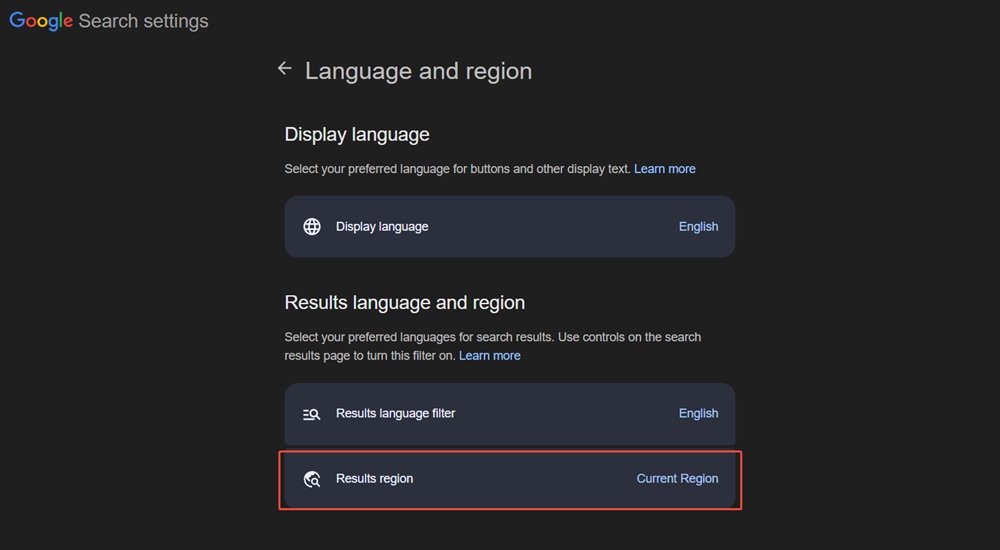
💡 Pro tip: Always use a private or incognito browser window when testing. Your logged-in account and browsing history will personalize results and skew what you see.
✅ Pros: Zero setup. No technical skills required.
❌ Cons: Your real IP address can still leak through browser background scripts. Results may not be 100% accurate.
Method 2: Use Google URL Parameters
Want more precise control without installing anything? Append custom parameters directly to your Google search URL. 🔗
After running a search, add these tags to the end of the URL:
&gl=us— Forces results from the United States&hl=en— Forces the display language to English&near=london— Simulates a search from a specific city
For example, to check UK results in English:https://www.google.com/search?q=your+keyword&gl=gb&hl=en
Need city-level targeting? The &near= parameter forces Google to simulate results as if you're physically in that location. Perfect for local SEO checks.
✅ Pros: Instant, no login required, highly customizable.
❌ Cons: Your real IP is still exposed. Best combined with a VPN for full accuracy.
Method 3: Use a VPN (Virtual Private Network)
A VPN masks your IP address and routes your traffic through a server in another country. 🛡️ Google sees the VPN server's location instead of yours — giving you localized results for that region.
How to use it:
- Install a VPN service.
- Select a server in your target country.
- Open a private/incognito browser window.
- Clear your cookies and cache.
- Search on Google as normal.
✅ Pros: Easy to set up. Works for most casual use cases.
❌ Cons: Most free VPNs use data center IPs, which Google can detect and flag. May trigger CAPTCHAs or block access during heavy use. Not suitable for large-scale scraping.
⚠️ Important distinction: Standard VPNs use commercial data center IP pools — and Google has massive blocklists for these. For professional-grade accuracy, you'll need residential proxies (covered in Method 7 below).
Method 4: Use the Google Ad Preview & Diagnosis Tool
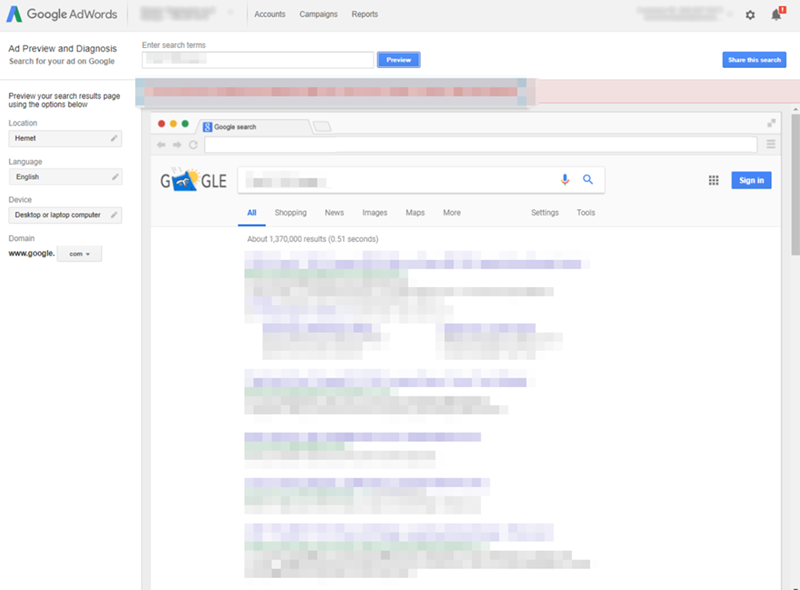
Here's a hidden gem. Create a free Google Ads account, then navigate to Tools → Ad Preview and Diagnosis. This dashboard lets advertisers preview how their PPC ads appear in foreign markets.
But here's the key insight: it renders a real-time simulation of a foreign browser session. That means it also shows 100% genuine organic results alongside paid ads — completely unaffected by your local browser history or IP address.
✅ Pros: Clean, unbiased data. No technical setup.
❌ Cons: Primarily designed for ad verification. Doesn't replicate the full organic browsing experience.
Advanced Tactics for Frequent & Precise Checks
When manual methods aren't enough for your daily workflow, it's time to level up.
Method 5: Emulate GPS Coordinates via Chrome DevTools
This is perfect for testing local map pack rankings and mobile SERP layouts. 📍
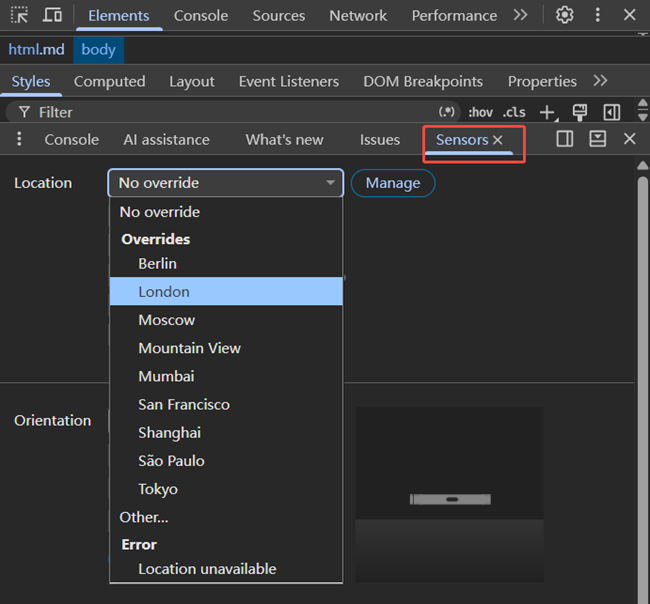
- Open Chrome and press F12 (or right-click → Inspect) to open DevTools.
- Click the three-dot menu in DevTools → More tools → Sensors.
- Under the Location dropdown, select Override Location.
- Enter the exact latitude and longitude of your target city. (e.g., New York:
40.7128, -74.0060) - Refresh the page and run your search.
This method is especially powerful for testing how Google My Business listings and local map packs appear in specific cities.
✅ Pros: Pinpoint accuracy down to neighborhood level. Completely free.
❌ Cons: Requires basic technical comfort. One location at a time only.
Method 6: Use Free Third-Party Search Simulators
Not comfortable with code? No problem. 🙌
Several free online platforms are built specifically for global SERP simulation. Tools like Valentin.app or the Search by Location utility from vpnMentor let you:
- Type your target keyword
- Choose an exact country or city
- Instantly see a real-time mirror of that local search market
One click. No setup. Zero cost.
✅ Pros: Extremely beginner-friendly. Great for quick spot checks.
❌ Cons: Limited query volume. Not suitable for automated or large-scale research.
The Professional Toolbox for Enterprise Marketers
Managing enterprise campaigns or running large-scale data extraction? Manual tools will eventually fail you.
High-frequency queries trigger automated defenses. You'll hit CAPTCHAs. You'll get blocked. Your workflow breaks.
Here's how professionals stay online at scale.
Method 7: Combine Rotating Residential Proxies with Anti-Detect Browsers ⚡
Why do standard VPNs fail at scale? Simple: they use commercial data center IP pools. Google maintains vast blocklists of these ranges. The moment multiple automated requests come from those IPs, it triggers CAPTCHAs — or blocks you entirely.
The professional solution? Rotating residential proxies + anti-detect browsers.
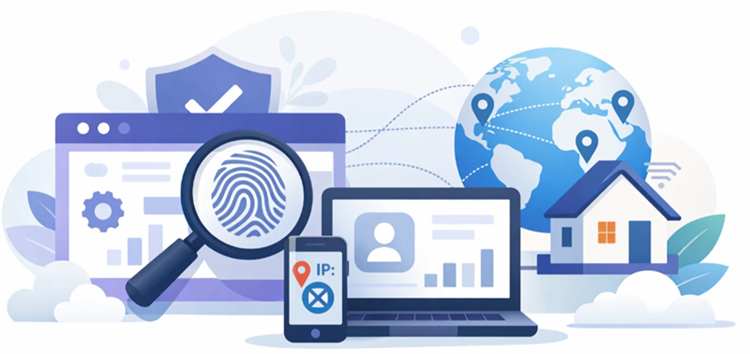
Residential proxies use genuine home IP addresses assigned by real telecom providers to real households. Google can't distinguish these from real users. When paired with an anti-detect browser, each session has isolated cookies, browser fingerprints, and user profiles — making it virtually undetectable.
This setup lets you:
- 🌐 Query multiple search markets simultaneously
- 📈 Run high-concurrency keyword tracking scripts
- 🚫 Avoid IP bans and rate limits entirely
- 🎯 Target specific countries, cities, or even ISPs
🔥 Ready to scale your international SEO research without getting blocked?
OkeyProxy is built exactly for this. Here's what sets it apart:
- ✅ 150M+ authentic residential IPs across 200+ countries
- ✅ City & ISP-level targeting for hyper-local SERP accuracy
- ✅ Unlimited concurrent sessions — no throttling, no blocks
- ✅ 99.9% uptime with enterprise-grade infrastructure
- ✅ Supports all major scraping frameworks (Scrapy, Puppeteer, Playwright, etc.)
Whether you're monitoring 10 keywords in one country or 10,000 keywords across 50 markets, OkeyProxy keeps your workflow running clean and uninterrupted.
👉 Start your 1GB rotating residential proxy free trial at OkeyProxy → See why global SEO teams trust it for cross-border market research.
Method 8: Use Professional SERP Trackers Inside Enterprise SEO Suites
Prefer a dashboard over raw proxy configs? Enterprise SEO platforms have you covered. 📊
Tools like Semrush, Ahrefs, and BrightLocal offer dedicated Position Tracking and Keyword Overview features. These platforms run background cloud queries against global search engines daily — automatically aggregating local rankings across multiple regions so you can monitor and graph international visibility trends without ever running a manual check.
Best for: marketing teams that need reporting-ready dashboards, trend graphs, and automated alerts.
✅ Pros: Fully automated. Visualization-ready. Scales to thousands of keywords.
❌ Cons: Subscription costs can be significant. Less flexible for custom scraping workflows.
How to Choose the Right Method 🎯
No single tool fits every scenario. Use this quick-reference guide to choose based on your needs:
| Your Need | Best Method | Why It Fits |
|---|---|---|
| Quick one-off competitor check | Ad Preview Tool / URL Parameters | Free, zero config, clean data instantly |
| Check a handful of markets weekly | VPN + Incognito Mode | Easy to use, covers most casual use cases |
| City-level local SEO testing | Chrome DevTools / Valentin.app | Pinpoint GPS-level targeting |
| High-volume data scraping & keyword monitoring | Residential Proxies (OkeyProxy) + Automation | Bypasses all blocks, handles high concurrency, enables continuous tracking |
| Team dashboards & trend reporting | Semrush / Ahrefs / BrightLocal | Fully automated, reporting-ready |
Frequently Asked Questions ❓
Q: Can I check Google search results from another country for free?
A: Yes. Google's URL parameters (&gl=, &hl=), the Ad Preview & Diagnosis tool, Chrome DevTools, and free simulators like Valentin.app all work at zero cost. They're best for occasional checks, not large-scale monitoring.
Q: Is using a VPN enough to get accurate foreign search results?
A: For casual checks, yes. But VPNs use commercial data center IPs that Google frequently detects and flags. For professional-grade accuracy and high-volume queries, residential proxies like OkeyProxy are far more reliable.
Q: Why do search results differ between countries?
A: Google customizes results based on your IP address, browser language, device GPS, and account history. The same keyword can return completely different rankings, map packs, and featured snippets depending on where you search from.
Q: What is the most accurate method to simulate foreign search results?
A: Combining rotating residential proxies with an anti-detect browser gives the most accurate simulation. It mimics a real local user, bypasses Google's detection systems, and scales to any volume without interruption.
Conclusion
Knowing how to get search results from other countries isn't optional anymore — it's a core skill for any serious international marketer. 🌐
Google's localization is engineered to be tight. But once you understand how it works, it's absolutely beatable.
Here's the simple rule of thumb:
- 🟢 Occasional checks? URL parameters, the Ad Preview Tool, or a free VPN + incognito mode will do the job.
- 🟡 Regular monitoring? Chrome DevTools or third-party simulators give you better precision.
- 🔴 Enterprise scale? You need residential proxies and automation. There's no shortcut.
For businesses serious about cross-border SEO, protecting your automated workflows with a premium residential proxy network is non-negotiable. OkeyProxy gives you 150M+ real residential IPs, city-level targeting, and rock-solid uptime — so you always see what your actual target customers see.
