
Telegram won’t load? 😩 You’re not alone. In certain regions, Telegram faces accessibility issues due to government restrictions or network throttling. Users often experience blocked access or painfully slow loading times, making it hard to stay connected with friends, family, or clients. However, using a proxy for Telegram can bypass these restrictions and get you back online in minutes.
What is a Proxy for Telegram?
A proxy for Telegram acts as an intermediary server between the Telegram app and the internet. It routes your traffic through the proxy server, bypassing restrictions imposed by ISPs or governments. In short: a Telegram proxy masks your real IP address, making it look like your traffic comes from somewhere else 🌍 — which helps you dodge blocks and throttling.
Telegram now officially supports two types of proxies: MTProto and SOCKS5. Both live right inside the app’s settings, but they work quite differently. Let’s break them down.
-
Telegram MTProto Proxy
MTProto is Telegram’s own proprietary proxy protocol. It was purpose-built to disguise Telegram traffic as ordinary web browsing, which makes it harder for censors to detect and block — all while keeping setup dead simple.
-
Telegram SOCKS5 Proxy
SOCKS5 is a general-purpose proxy protocol that routes traffic for many kinds of apps, not just Telegram. It’s widely supported, easy to configure inside the app, and doubles as your everyday proxy for browsers, bots, and automation tools.
MTProto vs SOCKS5: Which One Should You Use?
Both protocols will get you into Telegram, but they trade off differently on privacy, speed, and versatility. Here’s how they stack up side by side 👇
| Comparison | MTProto Proxy | SOCKS5 Proxy |
|---|---|---|
| Built by | Telegram itself | Open, industry-standard protocol |
| Works with | Telegram app only | Telegram, browsers, bots, scrapers, anti-detect browsers, and more |
| Traffic disguise | Disguises traffic to look like normal web/HTTPS browsing | No built-in disguise layer; relies on the proxy provider’s IP quality |
| Resistance to censorship (DPI) | Higher — harder for firewalls to fingerprint | Good, especially with high-quality residential IPs |
| Setup | Server, port, and secret key (often one-tap link) | Server, port, and username/password |
| Best for | Simply unblocking Telegram, quick and lightweight use | Multi-account management, automation, web scraping, and reusing one proxy across multiple apps |
🔑 Bottom line: If you only need Telegram to work, MTProto is the simplest, lightest option. But if you want one proxy that also powers your browser, bots, or multi-account workflows — SOCKS5, like OkeyProxy, is the more flexible, future-proof pick.
Why Does Telegram Need a Proxy?
Using a Telegram proxy can be beneficial for various reasons, especially in countries with restricted access or heavy surveillance. Here’s a closer look at why a proxy for Telegram might be necessary or advantageous:
- Bypass Geo-Blocks 🚧: In countries where Telegram is restricted or banned, a proxy for Telegram can help bypass these geo-blocks and restore access.
- Access Restricted Content 🔓: In some regions, certain content or features within Telegram — like specific channels, groups, or VoIP calls — might be limited. Telegram proxies route traffic through servers in regions where these features are fully accessible.
- Improve Connection Quality ⚡: If an ISP is throttling Telegram’s traffic, routing through a proxy for Telegram can improve loading speeds by avoiding direct throttling.
- Privacy and Anonymity 🕵️: Proxies help mask your IP address and make it harder to trace online activity back to your real location, protecting your privacy while you chat.
Countries Running Telegram through Telegram Proxies
- China — Telegram is often blocked due to the country’s strict internet censorship and control measures.
- Iran — Periodic bans and restrictions are imposed on Telegram, especially during political unrest or protests.Related: Bypassing Internet Restrictions – Free Proxy for Iran (IR)
- Russia — Efforts to block Telegram due to its use by various political groups and activists.
- Pakistan — Intermittent bans and restrictions on Telegram, particularly around security concerns, such as the Telegram ban in Pakistan in 2017.Related: Best Free Pakistan Proxy Server List
- Turkey — Periods of restricted access to Telegram during political tensions.
- United Arab Emirates (UAE) — Restrictions on certain VoIP services, including Telegram voice and video calls.
- Saudi Arabia — Restrictions on Telegram’s VoIP and some messaging features.
Telegram Proxy Settings: Mobile Device & PC
Configuring a proxy for Telegram is a quick process — just enable proxy settings and enter a few details. This setup helps you bypass regional restrictions and boosts privacy while using Telegram. Here’s a step-by-step guide for every device.
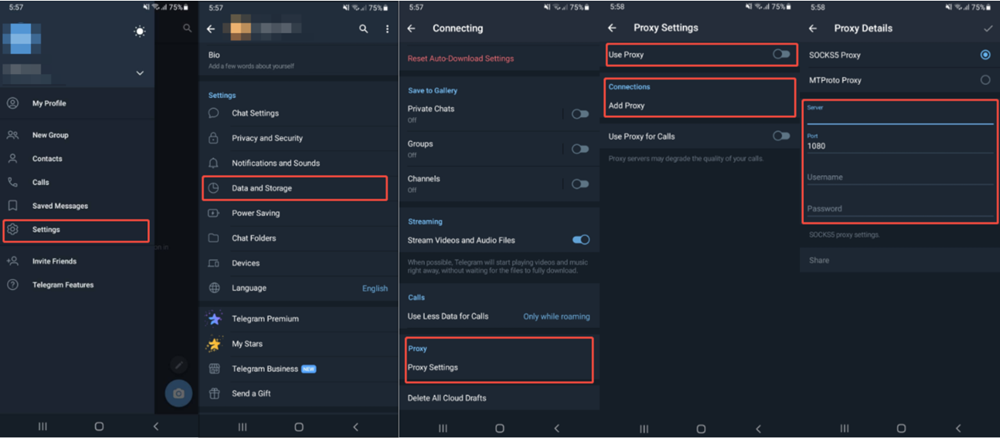
How to Add a Proxy to Telegram on iOS/Android
Whether you’re on Android or iOS, the steps to configure a proxy in Telegram are effortless.
- Launch the Telegram app on your Android or iOS device.
- Tap the three horizontal lines (hamburger menu) in the top-left corner, then select Settings.
- Scroll down and select Data and Storage.
- Scroll down again and tap Proxy Settings.
- Tap Add Proxy and enter the details for your chosen proxy server (e.g., proxy type, server address, port, and username/password for SOCKS5, or secret for MTProto).
- Once the details are entered, toggle the proxy switch on. Telegram will now connect through the proxy server. ✅
How to Add a Proxy to Telegram on Computer
Configuring a proxy on Telegram’s desktop app follows a similar process to mobile.
- Launch Telegram on your desktop.
- Click the three horizontal lines (hamburger menu) in the top-left corner, then go to Settings.
- Scroll down and select Advanced Settings.
- Under Connection Type, click Use Proxy.
- Choose the proxy type (MTProto or SOCKS5), then enter the server address, port, and other required details.
- Save the settings and enable the proxy. Telegram will now route all connections through it.
Want a deeper, click-by-click walkthrough with screenshots for SOCKS5 specifically? Check out our full guide: How to Set Up a SOCKS5 Proxy for Telegram.
How to Test If Your Telegram Proxy Is Working
Set up your proxy but not sure it’s actually doing anything? 🤔 Here’s how to confirm it’s live before you rely on it in a restricted region:
- Check the shield icon: On mobile, a small shield icon appears in the Telegram interface once a proxy is active. On desktop, a similar icon shows up next to your chat list.
- Open the Proxy Settings menu: The connected proxy should show a green « Connected » (or checkmark) status next to it. If it stays gray, the connection failed.
- Compare your IP address: Visit a site like ipinfo.io in your browser before and after enabling the proxy (note: this checks your browser’s IP, not Telegram’s — use it as a sanity check on the proxy server itself).
- Send a test message: Message yourself or a friend. If it sends instantly without spinning, your proxy connection is healthy.
- Load media or a channel with restricted content: If images, videos, and channels that were previously blocked now load normally, your proxy is successfully bypassing restrictions.
- Watch for reconnect loops: If Telegram keeps dropping and reconnecting, the proxy server itself may be overloaded or offline — time to switch servers.
Popular Proxy Services for Telegram
MTProto Telegram Proxy Servers
These servers are purpose-built for Telegram and can be found via online communities or specialized sites. MTProto proxies tend to offer strong performance thanks to Telegram’s own optimized protocol.
How to find an MTProto proxy list:
- Telegram Channels: Several Telegram channels are dedicated to sharing MTProto proxy links. Search for keywords like « MTProto Proxy » or « Iran Proxy » within Telegram to find these channels — they’re often updated regularly.
- Proxy Websites: Sites like spys.one or ProxyScrape sometimes list MTProto proxies, though they mostly focus on traditional proxies.
- Reddit and Forums: Subreddits like r/Telegram or regional forums often have community members sharing working MTProto proxies for a specific country.
- Proxy Bots: Some Telegram bots automatically hand out fresh MTProto proxies. Search within Telegram or check related forums for recommendations.
SOCKS5 Telegram Proxy Providers
Many paid services — like OkeyProxy, YuyuProxy, or Interstellar Proxy — offer SOCKS5 proxies that work seamlessly with Telegram. These providers cover a wide range of server locations, so you can bypass restrictions and improve connection speed no matter where you are.
Free Telegram Proxy Lists
Some sites offer free proxy lists (e.g., ProxyNova or FreeProxyLists). However, free proxies tend to be slower, less reliable, and can carry real security risks — always vet them carefully before trusting them with your Telegram traffic. Free options can work as a temporary patch, but for a consistently fast and secure experience, a premium proxy service is worth the investment. That’s exactly where OkeyProxy comes in.
OkeyProxy: The Powerful SOCKS5 Proxy Built for Telegram 🚀
Recognized as one of the best proxies for Telegram, OkeyProxy supports both SOCKS5 and HTTP(S) protocols and is trusted for web scraping, online privacy, and bypassing geo-restrictions. SOCKS5 is a versatile protocol that offers enhanced security and performance by forwarding traffic through a proxy server while masking your original IP address — and OkeyProxy takes it further with a vast network of high-quality, stable, and fast SOCKS5 proxies built for real-world use cases.
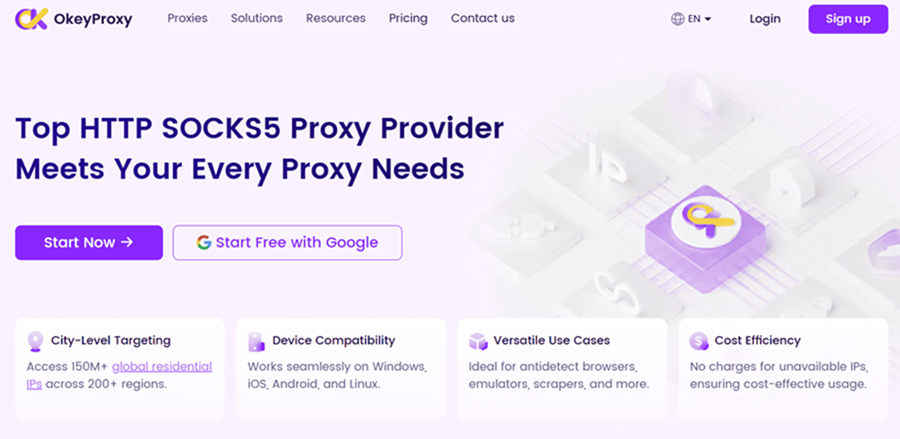
Here’s why thousands of users pick OkeyProxy for Telegram and beyond:
- 🛡️ High Anonymity: OkeyProxy’s SOCKS5 proxies never embed your user data into network packets, so your identity stays protected — ideal for privacy-conscious Telegram users.
- 🌐 Massive Global IP Pool: Access more than 150 million real residential IPs across the globe, so you always have a fresh, unblocked IP ready to go.
- ⚡ Fast and Reliable: A network optimized for speed and stability — critical for smooth messaging, voice calls, streaming, and scraping alike.
- 🔌 Broad Compatibility: Works seamlessly with Telegram, browsers, anti-detect browsers, and a wide range of automation tools.
- 💰 Flexible Pricing: Scalable plans built for solo users and large teams alike, so you only pay for what you need.
Beyond just unblocking Telegram, OkeyProxy powers web scraping, e-commerce, gaming, and social media management — all on the same robust SOCKS5 infrastructure.
💡 Ready to unblock Telegram with a proxy that actually keeps up? Register now and claim your free trial — see the speed difference for yourself before you commit to a plan!
How to Optimize Telegram Proxy Performance
- Choose a Proxy Close to Your Location — Selecting a server geographically close to you minimizes latency and keeps connections snappy.
- Use a Reliable Proxy Provider — For a stable, secure connection, a paid proxy service is worth it. Paid services generally beat free ones on speed, security, and uptime.
- Regularly Update Proxy Settings — Proxy servers can go offline or get blocked. Refreshing your server details periodically helps maintain uninterrupted access.
- Combine Proxies with VPNs — For extra privacy and to bypass more aggressive blocks, layering a proxy with a VPN adds another level of protection.
Common Issues with Telegram Proxies & How to Fix Them
Proxies for Telegram boost privacy and bypass geo-restrictions, but they’re not without hiccups. Here are the most common issues and how to solve them:
- Connection Drops — Solution: Switch to a different proxy server. It’s common for individual proxy servers to go offline or experience downtime.
- Slow Loading Times — Solution: Make sure the proxy server is located near your region, or upgrade to a higher-quality proxy provider with better performance.
- Unable to Connect to Proxy — Solution: Double-check your proxy settings (IP address, port, credentials). Confirm the server is active and actually supports Telegram traffic.
Conclusion
A proxy for Telegram can help you bypass blocks, avoid throttling, and boost your privacy — no matter where you’re connecting from. Whether you go with the lightweight MTProto proxy for quick, Telegram-only access, or a versatile SOCKS5 proxy like OkeyProxy for flexibility across all your apps, setting up a Telegram proxy is simple and genuinely effective. Follow the steps in this guide, pick the protocol that fits your needs, and enjoy faster, more secure, uninterrupted access to Telegram. 🎉