Free web proxy services have become essential tools for users seeking unrestricted, anonymous internet access. Among them, 4everproxy — available at www.4everproxy.com — has earned growing recognition as a free online proxy that requires no software installation. In this comprehensive review, we cover how 4everproxy works, how it helps hide your IP address, how to use it to unblock YouTube and other video sites, its key limitations, and the best 4everproxy alternatives for more advanced needs. Let’s get started!
What Is 4everproxy?
4everproxy is a free web proxy service that has been operating since 2008. It works as an intermediary between your device and the internet, routing your web traffic through its own servers instead of connecting you directly to the websites you visit. This process masks your real IP address and location, allowing you to browse anonymously, bypass geographic restrictions, and access blocked content — all without installing any additional software.
The service is built for simplicity: users visit the 4everproxy website, enter the URL they want to access, select a server location, and click « Go. » It is compatible with any device and operating system, making it accessible to a wide range of users.
How Does 4everproxy Work?
When you access a website through 4everproxy, your request follows a specific path rather than going directly to the target site:
- Request Initiation: You enter the target URL into the input field on 4everproxy.com.
- Traffic Rerouting: Your browser sends the request to the 4everproxy server, not the target website directly.
- Server Fetch: The 4everproxy server retrieves the requested page on your behalf.
- Encrypted Delivery: The content is sent back to your browser over an encrypted HTTPS connection, displayed within the proxy’s frame.
- Anonymity: Your local network — whether it’s your ISP, school, or employer — only sees a connection to 4everproxy, not the final destination website, effectively bypassing blocks and filters.
Important: Free web proxies like 4everproxy only proxy traffic within the browser window. They do not protect other applications running on your device. For system-wide protection, a VPN is required.
4everproxy Services Overview
Free Web Proxy / YouTube Proxy / Video Proxy
- Hides your real network identity, allowing you to surf anonymously.
- Encrypts all website connections for added security, serving even non-secure HTTP sites back to you via HTTPS.
- Compatible with any operating system, including Android, iOS, Windows, macOS, and Chrome OS.
- Full support for video and audio playback, including a dedicated Video Proxy for streaming sites.
- No registration or login required — completely free and instant to use.
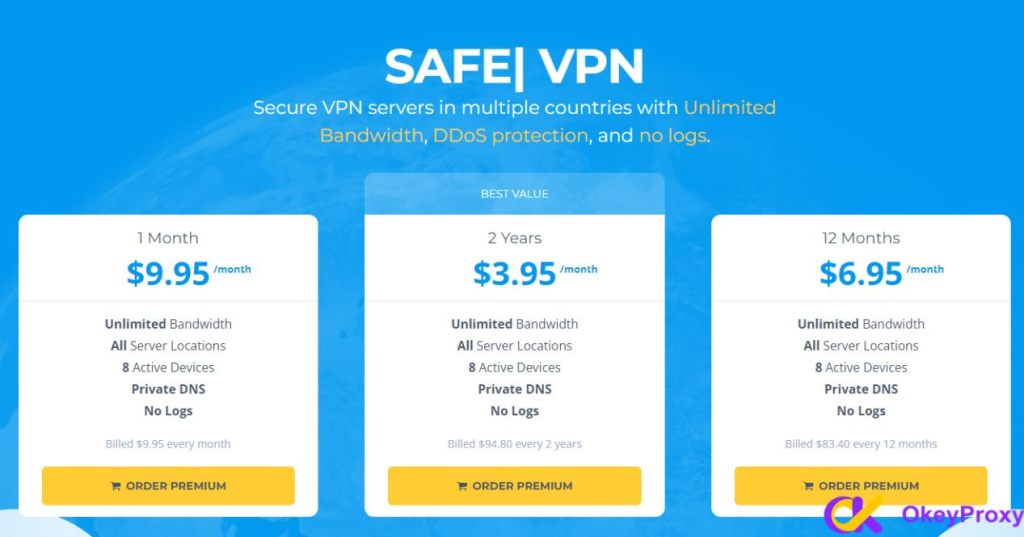
Premium VPN Plan
In addition to its free proxy service, 4everproxy also offers a paid VPN subscription with enhanced capabilities:
- Unlimited Bandwidth: No restrictions on speed or data usage across all plans.
- Custom Application: A dedicated app makes connecting to the VPN network simple and convenient.
- Anonymous DNS: Uses its own in-house Anonymous DNS service to prevent DNS leaks and further protect your privacy.
- No-Logs Policy: A strict no-logs policy ensures that your browsing activity is not stored or tracked.
- OpenVPN Protocol: The paid VPN operates on the OpenVPN protocol (UDP on port 1194 and TCP on port 8080), a widely trusted open-source standard for secure tunneling.
Key Features of 4everproxy Free Web Proxy
- High Anonymity: Unlike many free web proxies, 4everproxy assigns a different IP address for every page you visit, making it significantly more difficult to track your browsing session. The session-specific URLs generated for your connection are accessible only to you. Proxy sessions are automatically deleted two hours after you close your browser, ensuring that your browsing history and session data are not retained.
- SSL/TLS Encryption: All connections between your browser and 4everproxy are secured using SSL (Secure Sockets Layer) and TLS (Transport Layer Security). This means that even websites accessed over non-secure HTTP are served back to you over an encrypted HTTPS connection.
- Custom HTTP Proxy Option: Advanced users can enter a custom proxy in IP:PORT format. The web proxy will tunnel all traffic through one of its servers and then through the custom proxy you specify, adding an extra layer of routing control.
- Double Proxy: 4everproxy offers the ability to connect through multiple proxy servers simultaneously. By selecting a web server in one location and an IP address in a different location, your request is routed through two proxy servers — enhancing both anonymity and security.
- Worldwide Server Locations: The proxy network spans multiple countries, allowing you to browse from a server near your actual location for optimal speed, or from a specific region to access geo-restricted content.
- Easy to Use: Simply enter the URL you want to visit and click « Go. » No software download, configuration, or technical expertise is required. Compatible with all devices and browsers.
- Video Proxy: A dedicated Video Proxy feature handles the higher bandwidth demands of streaming platforms, providing smoother playback with less buffering when unblocking sites like YouTube.
Benefits of Using 4everproxy
- Bypass Geo-Restrictions: 4everproxy allows you to access websites and content restricted based on your location, giving you freedom to browse information that would otherwise be unavailable.
- Enhanced Privacy and Anonymity: By routing your online activity through a proxy server, 4everproxy masks your real IP address, making it harder for websites, advertisers, and other third parties to track you.
- Faster Video Streaming: The dedicated Video Proxy is optimized for video and audio playback, providing smoother streaming experiences with reduced buffering.
- Unblock YouTube and Other Sites: 4everproxy can unblock YouTube, Google, DuckDuckGo, Bing, Facebook, Wikipedia, Reddit, Instagram, TikTok, Twitter, and many other websites that may be restricted in your region or network.
- No Installation Required: As a browser-based tool, 4everproxy works on any device instantly — no app downloads, extensions, or setup needed.
- Useful for SEO and Web Testing: Web developers and SEO professionals can use 4everproxy to check how websites appear and function from different geographic locations.
How to Use 4everproxy Free Web Proxy
1. Navigate to the official website at https://www.4everproxy.com/.
2. On the main page, choose between Web Proxy, Video Proxy, or VPN, depending on your needs.
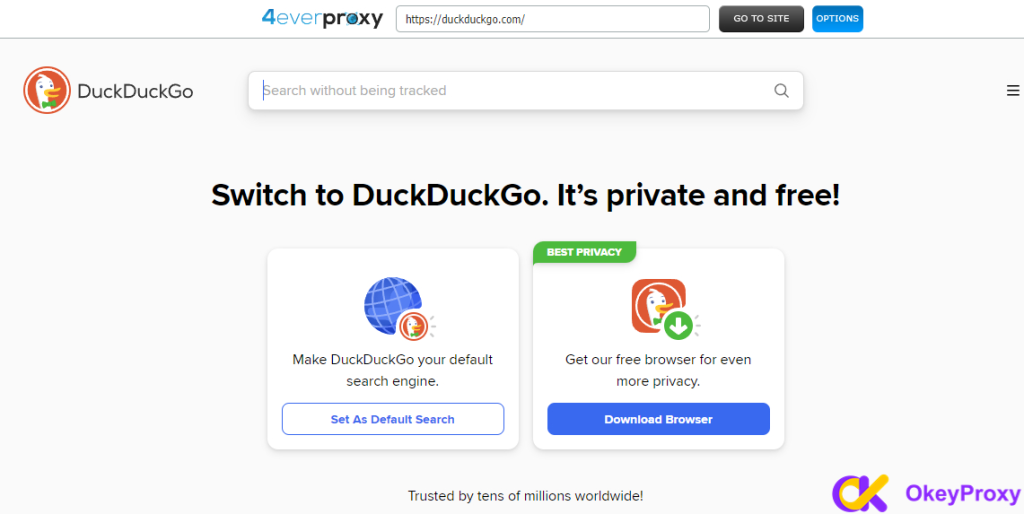
3. Enter the URL of the site you want to unblock (for example, YouTube or DuckDuckGo) in the input field.
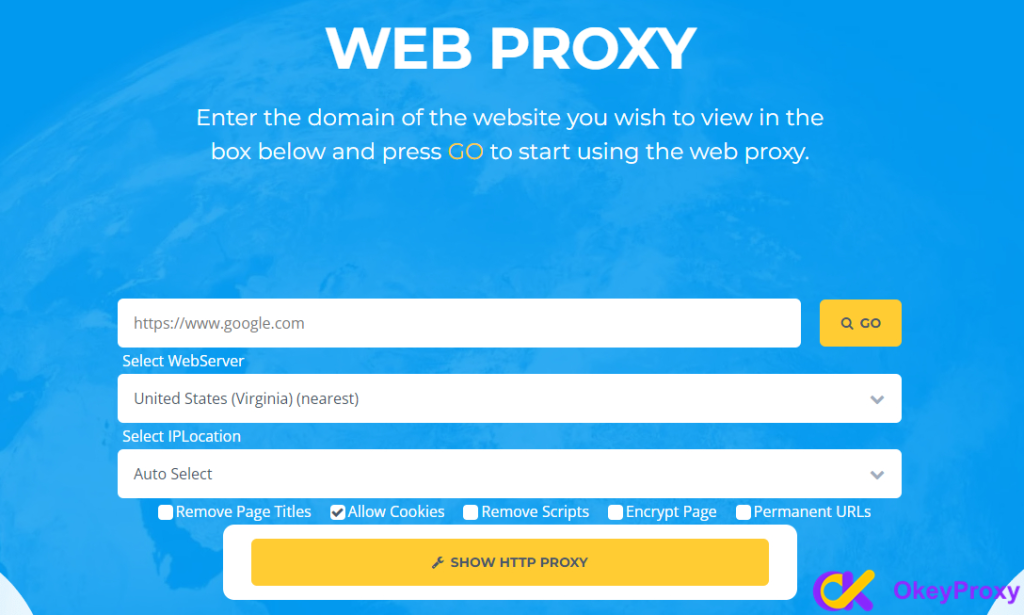
4. Select your preferred Web Server location and IP Location. If you choose a web server in one country and an IP address in a different country, your request will be routed through two proxy servers (Double Proxy).
5. Click « Go » to access the site through the proxy.
Is 4everproxy Safe? Security Analysis
4everproxy SSL/TLS Encryption
All connections between your browser and 4everproxy are encrypted using SSL/TLS, ensuring a secure channel for your session. Even when you visit non-secure HTTP websites through the proxy, 4everproxy serves them back to you securely via HTTPS. Each browsing session generates unique, encrypted URLs that are inaccessible to anyone except you — meaning that even if someone were to access your browsing history, the specific pages visited through the proxy cannot be identified.
Proxy sessions are also automatically cleared two hours after you close your browser, adding an additional layer of privacy by ensuring session data does not persist.
That said, while 4everproxy is generally safe for casual, everyday browsing, it does carry certain inherent risks that users should be aware of.
Limitations and Potential Risks of 4everproxy
- Browser-Only Protection: The free web proxy only routes traffic within the browser. Other applications on your device — including messaging apps, email clients, and other software — are not protected. For system-wide security, a VPN is necessary.
- Datacenter IPs Are Easily Detected: 4everproxy’s free service uses datacenter IP addresses, which are commonly flagged or blocked by sophisticated websites and platforms with advanced bot-detection systems. It does not offer residential proxies, which appear as genuine home user traffic and are far less likely to be detected.
- Poor Speed on Free Tier: As a free service, server resources are shared among many users, which can result in noticeably slow browsing speeds — especially during peak usage periods.
- Frequent Disconnections: Users may experience intermittent disconnections and may need to switch between server locations multiple times to find a stable connection.
- Intrusive Advertisements: The free service is supported by advertising. Ads may obstruct page content and could potentially direct users to unrelated third-party sites.
- Not All Server Locations Are Reliable: While many location options are listed, not all of them may function correctly at any given time. Trial and error is often required to find a working server.
- Third-Party Cookie Tracking: According to 4everproxy’s privacy policy, third-party advertising partners may use cookies or web beacons to collect user information during sessions, which presents a degree of privacy risk.
- Not Suitable for Sensitive Activities: The free web proxy should not be used for online banking, logging into personal accounts, or any activity involving sensitive personal or financial data. The paid VPN service is a significantly safer option for such use cases.
4everproxy Free Proxy vs. VPN: What’s the Difference?
It’s important to understand the distinction between 4everproxy’s free web proxy and its paid VPN offering, as they serve fundamentally different purposes:
- Coverage: The free web proxy only routes traffic within your browser. A VPN covers all internet traffic from your entire device, including background apps.
- Encryption: The free proxy provides session-level HTTPS encryption between your browser and the proxy server. A VPN creates an encrypted tunnel for all traffic between your device and the VPN server, providing much stronger privacy.
- Anonymity: The free proxy offers basic IP masking. A VPN, combined with a no-logs policy and private DNS, offers a significantly higher level of anonymity.
- Use Cases: The free proxy is best for quick, casual unblocking in a browser. The paid VPN is better suited for users who require consistent, system-wide privacy and security.
4everproxy Alternative – Why OkeyProxy Is the Smarter Choice
While 4everproxy works well for basic, occasional browsing needs, it falls short for users who require consistent performance, advanced features, or professional-grade proxy capabilities. For those use cases, OkeyProxy is a far superior alternative.
OkeyProxy provides access to a network of over 150 million global residential IP addresses across 200+ regions worldwide, covering virtually every country you may need to target. Unlike 4everproxy’s datacenter IPs — which are easily detected and blocked — OkeyProxy’s residential IPs are assigned by real ISPs and simulate genuine user behavior, making them highly effective for bypassing even the strictest geo-blocks and anti-bot systems.
Key advantages of OkeyProxy over 4everproxy include:
- 150M+ Residential IPs: A vast pool of genuine residential and datacenter IP addresses spanning 200+ regions, ensuring high success rates and minimal detection risk.
- Rotating & Static Options: Choose between rotating residential proxies (ideal for web scraping and large-scale data collection) or static residential/datacenter IPs (ideal for account management and stable sessions).
- High Speed & Stability: Unlike free proxies burdened by shared resources and heavy ad loads, OkeyProxy delivers consistent, high-performance connections purpose-built for professional use.
- Advanced Use Cases: Suitable for web scraping, SEO monitoring, social media management, ad verification, brand protection, market research, and e-commerce automation — tasks that are simply not feasible with 4everproxy’s free web proxy.
- No Risk Free Trial: OkeyProxy offers a genuine free proxy trial with full access to the same features and quality enjoyed by paid users — no credit card required, completely risk-free.
OkeyProxy Free Trial — What You Get
OkeyProxy’s free trial is designed to let you fully evaluate the service before committing. Trial options include:
- 1 GB of rotating residential or datacenter proxy traffic (valid for 24 hours)
- 1 static residential or datacenter IP address (valid for 24 hours)
How to Apply for the OkeyProxy Free Trial
- Register: Create a free account on the OkeyProxy registration page.
- Contact Us: Reach out via the contact form, email, Telegram, or live chat. Please share the following details: your use case, the proxy type you wish to test, your target country or region, and your estimated daily usage volume.
- Provide Your Email Address: Submit your registered email so the trial can be linked to your account.
- Trial Activation: The OkeyProxy team will activate your free trial promptly after reviewing your request.
- Start Testing: Begin using your trial proxies immediately with full access to OkeyProxy’s features and infrastructure.
Apply for your free OkeyProxy trial now and experience the difference between a basic free proxy and a professional-grade proxy solution — with zero risk.
Conclusion
4everproxy is a convenient and accessible free web proxy that makes it easy to unblock websites, hide your IP address, and access geo-restricted content — all without installing any software. Its SSL/TLS encryption, multiple server locations, dedicated Video Proxy, and Double Proxy feature make it a solid choice for casual, everyday browsing needs. However, as a free service, it comes with notable limitations: shared datacenter IPs that are easily detected, slow speeds, intrusive ads, and no system-wide device protection.
For users who need only basic browser-based unblocking, 4everproxy is a practical starting point. But for anyone requiring high performance, large-scale data tasks, or professional proxy capabilities — whether for web scraping, SEO, social media management, or other advanced activities — OkeyProxy is the recommended upgrade, offering 150M+ global residential IPs, superior speed, and a risk-free trial to get you started.
FAQ About 4everproxy
-
Does 4everproxy support video downloading?
Yes, 4everproxy supports video downloading. Users can download videos watched through its free Video Proxy. Please note that downloading copyright-protected content is prohibited and may violate applicable laws.
-
Is 4everproxy compatible with mobile phones?
Yes. 4everproxy is fully compatible with mobile devices. Users can access it through any mobile browser, just as they would on a desktop — no app installation required.
-
Can 4everproxy unblock Google and YouTube?
Yes. 4everproxy can unblock Google, YouTube, and many other platforms including DuckDuckGo, Bing, Facebook, Wikipedia, Reddit, Instagram, TikTok, Twitter, and more.
-
Is 4everproxy free?
Yes. 4everproxy’s web proxy and video proxy services are completely free to use with no registration required. A paid premium VPN plan is also available for users who need greater security, unlimited bandwidth, and system-wide device protection.
-
Can 4everproxy hide my IP address?
4everproxy provides a basic level of IP masking by routing your traffic through its proxy servers. However, it uses datacenter IP addresses that can be detected by sophisticated tracking systems. For stronger anonymity, residential proxies or a full VPN service are recommended.
-
Why can’t I open the 4everproxy website?
There are several possible reasons: your network administrator may have blocked it; it may be restricted in your country or region; there may be temporary technical issues with the website; or your browser settings or extensions may be preventing access. Trying a different network or browser can help diagnose the issue.
-
Are there free alternatives to 4everproxy?
Yes. Several free web proxy alternatives exist, including CroxyProxy, Blockaway, PlainProxy, and Yuyu Proxy. For professional tasks such as web scraping, SEO, or social media management that demand high-quality, stable proxy connections, OkeyProxy is the top recommended solution, offering 150M+ global residential IPs with exceptional speed, stability, and a free trial.