


















Scrape Shopee Product Rankings in 2025: Step-by-Step Guide
Shopee is the dominant marketplace across Southeast Asia with roughly 45–48 % of the region’s e-commerce volume, ahead of Lazada, Tokopedia, and newcomer platforms. One of the factors for the success of it is because Shopee invests heavily in mobile-first features (in-app games, live-stream shopping, TikTok-style feeds), which not only drive engagement but also surface rich metadata on browsing and buying patterns.
That depth of behavioral data is important when you want to know not just what sells, but how and why users discover products.
In this step-by-step tutorial, we’ll guide you through building a Python-based web scraper to extract product ranking data from Shopee, covering everything from setup to scaling with proxies and APIs.
Why Scrape Shopee Product Rankings?
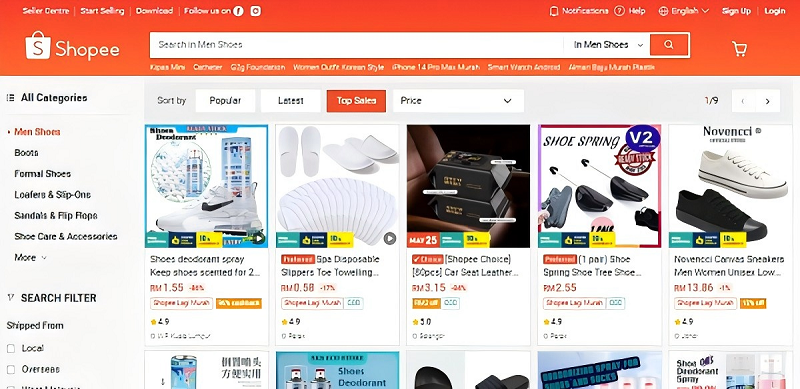
Shopee’s product rankings reflect real-time market trends, consumer preferences, and competitive dynamics, where it show how people are finding and choosing products, and what pricing and promotion strategies are working.
By programmatically collecting (scraping) those rankings over time, you can turn what would otherwise be a few disconnected snapshots into a rich, longitudinal dataset.
Here’s why that matters:
1. Reveal True Consumer Demand
a. Top Movers & Shakers: A product that jumps into the “Top 10” in a category is almost certainly seeing a surge in order volume and/or page views—an early signal of a trend.
b. Seasonality & Events: You’ll see how rankings shift around holidays, flash-sales (like 5.5 or 11.11), or category-specific events (e.g., beauty week), letting you forecast when to bulk up inventory or launch campaigns.
2. Benchmark Competitor Strategies
a. Pricing Tactics: If a competitor’s item climbs the ranks immediately after a price cut or coupon drop, that tells you exactly how price-sensitive customers in that category are.
b. Promotion Effectiveness: Scraping before, during, and after a banner spot or “Shopee Live” appearance shows you whether that marketing spend really translated into sustained ranking and sales.
3. Optimize Your Own Listings
a. SEO & Keywords: Rank data tied to on-page keywords can help you reverse-engineer which titles and tags correlate most strongly with visibility.
b. Image & Content Tests: When you A/B-test listing images or descriptions, watch your item’s relative rank versus stable competitors to see which treatment wins.
4. Monitor Emerging Product Trends
a. Category Drift: A new subcategory (e.g., “eco-friendly lunch boxes” under Home & Living) creeping into the Top 50 tells you where your next product development or sourcing effort should focus.
b. Cross-Category Insights: Perhaps “wireless earbuds” spike not only in Electronics but also in “Sports & Outdoors”; hinting at a growing market for gym-ready audio gear.
5. Data-Driven Inventory & Supply Chain
a. Lead Time Management: By tracking rank increases early, you can reorder critical items before they sell out.
b. SKU Rationalization: If certain colors or variants consistently languish outside the Top 100, it may be time to discontinue or discount them.
6. Consumer Behavior & Sentiment Analysis
a. Price Elasticity Curves: Combine scraped rank + price data to build demand curves (“if I raise price by 10%, will my rank and sales drop 5% or 20%?”).
b. Review Trends: Correlate changes in rank with review volume and average rating to spot quality issues or unmet expectations before they become crises.
How To Scrape Shopee Product Rankings
🔒 Disclaimer
Scraping Shopee may violate its Terms of Service. This tutorial is for educational purposes only. Always review a website’s robots.txt and terms before scraping and obtain permission when necessary.

Step 1: Set Up Your Environment
Before scraping, set up a Python environment with the necessary libraries.
Required Libraries
requests==2.31.0
beautifulsoup4==4.12.2
pandas==2.2.2
selenium==4.18.1
Library Roles
● requests: Sends HTTP requests (limited use due to JavaScript).
● beautifulsoup4: Parses HTML.
● pandas: Structures and exports data.
● selenium: Renders dynamic JavaScript-loaded pages.
Setup Instructions
1. Install Python 3.8+ from https://www.python.org/
2. Create a virtual environment:
python -m venv venv
source venv/bin/activate # On Windows: venv\Scripts\activate
3. Install libraries:
pip install -r requirements.txt
4. Download ChromeDriver and place it in your project folder or system PATH.
Step 2: Fetch and Parse a Shopee Product Page
Let’s start with a simple script to scrape a single Shopee product page. Shopee pages load content dynamically via JavaScript. Here's how to fetch content using Selenium:
from selenium import webdriver
from selenium.webdriver.chrome.options import Options
from bs4 import BeautifulSoup
import pandas as pd
import time
options = Options()
options.add_argument('--headless')
driver = webdriver.Chrome(options=options)
url = "https://shopee.com.my/search?keyword=laptop"
driver.get(url)
time.sleep(5) # Wait for JS to load
soup = BeautifulSoup(driver.page_source, "html.parser")
titles = [tag.text for tag in soup.find_all("div", class_="K8gFeQ")]
prices = [tag.text for tag in soup.find_all("div", class_="ZEgDH9")]
data = [{"Title": t, "Price": p} for t, p in zip(titles, prices)]
df = pd.DataFrame(data)
df.to_csv("shopee_products.csv", index=False)
driver.quit()
print("Data exported to shopee_products.csv")
Notes:
● Class names (K8gFeQ, ZEgDH9) may change. Always inspect the page source manually.
● Consider using time.sleep or WebDriverWait for better reliability.
Step 3: Handling Dynamic Selectors
Shopee uses obfuscated class names that change frequently. To find product ranking elements, use your browser's Inspect Element (F12) to:
1. Right-click a product title/price
2. Select "Inspect"
3. Note down the element's tag and class
Use soup.find_all() accordingly, but expect changes over time.
Step 4: Error Handling and Robust Parsing
To prevent crashes when a tag is missing:
title_tag = soup.find("div", class_="K8gFeQ")
title = title_tag.text.strip() if title_tag else "N/A"
Repeat for other fields like price, link, etc.
Step 5: Loop Over Multiple Pages Safely
Add delay to avoid rate-limiting or bans:
for page in range(1, 4):
url = f"https://shopee.com.my/search?keyword=laptop&page={page}"
driver.get(url)
time.sleep(5)
# Continue parsing as in Step 2
Step 6: Use Proxies to Avoid IP Bans
Use proxies to rotate your IP address:
proxies = {
"http": "http://user:[email protected]:port",
"https": "http://user:[email protected]:port"
}
try:
response = requests.get(url, headers=headers, proxies=proxies, timeout=10)
response.raise_for_status()
except Exception as e:
print("Request failed:", e)
Use proxies only if you're legally allowed to do so in your region.
Step 7: Use a Scraper API (Recommended for Scale)
A scraper API can handle proxies, rendering, and captchas:
import requests
import pandas as pd
api_url = "https://api.scraperapi.com"
payload = {
"api_key": "YOUR_API_KEY",
"url": "https://shopee.com.my/search?keyword=laptop"
}
response = requests.post(api_url, json=payload)
data = response.json()
products = data.get("products", [])
extracted_data = [{"Title": p["title"], "Price": p["price"]} for p in products]
df = pd.DataFrame(extracted_data)
df.to_csv("shopee_products_api.csv", index=False)
print("Data exported to shopee_products_api.csv")
When to Use an API
● Large-scale scraping
● Avoiding anti-bot protection
● Need consistent uptime
Comparison: Manual vs. Proxy-Enabled vs. API-Based Scraping
| Approach | Pros | Cons | Ideal Use Case |
| Manual Scraping | Free, full control, good for small projects | Prone to blocks, time-consuming to maintain | Learning, small-scale testing |
| Proxy-Enabled | Bypasses IP bans, scalable with OkeyProxy’s rotating IPs | Requires proxy setup, moderate complexity | Medium-scale projects, frequent scraping |
| API-Based | Handles all anti-bot measures, scalable, low maintenance | Paid service, less control over scraping process | Large-scale, production-grade scraping |
What Is OkeyProxy?
OkeyProxy provides reliable, rotating residential and datacenter proxies to ensure uninterrupted web scraping. With global IP coverage and easy integration, it’s a trusted solution for bypassing Shopee’s anti-bot measures.
Try OkeyProxy’s free trial to scale your scraping effortlessly!
Conclusion
Scraping Shopee product rankings empowers businesses with actionable insights for pricing, product monitoring, and market analysis. By combining Python libraries like requests and BeautifulSoup with tools like OkeyProxy, you can build a robust scraper that navigates anti-bot challenges. For larger projects, a scraper API simplifies the process, saving time and resources.
Legal Note: Always comply with Shopee’s terms of service and local data protection laws (e.g., GDPR, CCPA). Scrape only publicly available data and avoid excessive requests that could overload servers.
Next Steps: Experiment with the scripts above, explore OkeyProxy’s free trial, or check out our related tutorials on advanced scraping techniques.
FAQs
1. Why does my scraper get blocked by Shopee?
Shopee uses anti-bot measures like CAPTCHAs and IP rate limiting. Use rotating proxies from OkeyProxy and randomized delays to mimic human behavior.
2. How do I configure proxies with OkeyProxy?
Sign up for OkeyProxy, retrieve your proxy credentials, and add them to your script’s proxies dictionary.
3. What if Shopee’s HTML structure changes?
Regularly inspect Shopee’s pages using Developer Tools and update your script’s class selectors. Scraper APIs often handle such changes automatically.
4. Can I use scraped data for price monitoring?
Yes, scraping product rankings is ideal for tracking prices, discounts, and competitor strategies, helping optimize your pricing models.
5. How do I troubleshoot missing data in my scraper?
Check for JavaScript-rendered content (use Selenium) or incorrect selectors. Ensure your proxy is correctly configured and test with a single URL first.
