Many people search for a “random IP address” when they want more privacy, to test applications, or to avoid basic restrictions online. At first glance, the idea sounds simple: just generate a random set of numbers and use it as an IP.
However, IP addressing is far more structured than it appears. Before using or generating random IP addresses, it’s important to understand how IPs actually work—and why “random” doesn’t always mean usable or safe.
To start, let’s briefly look at what an IP address really is.
Prerequisite: Understanding What an IP Address Is
An IP address (Internet Protocol address) is a unique identifier assigned to a device connected to a network. It allows devices to send and receive data over the internet, much like a mailing address allows letters to reach the correct destination.
How IP addresses are generated and assigned
IP addresses are not created randomly for public use. Instead:
- IANA (Internet Assigned Numbers Authority) oversees global IP address allocation
- Large blocks are distributed to regional internet registries (RIRs)
- ISPs then assign specific IPs to users and devices
There are two main versions:
- IPv4 (e.g., 192.168.1.1) – 32-bit addresses
- IPv6 (e.g., 2001:db8::1) – 128-bit addresses
Because this system is carefully managed, not every possible IP address is valid or reachable on the public internet. This matters a lot when discussing random IPs.
What Is a Random IP Address?
A random IP address typically refers to an IPv4 or IPv6 address that is generated arbitrarily, rather than being officially assigned by an Internet Service Provider (ISP) or the relevant network registry such as IANA (Internet Assigned Numbers Authority).
In simple terms, it’s an address that follows the same format as a real IP address (e.g., four sets of numbers for IPv4 like 192.168.0.1 or a string of hexadecimal numbers for IPv6), but is not registered or assigned to any device or network in practice.
How Random IP Addresses Are Generated
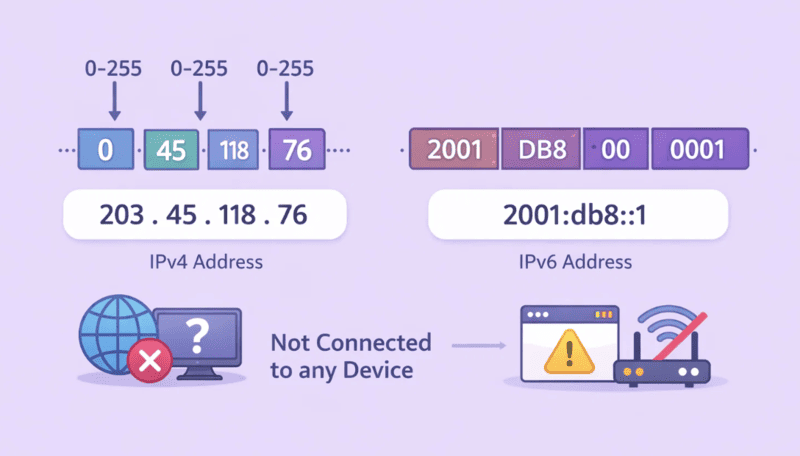
Random IPs are created by picking numbers between 0-255 for each octet in an IPv4 address or generating an arbitrary hexadecimal string for an IPv6 address. The IP may look real on paper, but this doesn’t guarantee it’s functional.
For example:
- IPv4: 203.45.118.76
- IPv6: 2001:db8::1
While both are valid formats, they are not connected to any specific device, and therefore won’t work for practical purposes such as accessing websites or routing traffic.
The Key Characteristics of a Random IP Address
Here’s a breakdown of what defines a random IP address:
Syntactically Valid
The address looks like any other valid IP address. This means it follows the structure and number ranges that are technically correct and would pass basic formatting checks.
Not Routed on the Public Internet
While the address appears correct, it does not belong to any device or network with an actual internet connection. So, it cannot be used to route traffic or access the web. The address may be unused or reserved for special purposes (like private networks or local devices).
No Ownership or Real Network Link
Random IPs are not linked to any real entity, device, or ISP. They don’t exist on the public internet and can’t be used to send or receive data. An IP must be linked to a specific organization, server, or device in order to function online.
Real-World Example
Imagine you’re trying to use a random IP you generated—let’s say 203.45.118.76. While this address is valid in format, if you tried to visit a website using this IP, you’d receive an error because:
- No website is hosted at that IP.
- There’s no device associated with that address to handle your request.
This is why, while valid IP format matters in theory, real-world functionality doesn’t follow the same rules.
The Problem: A “Real-Looking” IP That Isn’t
This can be confusing because randomly generated IPs may look like they’re legitimate, but their lack of real-world association with a network makes them unusable for most applications. The internet is carefully managed, and for an IP to be usable, it must be registered and assigned by an authoritative body (ISP, registry, or hosting provider).
What Does This Mean for You?
When you encounter a random IP address (whether generated by a tool or manually created), it’s important to understand its limitations. These addresses:
- Can’t route internet traffic
- Aren’t associated with real devices
- Can’t help you hide your identity or access content in the way you’d expect a valid IP address to do
So, while random IPs might seem like a quick and easy solution, they don’t serve many practical purposes in real-world internet applications like accessing websites, testing web traffic, or anonymizing your online identity.
The Key Question: Are Random IPs Useful?
As we’ve seen, the main use for random IP addresses is testing, education, or simulation. They can be used to experiment with network tools or generate hypothetical scenarios but not for actual internet use.
For tasks like hiding your identity, bypassing geo-restrictions, or scraping websites, you’ll need real, routable IPs. Random IPs simply don’t meet these requirements.
Use Cases of Random IP Addresses
Although random IP addresses are not suited for tasks like hiding your identity or bypassing geo-restrictions, they still have practical uses in testing, research, and simulations. Here are a few key scenarios where random IPs are commonly employed:
1. Network and Security Testing: Developers and network administrators can use random IP addresses to simulate various network conditions during testing. These IPs help assess how applications handle unexpected IP sources, aiding in testing security features and network performance.
2. Penetration Testing & Ethical Hacking: Ethical hackers use random IPs to perform simulated attacks and identify potential vulnerabilities in systems. By impersonating different IP addresses, they can assess security protocols without revealing their actual location.
3. Research and Educational Purposes: In research environments, random IPs are used for simulations and experiments, where the focus is on testing network behavior or generating data scenarios. Researchers can create large volumes of random IPs for data collection or educational exercises.
4. Geo-Simulation for Testing: Random IPs can help developers simulate how content or services appear to users from different geographical locations. This can be useful for testing localized content or studying how geographic restrictions impact web access.
5. Testing Web Scraping Tools (with limitations): While real IPs are necessary for web scraping tasks, random IPs can be used in a limited capacity for simulating requests or testing scraping tools in controlled environments. However, they cannot bypass anti-scraping measures on websites effectively.
What Is a Random IP Address Generator?
When it comes to working with random IP addresses, many people turn to random IP address generators. These tools are designed to generate random-looking IP addresses by randomly selecting numbers that fall within the valid range for IPv4 addresses.
Now, let’s look at the random IP address generator and how it works.
A random IP address generator works by creating a valid IPv4 address through the following process:
- Random Number Selection: The generator randomly picks four numbers, each between 0 and 255. These numbers represent the four octets of an IPv4 address (e.g., 192.168.0.1).
- Format the Address: The selected numbers are combined with periods (.) to form a complete IP address, which is syntactically correct (e.g., 134.22.176.52).
- Output: The result is a randomly generated IP address that looks valid on the surface.
Key Limitation: Not All Random IPs Are Usable
While these generated IPs look like real, usable IP addresses, they don’t guarantee that the IP is routable or usable on the internet. This means:
- Private IP Ranges: Many of the generated IPs may fall within private IP ranges (e.g., 192.168.x.x or 10.x.x.x), which are not accessible on the public internet.
- Reserved Addresses: Some generated IPs may fall within blocks reserved for special purposes (e.g., multicast addresses or loopback addresses).
- Not Assigned: These IPs may not even exist in any network; they are simply created as valid IPv4 addresses without any actual routing.
Thus, while a random IP address appears valid, it is not always functional in real-world applications.
For practical applications such as hiding your real IP address, bypassing geo-restrictions, or conducting serious web scraping, random IPs fall short. You’ll need real, routable IPs, which can be obtained through tools like VPNs, proxies, or Tor networks.
Example: How to Generate Random IP Addresses in Python and JavaScript
Here are simple examples of generating random IPs in both Python and JavaScript:
Python
import random def generate_random_ip(): return ".".join(str(random.randint(0, 255)) for _ in range(4)) print(generate_random_ip())
This Python script randomly selects four numbers between 0 and 255 to create an IP address.
JavaScript
function generateRandomIP() { return Array.from({ length: 4 }, () => Math.floor(Math.random() * 256) ).join(".");} console.log(generateRandomIP());
This JavaScript function does the same, creating a random IPv4 address by selecting four random numbers.
Best Alternative to Random IPs: Use Rotating Proxies
As explained earlier, random IP generators can create IP-looking strings—but they don’t provide real internet connectivity. For any task that requires actual network access, a far more practical and reliable solution is rotating proxies.
Random IP Generator vs. Rotating Proxies
While random IP generators can produce IP-looking strings, they cannot actually connect to the internet. To better understand why rotating proxies are the superior solution, let’s compare the two side by side:
| Feature | Random IP Generator | Rotating Proxies |
|---|---|---|
| Real internet access | ❌ No | ✅ Yes |
| Legitimate IP ownership | ❌ No | ✅ Yes (ISP-assigned) |
| IP rotation | ⚠️ Simulated only | ✅ Real, automatic rotation |
| Geo-location control | ❌ No | ✅ Country / city-level targeting |
| Scraping & automation support | ❌ Not usable | ✅ Designed for scraping and automation |
Why Rotating Proxies Work Better
Rotating proxies use real, routable IP addresses that are actively assigned by ISPs. These IPs automatically change per request or session, which makes them suitable for:
- Web scraping at scale
- Account management and automation
- Geo-testing and content localization
- Avoiding IP-based rate limits or blocks
Unlike random IP generators, rotating proxies don’t just look real—they actually function on the public internet.
A Note on Residential Rotating Proxies
Stop wasting time to collect suspicious free proxies – use reliable paid proxy services. OkeyProxy‘s advanced residential proxies will ensure that you get a new IP address for each connection.
Among all proxy types, rotating residential proxies are especially effective. They route traffic through real household IPs, making requests appear as if they come from genuine users rather than scripts or bots.
The rotating proxies are perfectly suitable for web scraping, market research, automation, and more. You can take a rotating proxy as a random IP address changer, it assigns you a different random IP address from a respective pool for every new connection.
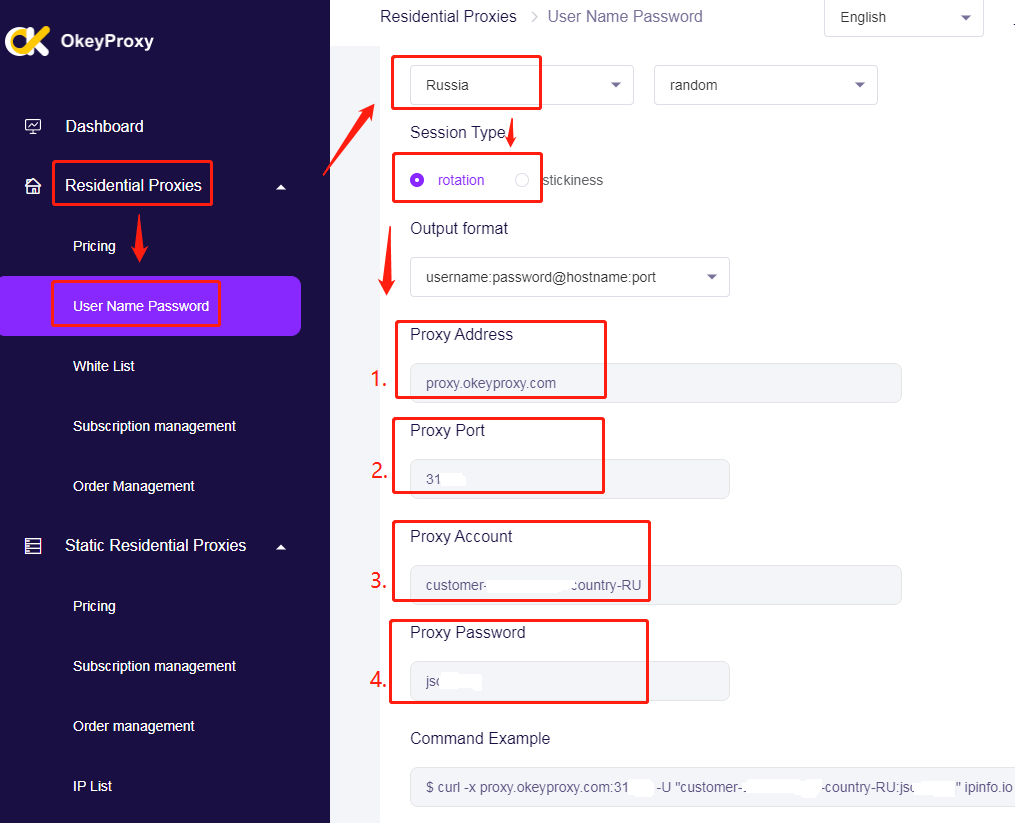
How to generate random rotating residential proxies in OkeyProxy
Because the rotating proxy is good at issuing countless requests from various IPs in a short time, it has become an ideal tool for grasping tasks on search engines and online markets through built-in anti-robotics and anti-spam systems. Search engines like Google or E-stores like Amazon restrict the number of requests sent from a single IP. If this limit is exceeded, your IPs will be banned.
Rotating proxies use different random IPs for each data request session to help overcome this problem so that you can use this proxy to scrap and complete the task without notifying the internal anti-robot system.
Another field of using rotating proxies is marketing and reputation intelligence. Marketing information is to obtain information about your current market status by studying competitors. You can use a proxy to analyze data from competitors (prices, descriptions, images, etc.) from competitors’ e-stores to provide better offers for your potential customers. A residential rotating proxy that can be used in a specific country/region.
Conclusion
A random IP address may look convincing, but in most cases, it’s not usable on the real internet. IP addresses are carefully managed resources, and randomly generating one rarely produces a valid, reachable endpoint.
While random IPs have their place in testing and learning, real-world applications require legitimate, routable IP addresses. For scenarios where IP rotation or anonymity is needed, tools like VPNs, Tor, or—most reliably—rotating proxy services are far better alternatives.