

WhatsApp connects over 2 billion people worldwide. 🌍 But in some countries, it’s blocked, throttled, or restricted entirely. That’s where a WhatsApp proxy comes in. It reroutes your connection through another server, so you can keep chatting even when the direct route is closed. No VPN subscription. No losing your number. Just a stable, private connection back to your contacts.
This guide breaks down exactly how a WhatsApp proxy works, why you’d use one, and — most importantly — the two real ways to set one up: WhatsApp’s built-in proxy option, and a full system-level (OS-wide) proxy setup. We’ll also cover how to pick a provider you can trust, and how to fix the most common connection errors. Let’s dive in. 🚀
What Is a WhatsApp Proxy?
A WhatsApp proxy is simply a server that sits between your phone and WhatsApp’s own servers. Instead of connecting to WhatsApp directly, your app sends its traffic to the proxy first. The proxy then forwards that traffic to WhatsApp — and routes the reply back to you. 🔄
To your network provider, it just looks like you’re talking to the proxy server, not WhatsApp. That’s what lets you slip past censorship, ISP-level blocks, or restrictive workplace/school Wi-Fi. Importantly, this doesn’t weaken your privacy: WhatsApp’s end-to-end encryption stays fully active whether you’re connecting directly or through a proxy, so your messages remain unreadable to the proxy operator, your ISP, or anyone else in between. 🔒
Why You Might Need a WhatsApp Proxy
You don’t need to be a power user to benefit from a proxy. Here are the most common reasons people set one up:
- 🌐 Bypassing Geo-Restrictions: WhatsApp is banned or heavily restricted in several countries. A proxy gives you a working route back in.
- 🕵️ Preserving Anonymity: A proxy masks your real IP address, adding a layer of privacy to your connection.
- 💼 Managing Multiple Accounts: Businesses running several WhatsApp accounts for support or marketing often assign a separate proxy to each account, keeping them isolated and reducing the risk of a mass ban.
- 🏢 Dodging Network Restrictions: Corporate and school networks frequently block messaging apps. A proxy routes around those internal firewalls.
- 📶 Staying Online During Shutdowns: During internet shutdowns or throttling events, volunteer and commercial proxy servers are often the only way affected users can keep messaging their families.
Two Ways to Set Up a WhatsApp Proxy
Here’s the part most guides skip: WhatsApp actually offers two very different ways to use a proxy, and they are not interchangeable. Picking the right one depends on what you’re trying to achieve. ⚙️
Method 1: WhatsApp’s Built-in Proxy Setting
Since late 2023, WhatsApp has shipped a native « Proxy » option inside its own settings. It’s the fastest way to get started — but it comes with an important limitation you should know before you rely on it. 👇
The limitation: WhatsApp’s in-app proxy only communicates over its own standard ports — typically 80, 443, or 5222, depending on whether the connection uses TLS. It only reroutes WhatsApp’s own traffic (not your whole device), and it does not support the SOCKS5 protocol. If your proxy provider assigns a non-standard port, or if you need SOCKS5-level control, this built-in method simply won’t connect. It’s best suited for a quick fix when WhatsApp is blocked but the rest of your network access is fine.
📱 Setting it up on Android:
- Open WhatsApp and go to the Chats tab.
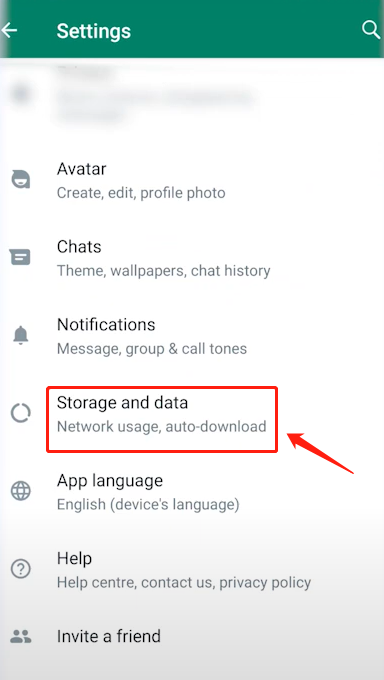
- Tap the triple-dot icon in the top right, then tap Settings.

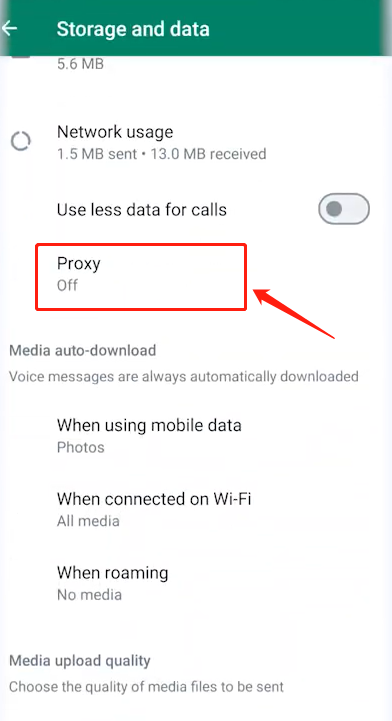
- Go to Storage and Data → Proxy, then tap Set Up Proxy.

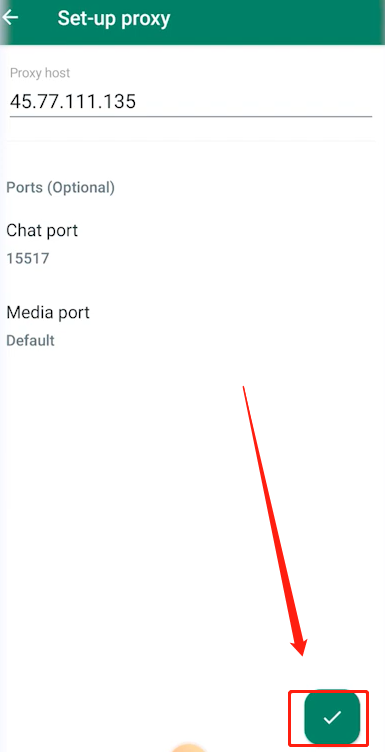
- Enter your proxy server address. Optionally, expand the port settings to set a separate chat port and media port if your provider gave you specific ones.

- Tap the green checkmark to save and connect.


📱 Setting it up on iPhone:
- Open WhatsApp and tap Settings.
- Go to Storage and Data → Proxy, then tap on proxy settings.
- Tap Proxy Address and enter your server’s address. Set separate chat/media ports if required.
- Save your configuration, then restart WhatsApp to apply it.
💡 The proxy address you enter above is only as reliable as the server behind it. Free, publicly shared addresses get overloaded and blacklisted fast — which is exactly why we built OkeyProxy. Our static residential proxies give you a stable host address that plugs straight into the field above. 🛡️
Method 2: System-Level (OS-Wide) Proxy Routing
If the built-in option doesn’t cut it — because your provider only offers SOCKS5, because you’re on a non-standard port, or because you simply want stronger, encrypted, whole-device protection — the better route is to configure the proxy at the operating system level. This routes all of your device’s traffic, WhatsApp included, through your chosen proxy server. It’s more robust, harder to detect and block, and it protects every app on your phone, not just WhatsApp. 🔐
🤖 On Android:
- Go to Settings → Network & Internet → Wi-Fi.
- Press and hold your connected network, then tap Modify Network.
- Expand Advanced Options and set Proxy to Manual.
- Enter your proxy hostname and port, then save. For SOCKS5 proxies — which native Wi-Fi settings don’t support — use a dedicated proxy manager app to route the whole device through a SOCKS5 residential IP instead.
🍎 On iPhone:
- Go to Settings → Wi-Fi, then tap the ⓘ icon next to your connected network.
- Scroll to Configure Proxy and select Manual.
- Enter the server address, port, and authentication details (if required), then tap Save.
- Note: iOS’s native Wi-Fi proxy field only supports HTTP/HTTPS proxies. For SOCKS5, install a proxy client app that can tunnel all device traffic through a SOCKS5 residential IP.
💡 Why this method pairs so well with residential proxies: System-level routing works best with a proxy that can hold a stable session across all your apps — not just messaging traffic. OkeyProxy gives you 150M+ rotating and static residential IPs across 200+ regions, full HTTP(S) and SOCKS5 support — so your entire device, WhatsApp included, stays connected through a real residential IP instead of a flagged datacenter one. 🌎
How to Choose the Ideal WhatsApp Proxy Provider
A poorly maintained proxy causes more problems than it solves: dropped messages, laggy voice notes, blurry video calls, and — worst of all — a higher chance WhatsApp flags your account. Free lists you find on random forums might work for an hour, then disappear. Before picking a provider, weigh these six factors: 👇
- ✅ Reliability: Look for a provider with a track record of uninterrupted uptime. Frequent disconnections defeat the whole purpose.
- 🔐 Security: Choose a provider that doesn’t log your traffic and supports encrypted connections. An insecure proxy exposes your data to third parties.
- ⚡ Speed: Slow proxies mean delayed messages and choppy calls — a real problem for business use.
- 🎧 Support: 24/7 support matters. Proxy issues tend to happen at the worst possible time.
- 💰 Price: Free proxies are tempting but risky. A modest paid plan buys you far more reliability and security.
- 📍 Server Locations: If your goal is bypassing a geo-restriction, make sure the provider actually has servers (or IPs) in the region you need.
Providers like OkeyProxy check all six boxes: 150M+ residential IPs across 200+ regions, average response times under 0.6 seconds, and both HTTP(S) and SOCKS5 support.
Troubleshooting Common WhatsApp Proxy Issues
Even a well-configured proxy can run into hiccups. Here’s how to fix the most common ones: 🛠️
- 🚫 Proxy server blocked or unresponsive: If you suddenly can’t send or receive messages, your proxy address may have been blocked or gone offline. In WhatsApp’s proxy settings, press and hold the old address to remove it, then enter a fresh, working address from your provider.
- 🔌 Port mismatch: Standard WhatsApp traffic runs over port 443 or 80. If your provider assigns you a different port, open the port settings under « Set Ports » and enter the chat and media ports they gave you — don’t guess.
- 🔒 Encryption concerns: Whether you’re connected directly or through a proxy, WhatsApp’s native end-to-end encryption stays active at all times. A proxy only changes your network route — it never has access to your message content.
- 🔄 Still not connecting? Double-check the address for typos, confirm your provider’s server is currently active, and try switching between the built-in method and system-level routing — one often works when the other doesn’t.
Frequently Asked Questions
Is using a WhatsApp proxy legal?
In most countries, yes — proxies are a standard networking tool. In regions where WhatsApp itself is restricted, laws vary, so it’s worth checking local regulations before relying on one.
Will a proxy slow down my WhatsApp calls?
A quality proxy with low latency (like a residential proxy close to your target region) should have minimal impact. Free or overloaded public proxies are the ones that typically cause lag.
Do I need a proxy on every device?
Yes — WhatsApp’s built-in proxy setting is configured per device/app install, and system-level proxy settings are also device-specific, so you’ll need to repeat the setup on each phone or tablet.
Conclusion
A WhatsApp proxy is a genuinely useful tool: it gets you past geo-restrictions, adds a layer of anonymity, helps businesses manage multiple accounts, and keeps you connected when local networks clamp down. Whether you go with WhatsApp’s quick built-in proxy field or a full system-level SOCKS5 setup, the deciding factor is always the same — the quality of the server behind it. 🌟
That’s why choosing a reliable, secure provider like OkeyProxy matters more than the setup method itself. The right proxy doesn’t just restore your connection — it keeps your chats fast, private, and consistently online.