Imagine having a personal assistant who never sleeps, never gets tired, and never misses a flash sale. While you’re busy with work—or even asleep—this assistant is quietly scanning online stores, tracking prices, checking stock, and ready to act the moment the right opportunity appears.
That assistant is a shopping bot. 🛒🤖
From finding the best deals to grabbing limited-edition sneakers in seconds, shopping bots have become a powerful tool in modern online shopping. But how do they actually work, and are they always a good idea? Let’s break it down.
What Is a Shopping Bot?
A shopping bot is an automated software tool designed to help users shop online without constant manual effort. Instead of clicking through product pages yourself, the bot interacts with websites or apps on your behalf.
Depending on how it’s built, a shopping bot can:
- Search for products
- Compare prices across stores
- Monitor stock availability
- Apply coupons or discounts
- Even complete purchases automatically
Some shopping bots are simple scripts, while others are AI-powered chatbots that can understand user preferences and respond conversationally. Thanks to recent advances in generative AI, shopping bots have become smarter, more flexible, and easier to use—even for non-technical users.
Think of them as a GPS for online shopping: you still choose the destination, but the bot figures out the fastest route.
How Do Shopping Bots Work?
Imagine shopping bots as your personal, tireless digital assistants. They work around the clock, never tiring, to do the tedious parts of online shopping for you. These bots follow a set of simple rules to decide what to buy, where to find it, and when to act—all without needing any human input once set up.
So, how do these clever little helpers actually get the job done? Let’s break it down:
The Tech That Powers Shopping Bots
Shopping bots might seem magical, but they’re powered by some key technologies that allow them to do their job efficiently:
- Web Scraping: Think of web scraping as the bot’s “eyes” on the web. It scans product pages, gathering important info like prices, availability, and descriptions, just like a shopper quickly reading a product listing.
- APIs: Some websites allow bots to directly request product info through a service called an API. It’s like getting the product details from a store’s “back office,” making it much faster and more reliable than simply reading the page.
- Automation Frameworks: These act like the “hands” of the bot. They simulate human actions—clicking, scrolling, and filling out forms—so the bot can interact with the website like a real person.
- AI and Machine Learning: The smartest bots learn from user preferences, just like a personal shopper who gets better at choosing what you like over time. They can even suggest products or help you compare options.
- Databases: Bots use databases to keep track of all the info they gather. This includes things like prices, stock levels, and even your previous searches, so they can make better decisions next time.
- Proxies and IP Rotation: Shopping bots use these to avoid getting blocked by websites. It’s like wearing different disguises so the website doesn’t realize it’s the same bot trying to shop over and over again.
How the Bot Shops for You
While shopping bots may look different depending on the tool, they usually follow a similar “shopping process”:
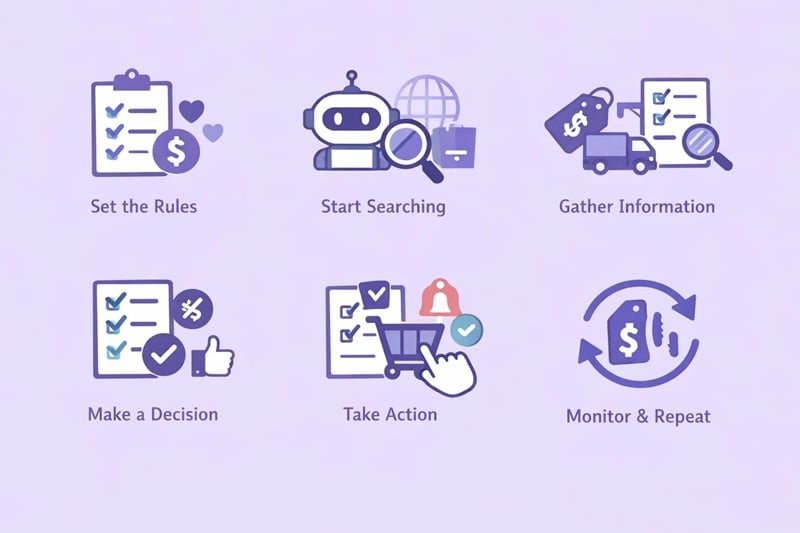
- Set the Rules: You decide what the bot should look for—like the products you want, your budget, and which websites to search. It’s like giving your assistant a shopping list.
- Start Searching: The bot then searches online stores or APIs for the items you’re after, based on the rules you set. It’s like sending your assistant out to check every store for the best deal.
- Gather Information: The bot collects key details: prices, availability, shipping options—everything it needs to compare and make decisions.
- Make a Decision: It then compares everything it finds against your preferences. For example, if a product is too expensive, the bot won’t pick it, but if it meets all your criteria, it moves on to the next step.
- Take Action: Once it finds the right product, the bot can either send you a notification to review, add it to your cart, or even complete the purchase for you.
- Monitor and Repeat: Some bots don’t stop at one search. They keep an eye on price changes or stock updates, making sure you never miss a deal.
In short, shopping bots do the heavy lifting of online shopping. They automate the process of finding and buying products, making it quicker, easier, and more efficient. Just like having a personal shopper who never gets tired.
Types of Shopping Bots
Not all shopping bots do the same job. Think of them like different “shopping assistants,” each trained for a specific task. Some help you chat and browse, others quietly watch prices or inventory in the background, and a few sprint at lightning speed for limited drops.
Here are the most common types of shopping bots you’ll see today:
1. Personal Shopping Chatbots (Most Common)
These are the bots most people interact with directly. They work like a friendly store assistant in a chat window—answering questions, suggesting products, and guiding users through purchases.
You’ll often find them on e-commerce websites, messaging apps, or customer support platforms.
What they do:
- Recommend products based on preferences
- Answer common questions (price, size, availability)
- Help users complete orders
2. Inventory Monitoring Bots
Inventory bots are like night guards for online stores. They constantly check whether a product is back in stock and alert users the moment it becomes available.
They’re especially popular for high-demand or frequently sold-out items.
What they do:
- Monitor stock status in real time
- Send alerts when items restock
- Track availability across multiple stores
3. Price Comparison Bots
These bots act like bargain hunters with spreadsheets. They scan multiple stores, compare prices, and help users find the best deal.
Some run on demand, while others monitor prices over time.
What they do:
- Compare prices across platforms
- Track price history
- Alert users when prices drop
4. Automated Purchasing Bots
These bots go a step further—they don’t just watch; they act. Once conditions are met, they can automatically add items to carts and complete purchases.
Think of them as “hands-free checkout assistants.”
What they do:
- Buy products automatically based on rules
- Handle checkout processes
- Save time during high-demand purchases
5. Coupon and Discount Finder Bots
These bots are like coupon clippers that never miss a deal. They scan checkout pages and automatically apply the best available discounts.
What they do:
- Find promo codes
- Apply discounts automatically
- Test multiple coupon combinations
6. Sneaker & Limited-Edition Bots
These are the fastest—and most controversial—shopping bots. Designed for speed, they compete in milliseconds to secure limited items like sneakers, collectibles, or concert tickets. By the way, if you’re interested in sneakers and limited-edition robots, you might also want to check out our dedicated sneaker proxies.
What they do:
- Monitor release times
- Auto-checkout within seconds
- Bypass queues (where possible)
In short, shopping bots range from friendly helpers to lightning-fast buyers. Whether you’re casually hunting discounts or managing high-volume purchases, there’s a bot type designed for that specific shopping style.
Popular Shopping Bot Examples (For Reference)
To better understand how shopping bots are used in real life, here are a few well-known examples across different scenarios.
🧳 Travel & Deal-Finding Bots
SnapTravel (Rebrand to Super.com) – Focuses on finding hotel deals through chat interfaces like Messenger or WhatsApp. Ideal for travelers who want quick price comparisons without browsing dozens of sites.
🛍️ Product Discovery & Recommendations
Birdie – Helps users discover products based on reviews, rankings, and personal preferences, saving time on manual research.
ChatShopper – A conversational assistant that returns product suggestions based on simple keyword input.
🌍 Cross-Border & Assisted Shopping
Intercom Operator – As a shopping assistant, it enables users to browse product listings and make purchases in an easy-to-understand manner.
📩 E-commerce Messaging & Automation
SMSBump – Designed for merchants rather than buyers, automating cart reminders, shipping updates, and customer re-engagement.
Yellow Messenger / Kick Bot Shop – Platforms for building custom conversational bots for e-commerce and customer interaction.
These examples highlight how diverse shopping bots can be—from personal assistants to full-scale e-commerce automation tools. However, most advanced shopping bots rely on automation logic, stable networks, and often proxy support to function reliably at scale.
Benefits of Using Shopping Bots
Shopping bots can be incredibly useful when used responsibly:
- Save Time: No need to constantly refresh pages or compare prices manually
- Never Miss Deals: Bots work 24/7, even while you sleep
- Faster Purchases: Critical for limited-stock or high-demand items
- Reduce Human Error: Bots don’t forget rules or hesitate
- Scalability: Useful for businesses monitoring large product catalogs
For many users, a shopping bot is less about cheating the system and more about leveling the playing field.
How to Create an Automated Shopping Bot
Creating a shopping bot may sound intimidating at first, but it doesn’t have to be. Think of it like teaching a very obedient assistant a shopping routine—you decide the rules, and the bot repeats the task without getting tired or distracted.
Depending on your goals and technical skills, there are different ways to build one.
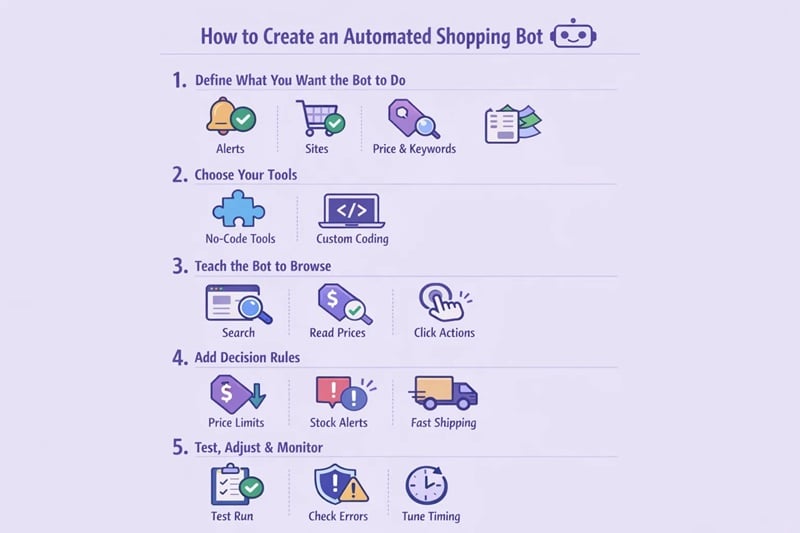
Step 1: Define What You Want the Bot to Do
Start simple. Ask yourself:
- Do you want alerts only, or automatic purchases?
- Which websites should the bot visit?
- Are there price limits, product keywords, or size preferences?
Clear rules help prevent mistakes—like buying something you didn’t actually want.
Step 2: Choose Your Tools
There are two main paths:
No-code / low-code tools
Great for beginners. These rely on visual workflows or browser automation.
- Tools like browser automation platforms, monitoring tools, or chatbot builders
- Ideal for stock alerts, price tracking, or basic actions
Custom-built bots (coding required)
More flexible and powerful.
- Common languages: Python or JavaScript
- Libraries: Selenium, Playwright, Puppeteer
- Best for complex workflows or high-speed automation
Step 3: Teach the Bot How to “Browse”
Your bot needs to know how to:
- Open product pages
- Search for keywords
- Read prices, stock status, and buttons
- Simulate clicks, scrolling, and form filling
This is where automation frameworks act like a virtual mouse and keyboard.
Step 4: Add Decision Rules
Now comes the “thinking” part:
- Buy only if the price is below X
- Alert only when stock changes
- Choose the fastest shipping option
These rules prevent impulsive or incorrect actions.
Step 5: Test, Adjust, and Monitor
Never run a bot blindly.
- Test it on a single product
- Watch for errors or blocked requests
- Adjust timing to avoid suspicious behavior
A well-behaved bot looks more human—and lasts longer.
Why Proxies Matter for Shopping Bots
If shopping bots are the engine, proxies are the license plates. Without them, platforms quickly notice repeated traffic coming from the same place—and that’s when blocks, captchas, or bans appear.
The Problem Without Proxies
When a bot sends many requests from one IP address:
- Websites may flag it as automation
- You may see captchas or access denied errors
- Region-specific products or prices may be hidden
This becomes even more obvious when managing multiple accounts or running bots 24/7.
How Proxies Help Shopping Bots
Using proxies allows your bot to:
- Appear as normal users from different locations
- Access region-locked products or pricing
- Reduce IP bans and rate limits
- Run multiple bots or accounts safely
For most shopping bots, stability matters more than speed. Constantly changing or low-quality IPs can actually trigger more security checks.
Choosing the Right Proxy Type
This is where many users struggle. In practice:
- Residential proxies look like real home users and blend in naturally
- ISP static proxies offer consistency for long-running bots or account-based tasks
- Datacenter proxies are fast, but easier to detect for shopping automation
Many experienced users prefer stable residential or ISP proxies, especially for e-commerce automation.
Why Users Choose OkeyProxy
When running shopping bots, consistency and scale are key. That’s why many users turn to OkeyProxy, which offers:
- Real residential and ISP IPs
- Large IP pools with location targeting
- Stable connections suitable for automation
- Support for multiple accounts and long-running tasks
In short, a shopping bot without proxies is like shopping in disguise without changing clothes—it won’t take long before security notices. With the right setup, automation becomes smoother, safer, and far more effective.
Drawbacks and Risks of Shopping Bots
Shopping bots aren’t magic—and they come with real risks:
- Account Bans: Many platforms restrict automated behavior
- IP Blocks: Poor proxy setups get flagged fast
- Legal and Ethical Concerns: Violating a site’s terms of service can have consequences
- Unfair Competition: Bots can disadvantage regular users during limited releases
- Technical Maintenance: Bots require updates as websites change
Used irresponsibly, shopping bots can cause more trouble than they’re worth. Responsible use and ethical boundaries matter.
Conclusion
Shopping bots are powerful tools—like a sports car, impressive but dangerous if misused.
When used correctly, they save time, reduce effort, and help users make smarter purchasing decisions. When abused, they can trigger bans, ethical issues, and frustration.
Understanding how shopping bots work, what they’re best used for, and how to manage risks is the key to using them wisely.
FAQs About Shopping Bots
❓Q: Do shopping bots always need proxies?
💬A: Not always, but proxies are essential for large-scale or frequent automated shopping to avoid detection and IP bans.
❓Q: Are shopping bots legal?
💬A: Shopping bots themselves aren’t illegal, but using them may violate a website’s terms of service.
❓Q: Where can I find shopping bots?
💬A: You can find open-source bots, commercial tools, or build your own using automation platforms. Such as Tidio, Intercom, Ada, Yellow.ai.
❓Q: Can I create a shopping bot without coding skills?
💬A: Yes. Many no-code and low-code tools allow users to create basic shopping bots without programming.