As we spend more time online, privacy has become a growing concern for many people. With constant surveillance, data tracking, and cyber threats lurking around, it’s no wonder that more individuals are looking for ways to browse the web anonymously.
Whether it’s protecting personal information, accessing restricted content, or simply maintaining a sense of security, using anonymous proxies is one of the best ways to achieve privacy and anonymity online.
In this article, we’ll dive into what anonymous proxies are, how they work, and why they’re essential for safe and private browsing. Plus, we’ll share tips on how to choose the right one to meet your needs.
What Are Anonymous Proxies?
An anonymous proxy is a tool designed to protect your identity by masking your real IP address while you browse the internet. It acts as an intermediary server that sits between your device and the websites you visit. By hiding your true IP address, anonymous proxies help prevent websites and third parties from tracking your browsing activity. This is particularly important for people who want to maintain privacy or bypass restrictions.
Proxy Types by Anonymity Level:
Anonymous proxies vary in their level of anonymity. Depending on the proxy server’s configuration, they can be classified into three types:
- Level 1: Elite Proxies (High Anonymity Proxies)
- Level 2: Anonymous Proxies
- Level 3: Transparent Proxies
Each of these types modifies the HTTP request header to a different degree. Below is a comparison of the key features:
| Feature | Elite Proxy | Anonymous Proxy | Transparent Proxy |
|---|---|---|---|
| Hides IP Address | Yes | Yes | No |
| Identifies Proxy Usage | No | Yes | Yes |
| Privacy Level | Highest (High Anonymity) | Medium | Low |
| Common Usage | Best for anonymity | General use | Typically for caching |
How Do Anonymous Proxies Work?
Anonymous proxies act as intermediaries between your device and the websites you access. When you use an anonymous proxy, your device sends a request to the proxy server, which then forwards the request to the target website on your behalf. The website sees the request as coming from the proxy server rather than your real IP address, ensuring your identity remains hidden.
Technical Process
- Request Routing: When you make a request to a website (e.g., by entering a URL in your browser), the request is first routed through the proxy server.
- IP Masking: The proxy server then replaces your real IP address with one of its own. This ensures that the website you visit only sees the proxy server’s IP address.
- Response Forwarding: After the website processes the request and sends back a response (e.g., loading a webpage), the proxy server forwards the content back to your device.
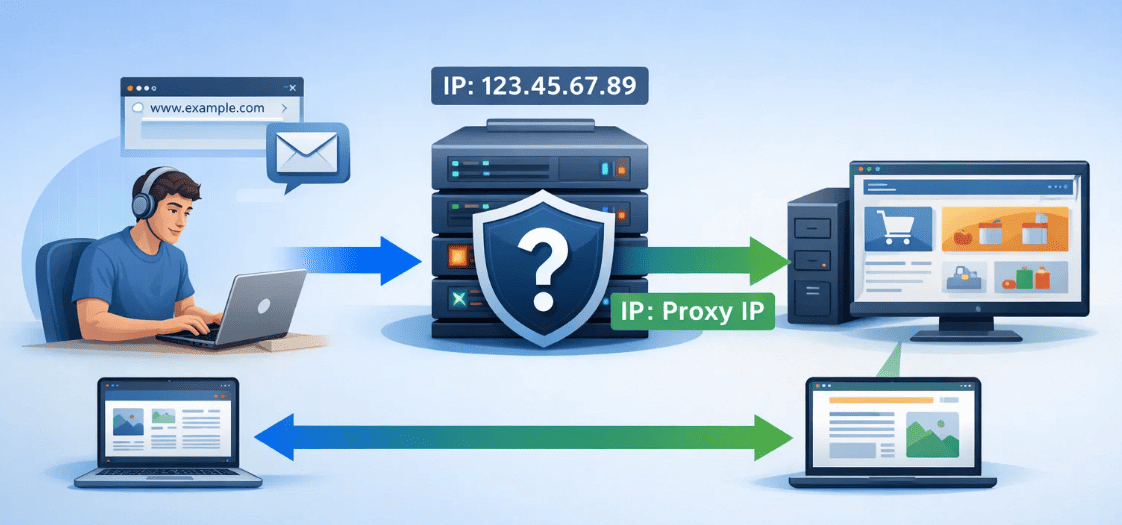
By doing this, anonymous proxies allow users to browse the web without revealing their true location or identity.
Why Use Anonymous Proxies?
There are several compelling reasons why people choose to use anonymous proxies:
1. Enhanced Privacy
Anonymous proxies hide your real IP address, ensuring that websites and advertisers cannot track your browsing activities.
2. Bypassing Geo-Restrictions
If you’re trying to access content restricted to specific regions (e.g., streaming services like Netflix), an anonymous proxy can help you bypass these geographic blocks by masking your IP address with one from a different location.
3. Preventing Tracking and Targeted Ads
Advertisers track your online behavior to target you with personalized ads. Using an anonymous proxy helps reduce this tracking.
4. Avoiding Censorship
In some countries, access to certain websites is blocked. Anonymous proxies enable you to bypass these restrictions and access the content you want.
For reliable and high-anonymity proxies, OkeyProxy, a professional anonymous proxy provider, offers tailored solutions to meet diverse needs.
Can Anonymous Proxies Be Tracked?
While anonymous proxies do a great job of hiding your real IP address, they are not entirely untraceable. Websites and services use advanced techniques to detect and track proxy usage. For example:
- Cookies & Fingerprinting: Cookies and browser fingerprinting techniques can also be used to track your activity across different sites, even when using an anonymous proxy.
- Behavioral Analysis: Platforms may also monitor browsing behavior for unusual activity that signals proxy use, like repeated patterns of accessing certain content at odd times.
- Advanced Anti-Proxy Systems: Some websites have sophisticated anti-proxy systems that can detect and block known proxies, often by checking proxy IP lists or patterns of proxy usage across different users.
- Logs from Proxy Providers: Many proxy services maintain logs of your usage, which can be used to trace your online activity.
However, elite proxies (also called high anonymity proxies) offer a much higher level of protection against detection and tracking. These proxies don’t disclose their proxy usage to websites, making them harder to detect. Yet, they still don’t offer perfect anonymity, especially if your traffic is not encrypted or if the proxy provider keeps logs.
How to Choose the Right Anonymous Proxy
When selecting an anonymous proxy, there are several factors you should consider:
- Speed: Look for proxies with low latency and fast speeds, especially if you’re planning to use them for streaming or gaming.
- Location Diversity: Choose a proxy provider that offers a wide range of IP addresses across different locations.
- Reliability: Ensure the proxy service offers a stable and uninterrupted connection.
- Security: The proxy provider should offer encryption to keep your data secure.
- Residential vs. Data Center Proxies: Residential proxies are generally harder to detect and block compared to data center proxies, which are often flagged by websites.
💡 Looking for a reliable and fast anonymous proxy service? [Try OkeyProxy for free today!]
How To Turn ON/OFF Anonymous Proxies?
Enabling or disabling an anonymous proxy involves configuring the proxy settings on your device, browser, or application. Here’s a step-by-step guide for different platforms and devices:
1. On Windows
Turn ON Anonymous Proxy:
- Press
Win + Ito open the Settings menu. Go to Network & Internet > Proxy. - Under Manual proxy setup, toggle Use a proxy server to ON.
- Enter the IP address and Port provided by your proxy service. Save the settings.
- Open a browser and visit an IP-checking website to verify that the anonymous proxy is active.
Turn OFF Anonymous Proxy:
- Go to the same Proxy Settings.
- Toggle Use a proxy server to OFF.
- Save the settings to restore your direct internet connection.
2. On macOS
Turn ON Anonymous Proxy:
- Click on the Apple menu and select System Preferences > Network.
- Choose the active network connection (e.g., Wi-Fi or Ethernet) and click Advanced.
- Go to the Proxies tab. Check the type of proxy you want to enable (e.g., HTTP, HTTPS, or SOCKS). Enter the Proxy Server Address and Port.
- Click OK, then Apply to enable the proxy.
Turn OFF Anonymous Proxy:
- Go to the Proxies tab in Network Preferences.
- Uncheck the proxy type(s) you enabled earlier.
- Click OK and then Apply to disable the proxy.
3. On Android
Turn ON Anonymous Proxy:
- Go to Settings > Network & Internet > Wi-Fi.
- Long-press the connected Wi-Fi network and select Modify Network.
- Under Advanced options, select Proxy > Manual. Enter the Proxy Hostname and Port.
- Save the changes and test the connection by browsing a website.
Turn OFF Anonymous Proxy:
- Follow the same steps to access Modify Network.
- Set Proxy to None under Advanced options.
- Save the changes to disable the proxy.
4. On iOS (iPhone/iPad)
Turn ON Anonymous Proxy:
- Open Settings > Wi-Fi.
- Tap the connected Wi-Fi network.
- Scroll down to HTTP Proxy and select Manual. Enter the Server Address, Port, and authentication credentials (if required).
- Save the settings and verify the proxy is working.
Turn OFF Anonymous Proxy:
- Access the Wi-Fi network settings.
- Set HTTP Proxy to Off.
- Save the changes to disable the proxy.
5. On Web Browsers
Google Chrome (Windows/Mac):
Chrome uses system proxy settings. Follow the instructions for Windows or macOS above to enable or disable the proxy.
Mozilla Firefox:
- Turn ON Proxy: Open Firefox and go to Menu > Settings > General > Network Settings. Select Manual proxy configuration and input the proxy details. Click OK to enable.
- Turn OFF Proxy: Return to Network Settings and select No proxy. Save the settings.
6. With Proxy Managers
- Turn ON: Configure the tool that manages proxy, such as Clash, V2RayNG and ShadowRocket, with the proxy server details provided by your anonymous proxy service.
- Turn OFF: Disable or exit the tool to stop using the proxy.
7. With Proxy Services
If using a professional proxy service like Okey Proxy:
- Log in to the service dashboard.
- Follow the instructions provided and get the anonymous proxy server details.
- Use their app or setting device system for easy toggling of the proxy ON/OFF.
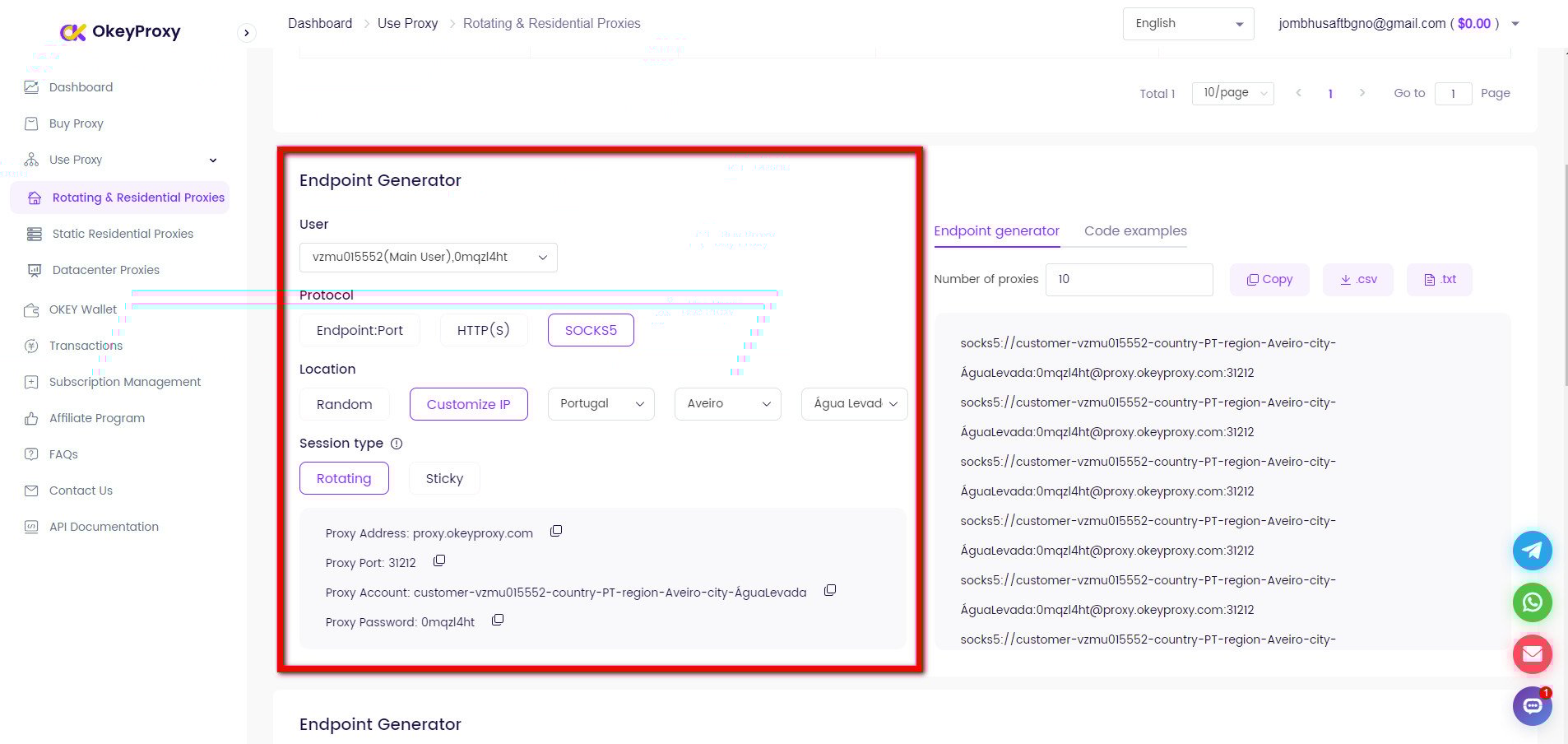
After turning the proxy ON or OFF, verify the setup by visiting an IP-checking website to confirm if the proxy is active or disabled.


Top-Notch Socks5/Http(s) Proxy Service

- Scalable Plans: Static/Rotating Residential Proxies
- Seamless Integration: Win/iOS/Android/Linux
- High Security: Ideal for Antidetect Browsers, Emulators, Scrapers, etc.
- Reliable Performance: Quick Transfer & Low Latency

By following these steps, users can enable or disable anonymous proxies on their devices with ease.
Top Socks5/Https Residential Proxies 2026 for Every Users!
Free/Premium Anonymous Proxy List
Below is a curated list of free and premium anonymous proxy providers, categorized to help users choose based on their needs for privacy, speed, reliability, and budget.
Free Anonymous Proxies
Free proxies are suitable for basic tasks like bypassing minor restrictions or occasional use. However, they often come with limitations like slower speeds, lower reliability, and potential security risks.
1. FreeProxyList
Website: free-proxy-list.net
Features:
- Large database of HTTP and HTTPS proxies.
- Free and regularly updated.
- Includes anonymity level indicators (elite, anonymous, transparent).
Limitations:
- Unreliable uptime.
- Limited speed and security.
2. HideMyAss (HMA) Free Proxy
Website: hidemyass.com/proxy
Features:
- Simple web-based proxy tool.
- Works for bypassing geo-restrictions.
- No registration required.
Limitations:
- Limited to browser-based usage.
- Ads and basic functionality only.
3. ProxyScrape
Website: proxyscrape.com
Features:
- Free proxies with options for HTTP, HTTPS, and SOCKS.
- Regular updates on working proxies.
Limitations:
- Free proxies may be overused and slow.
4. KProxy
Website: kproxy.com
Features:
- Free browser-based proxy for anonymity.
- Extensions for Chrome and Firefox.
Limitations:
- Limited data and speed for free users.
5. Spys.one
Website: spys.one
Features:
- Free proxy list with detailed information (anonymity, uptime, location).
Limitations:
- May include unreliable or outdated proxies.
Premium Anonymous Proxy
Premium proxies offer superior performance, reliability, and security. They are ideal for advanced needs like web scraping, SEO, gaming, and accessing geo-restricted content.
OkeyProxy [Recommended]
Website: okeyproxy.com
Features:
- High-anonymity SOCKS5 & HTTP(s) proxies.
- Rotating or static residential proxies.
- 150M+ IP addresses from more than 200 areas available.
- Excellent for web scraping, SEO, multi-account management, streaming, etc.
Advantages:
- Unmetered bandwidth usage.
- Reliable uptime and fast speeds.
- IP extraction through API supported.
- No cost for unavailable IP addresses.
- Competitive pricing with various plans.
Start with the ideal Anonymous Proxy with Advanced Features and More Security.

How to Fix “Anonymous Proxy Detected” and Other Proxy Errors
If you encounter the “anonymous proxy detected” message, it means the website has identified that you are accessing it via an anonymous proxy. There are several reasons why this can happen:
- IP Leaks Through Applications or Browser: Certain apps or websites may leak your real IP address through cookies or cache data, revealing your true identity.
- Multiple Requests from the Same IP: If you use the same proxy IP address for several requests within a short period, it can raise red flags and be detected as a proxy.
- Low-Quality Proxies: Cheap or low-quality proxies are often flagged by websites due to their predictable behavior and easily detectable patterns.
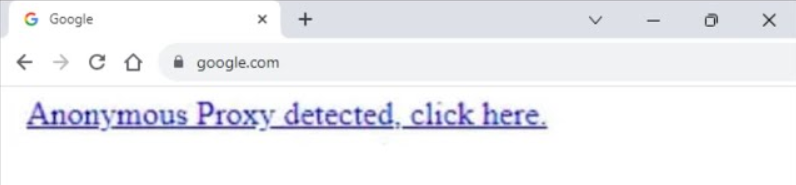
To resolve this issue, here are a few steps you can take:
- Clear Browser Cache and Cookies: Some apps or websites may store data in your browser that leaks your real IP address. Clearing your cache and cookies ensures that no unwanted information is exposed.
- Adjust Rotation Settings: If you’re using a rotating proxy, try shortening the time between each session or increasing the frequency of IP rotation. This helps in distributing your requests across a larger pool of IPs, reducing the chances of detection.
- Upgrade to Higher-Quality Proxies: Low-quality proxies are often easy to detect. For better anonymity and fewer detection issues, consider switching to elite proxies or high anonymity proxies, which offer a higher level of privacy and are less likely to be flagged.
By following these steps, you can improve your chances of bypassing proxy detection and maintain your privacy while browsing or accessing restricted content.
Conclusion
Anonymous proxies are an excellent tool for anyone looking to protect their online identity, access restricted content, or enhance their privacy. Whether you’re streaming geo-blocked shows, managing multiple accounts, or just want to browse without being tracked, an anonymity proxy has you covered.
For the best experience, go with a trusted provider like Okey Proxy to ensure your anonymity and security are in good hands.
Ready to browse the web anonymously? Start with a reliable anonymous proxy today!