We’ve all been there: it’s lunch break, you’ve finished your assignments, and you’re ready to jump into Blox Fruits o Adopt Me! with your friends. You open your laptop, head to the site, and—BAM—the dreaded “Access Denied” screen appears. School administrators are notoriously good at blocking anything that remotely looks like fun, especially Roblox.
But here’s the thing: firewalls aren’t perfect. Whether you’re using a restricted Chromebook or a locked-down Windows PC, there are several ways to bypass these digital roadblocks. In this guide, we’ll break down exactly how to play Roblox unblocked at school using six proven methods—from cloud gaming to residential proxies, we’ve got you covered.
What Is Roblox and Why Do Schools Block It?
If you’re reading this, you probably already know that Roblox isn’t just one game—it’s a massive platform of millions of user-created experiences, from life simulators like Brookhaven RP to anime adventures like Blox Fruits and competitive titles like The Strongest Battlegrounds. It’s a place for creativity, social interaction, and competitive gaming. So why are schools so determined to shut it down?
How School Firewalls Work
Most school IT departments deploy layered firewall systems (such as GoGuardian, Securly, or Lightspeed) that block Roblox through multiple mechanisms simultaneously:
- URL & DNS Filtering: The simplest layer. The firewall maintains a blocklist of domains like
roblox.comand prevents DNS resolution, so the address never resolves to an IP. - Ispezione profonda dei pacchetti (DPI): More advanced firewalls analyze actual data packets. They can identify gaming traffic patterns even when the domain is disguised, which is why free VPNs often fail.
- Bandwidth Management: Roblox is a data-heavy, real-time 3D platform. If hundreds of students stream game environments simultaneously, the school’s internet grinds to a halt, disrupting actual schoolwork.
- Distraction Control: Teachers want students focused on lessons, not pizza-delivery careers in Work at a Pizza Place.
- Safety Concerns: Because Roblox is an open social platform with chat features, schools block it to reduce exposure to strangers and user-generated content on unsupervised networks.
Understanding which blocking method your school uses is the key to choosing the right bypass strategy. If they block the website domain, use a mirror. If they block the IP range, use a proxy. If they use DPI to block everything, go to the cloud—or use your own network entirely.
Is It Legal to Unblock Roblox at School?
Technically, bypassing a school firewall is not a federal crime in most jurisdictions, but it almost certainly violates your school’s Acceptable Use Policy (AUP)—a document you likely signed at the start of the year.
Bypassing school network restrictions may violate your school’s acceptable use policy. Consequences can include detention, suspension, or permanent loss of computer privileges. These methods are intended for use during genuine free periods (lunch, study hall) on personal devices. Use them at your own risk and always put your studies first.
6 Most Effective Methods to Play Roblox Unblocked at School
Here are the top-tested strategies for 2026. Each varies in difficulty, cost, and effectiveness depending on how strict your school’s IT setup is.
Method 1: Cloud Gaming Platforms (Best for “No Download” — Recommended First)
Cloud gaming is the go-to starting point for how to play Roblox unblocked at school. Instead of running the game on your school computer, a powerful remote server runs the game and streams a video feed directly to your browser. Because no game client is installed and traffic looks like standard HTTPS video streaming, many basic school filters don’t recognize it as gaming traffic.
How to Use now.gg
- Open your browser (Chrome or Edge work best) and navigate to ora.gg.
- Search for “Roblox” in the platform’s game library and click the result.
- Select your plan. Note: as of 2025, now.gg introduced session limits for free users and offers paid day passes and monthly subscriptions. Free slots may be available during off-peak hours.
- Log in to your Roblox account when prompted and start playing immediately—no download needed.
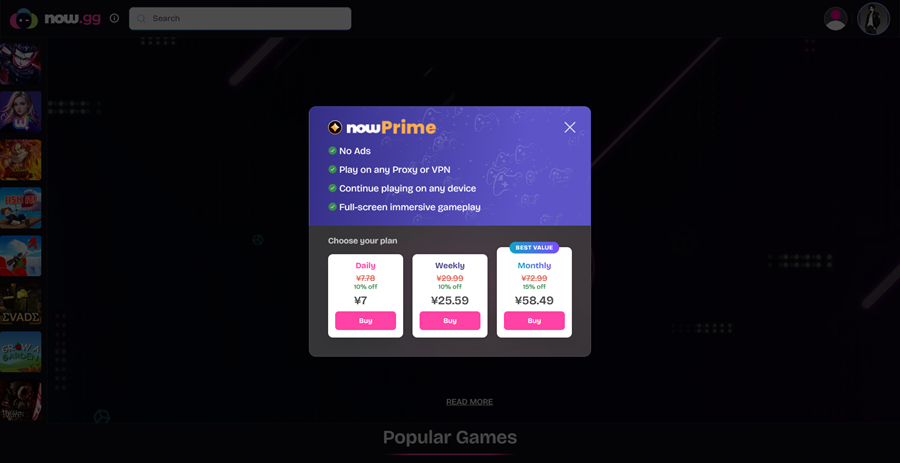
Important 2026 Update: The official Roblox listing was removed from now.gg in 2025, but a functionally identical third-party version remains available by searching “Roblox” on the platform. All account progress, Robux balance, and game data remain tied to your own Roblox account. Always access now.gg through the official URL to avoid credential-harvesting mirror sites.
Alternative Cloud Platforms
If now.gg is blocked or its queues are too long, try EasyFun.gg o BlueStacks X—both support Roblox in-browser. CloudMoon is a newer entrant with servers in 22 regions that is worth testing as a backup.
One Critical Limitation: Many schools in 2026 have also begun filtering cloud gaming domains and streaming traffic categories. Effectiveness varies widely between schools—some students report no issues while others find both Roblox and now.gg blocked simultaneously.
| Pro | Contro |
|---|---|
| No installation required; works on Chromebooks; leaves no local trace; bypasses hardware limits. | Requires stable internet (min. 5–10 Mbps); high latency on congested servers; free tier now limited; some schools have started blocking cloud gaming domains. |
Method 2: Proxy Websites: Accessing Roblox via a Web Proxy
A web proxy acts as a middleman. Instead of going directly to roblox.com, you go to a proxy site, which then “fetches” the Roblox page for you. The school’s firewall only sees you visiting the proxy, not the game site.
Steps to Use a Web Proxy
- Find a working web proxy (search for “unblocked web proxy 2026”).
- Paste the Roblox URL into the proxy’s search bar.
- Select “Direct Open” or “Standard Proxy.”
- Wait for the page to load (it might be slow).
Note on SOCKS5 Proxies: If basic web proxies are blocked, you need a high-tier solution. This is where OkeyProxy comes in. Professional SOCKS5 deleghe residenziali from OkeyProxy are nearly impossible for school filters to catch because they use real residential IP addresses. This makes your connection look like it’s coming from a normal home network rather than a “gaming site.” It is significantly faster and more stable than free web proxies.
Security Warning: Never enter your Roblox credentials on an unfamiliar free proxy site. Many are designed specifically to harvest login information. If you use a proxy service, always choose a reputable paid provider.
| Pro | Contro |
|---|---|
| Available on Chromebook; No registration or download required. | Free web proxies are risky and unreliable; quality residential proxies require a paid subscription. |
Method 3: VPN Browser Extensions
A VPN (Virtual Private Network) encrypts your browser traffic, hiding it from the school’s network filters. If you can access the Chrome Web Store, a VPN extension is a quick fix.
How to Install a VPN Extension
- Open the Chrome Web Store and search for “VPN.”
- Install a reputable extension (NordVPN or ExpressVPN’s free tier are trustworthy options; avoid random “unblock everything” extensions from unknown developers).
- Click the extension icon, choose a nearby server (proximity = lower latency = less lag), and activate it.
- Refresh your browser and navigate to Roblox or your preferred cloud gaming platform.
Key Limitation: Modern school firewalls use Deep Packet Inspection to detect and block VPN protocols (UDP/TCP). Most school IT departments also block the Chrome Web Store extension menu entirely, preventing installation. Free VPNs are particularly easy to detect and are almost universally blocked on school networks. If you already have a premium VPN with obfuscation features (which disguise VPN traffic as normal HTTPS), your chances of success are much higher.
| Pro | Contro |
|---|---|
| Easy to toggle on/off; good encryption; reliable against basic keyword and DNS filters. | Most school IT departments block VPN protocols and the Web Store; free VPNs are often already blocked or unsafe; premium VPNs cost money. |
Method 4: USB Portable Browser
If the school has locked down computer settings and you can’t install extensions, you can bring your own software. A portable browser (like Firefox Portable) runs entirely from a USB flash drive without requiring any installation on the host computer.
How to Set It Up
- On your home computer, download Firefox Portable from the official Portable Apps website (
portableapps.com). - Install it directly onto a USB flash drive.
- While still at home, configure the browser with a VPN extension or proxy settings (such as OkeyProxy’s SOCKS5 configuration) so it’s ready to go.
- At school, plug the USB into a school computer and double-click the
.exefile to launch the browser directly from the drive. - Navigate to your cloud gaming platform or Roblox through your pre-configured proxy.
Important Checks: First verify that USB ports are not disabled by your school’s policy—many IT departments lock them. Also note that running unfamiliar software from a USB drive is highly visible if a teacher or IT staff member looks over your shoulder. This method combines well with deleghe residenziali pre-configured at home for maximum effectiveness.
| Pro | Contro |
|---|---|
| Bypasses locked browser settings; can carry custom proxy/VPN configuration; no local installation required. | USB ports may be disabled; visually conspicuous; requires preparation at home; high-risk if discovered by IT staff. |
Method 5: Roblox Mirror Sites
Mirror sites are third-party websites that host browser-based or simplified versions of Roblox games under a different domain name. Because they use non-Roblox URLs, they can slip past filters that specifically target roblox.com. They’re best suited for a quick gaming session and require the least technical setup.
Commonly Referenced 2026 Mirror Links:
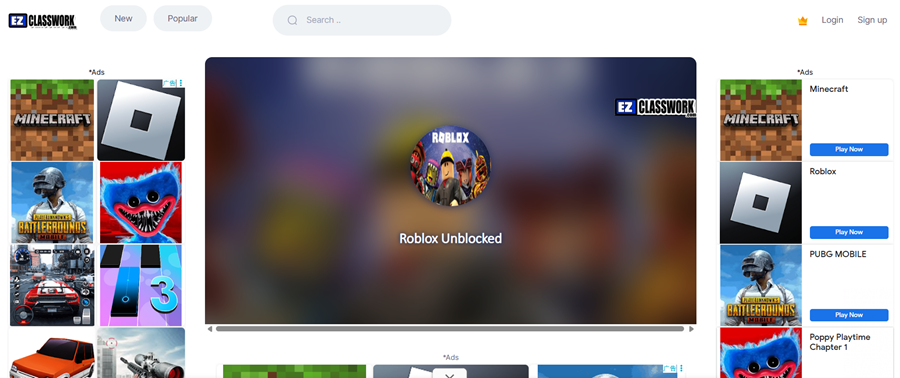
Security Warning: Mirror sites vary enormously in quality and trustworthiness. Never log in with your Roblox credentials on a mirror site if the login page looks different from Roblox’s standard interface. Enable Two-Factor Authentication (2FA) on your account before using any third-party site to protect your Robux and items. Expect ads—they’re how these sites fund themselves.
| Pro | Contro |
|---|---|
| Zero setup required; works instantly in any browser; great for a quick session. | Lower game performance; many sites contain intrusive ads; significant account security risk on unverified sites; frequently get blocked once discovered. |
Method 6: Mobile Hotspot
If all else fails, stop using the school’s network entirely. By tethering your school laptop or personal device to your phone’s mobile hotspot, you create a completely private internet connection that the school firewall has absolutely no visibility into.
How to Connect
- On your phone, go to Settings > Personal Hotspot (iPhone) or Settings > Network & Internet > Hotspot (Android) and enable it.
- On your school laptop, click the Wi-Fi icon in the taskbar and look for your phone’s name in the list of available networks.
- Enter your hotspot password and connect.
- Open Roblox (or a cloud gaming platform) and play as if you were at home—no firewall, no restrictions.
Data Usage Heads-Up: Roblox and cloud gaming consume significant mobile data. Monitor your data usage, especially if you’re on a limited plan. This method is best if you have an unlimited data plan. Also be aware that some schools have rules against using personal hotspots on school premises even on personal devices—check your AUP.
| Pro | Contro |
|---|---|
| Completely bypasses school network and firewall; full game speed with no restrictions; zero technical setup. | Consumes mobile data quickly; phone battery drains faster; may still violate school device/classroom policies; not feasible on limited data plans. |
Method Comparison Table
Not sure which method suits your situation? Use this quick reference to find the best approach based on your device, technical comfort level, and school’s strictness.
| Metodo | Facilità d'uso | Game Speed | Livello Stealth | Il migliore per |
|---|---|---|---|---|
| Cloud Gaming (now.gg / EasyFun) | ⭐⭐⭐⭐⭐ | ⭐⭐⭐ | ⭐⭐⭐ | Chromebooks, quick setup |
| Proxy web gratuito | ⭐⭐⭐ | ⭐⭐ | ⭐⭐⭐ | Laptops / PCs, undetectable long sessions |
| VPN Extension | ⭐⭐⭐⭐ | ⭐⭐⭐⭐ | ⭐⭐ | Personal laptops with Web Store access |
| USB Portable Browser | ⭐⭐ | ⭐⭐⭐⭐ | ⭐⭐⭐ | Heavily locked-down school PCs |
| Siti specchio | ⭐⭐⭐⭐⭐ | ⭐⭐ | ⭐⭐ | One-time quick play, no account needed |
| Hotspot mobile | ⭐⭐⭐⭐ | ⭐⭐⭐⭐ | ⭐ | Unlimited data users, maximum reliability |
Safety Tips & Best Practices for Gaming at School
Getting unblocked is only half the battle. Staying out of trouble and keeping your account secure is the other half. Follow these best practices:
- Respect School Policy First: If you have a major exam or a strict classroom environment, don’t risk it. Save gaming for genuine free periods like lunch or study hall.
- Always Use Incognito/Private Mode: On shared school computers, private browsing prevents the browser from caching game data, storing cookies, or saving your Roblox password for the next user.
- Log Out After Every Session: On any shared device, leaving your account logged in is an open invitation for account theft or unauthorized purchases.
- Enable Two-Factor Authentication (2FA): Activate 2FA on your Roblox account before using any third-party proxy or mirror site. It protects your Robux and items even if your password is compromised.
- Avoid Unknown Free Proxies: Many free proxy sites are specifically engineered to capture login credentials. Free proxies are often slow, riddled with ads, and frequently compromised. If you use a proxy, use a reputable paid service like OkeyProxy.
- Optimize Browser Performance: Cloud gaming is memory-intensive. Close all unnecessary tabs before playing. In Chrome, enable hardware acceleration (
chrome://settings/system) so your GPU handles video decoding, which significantly reduces lag. - Connection Speed Matters: Cloud gaming requires a minimum of 5 Mbps, with 15 Mbps or faster for a smooth experience. Check both speed and ping—a 100 Mbps connection with 80ms ping will perform worse than a 20 Mbps connection at 15ms.
- Alt-Tab Is Your Friend: Keep a school-appropriate tab (Google Docs, Canvas, your school’s LMS) open in an adjacent window. Use Alt + Tab to switch immediately if a teacher approaches.
- Use Trusted Cloud Services Only: Only access now.gg through its official URL. Fake mirror sites that look identical exist specifically to steal account credentials.
Frequently Asked Questions About Roblox Unblocked at School
Can I play Roblox at school without downloading anything?
Yes. Cloud gaming platforms like now.gg and EasyFun.gg stream Roblox from remote servers directly to your browser—no download or installation required. This makes them ideal for school-issued Chromebooks where installing software is impossible.
Is unblocking Roblox at school illegal?
In most countries, bypassing a school firewall is not a criminal offense. However, it almost certainly violates your school’s Acceptable Use Policy (AUP). The consequences are disciplinary—detention, suspension, or loss of computer privileges—not legal. Always understand your school’s specific policies before proceeding.
Why do free VPNs usually fail to unblock Roblox at school?
Modern school firewalls use Deep Packet Inspection (DPI) to detect and block VPN traffic patterns. Free VPNs use well-known IP ranges and protocols that are trivial for school IT systems to identify and blacklist. Premium VPNs with obfuscation features have a much better success rate, but even these can be blocked on stricter networks.
What is the difference between a web proxy and a residential proxy?
A free web proxy routes your traffic through a shared data center server with an IP address that school filters can easily recognize and block. A residential proxy, such as those offered by OkeyProxy, routes your traffic through a genuine home internet connection with a real residential IP address. To your school’s firewall, the traffic looks like it comes from a normal household—making it far more difficult to detect and block.
Is it safe to log into my Roblox account on mirror sites?
Be very cautious. Only log in on mirror sites if the login interface is clearly Roblox’s own official login screen (which some cloud platforms redirect to). If a mirror site has its own custom login form asking for your Roblox credentials, do not enter them. Always have 2FA enabled on your account as a safety net.
Conclusione
Knowing how to play Roblox unblocked at school in 2026 is about choosing the right tool for your specific situation. While school firewalls have gotten smarter—now often filtering cloud gaming domains in addition to Roblox directly—the available bypass methods have also evolved.
If you want the easiest route, go with ora.gg. If you want the most reliable, high-speed connection that won’t be detected by school filters, setting up a residential proxy with OkeyProxy is the professional choice. Whichever method you choose, play smart, keep an eye on the door, and happy gaming!