In an era where internet privacy and security are paramount, Shadowrocket stands out as a robust tool for managing proxies. Whether users want to enhance online privacy or bypass geo-restrictions, it offers a comprehensive solution for various platforms. This tutorial will walk you through the steps to gain knowledge of Shadowrocket and learn how to set up Shadowrocket for Android, iOS, Mac and Windows.
What is Shadowrocket?
Shadowrocket is a rule-based proxy utility client that works with protocols including HTTP, HTTPS, SOCKS5, and Shadowsocks, allowing users to route internet traffic through various proxy servers, ensuring privacy and bypassing regional restrictions. Here are some of its key features and common uses:
- Proxy Management: Shadowrocket allows users to configure and manage different types of proxy servers, such as HTTP, HTTPS, SOCKS5, and Shadowsocks.
- Traffic Encryption: The app encrypts traffic, enhancing privacy and security by preventing unauthorized access and monitoring.
- Traffic Monitoring: Users can monitor network traffic in real-time, including bandwidth usage, connection logs, and detailed statistics.
- Rule-Based Routing: The application supports rule-based routing, which lets users specify which traffic should go through the proxy and which should use a direct connection. This can be based on domain names, IP addresses, or other criteria.
- Ad Blocking: Shadowrocket includes functionality for blocking ads, tracking scripts, and other unwanted content.
- Performance Optimization: The app optimizes network performance by reducing latency and improving connection speeds through its proxy servers.
- User-Friendly Interface: It provides a clean, intuitive interface for easy configuration and management of network settings.
How Does Shadowrocket Work?
Shadowrocket allows users to set up rules to manage their internet traffic by redirecting traffic based on domain names. For example, users can route traffic from specific websites through a proxy.
- IP-based Rules: Redirect traffic based on IP addresses.
- Geo-based Rules: Route traffic based on geographic location.
- Keyword-based Rules: Filter traffic based on specific keywords.

With its flexible configuration options, Shadowrocket is popular among users who seek greater control over their internet connections and prefer using proxies for secure, unrestricted browsing.
How to Configure Shadowrocket?
Although Shadowrocket is primarily an iOS application used to configure and manage proxies on iPhone and iPad, similar proxy functionality can also be achieved on other platforms, including Android, Mac, and Windows. However, the setup process varies depending on the device, the app version, and the specific proxy service you are using.
How to Set Up Shadowrocket on iOS
Setting up Shadowrocket on your iPhone or iPad involves a few straightforward steps:
Step 1: Get Your Proxy Credentials from OkeyProxy
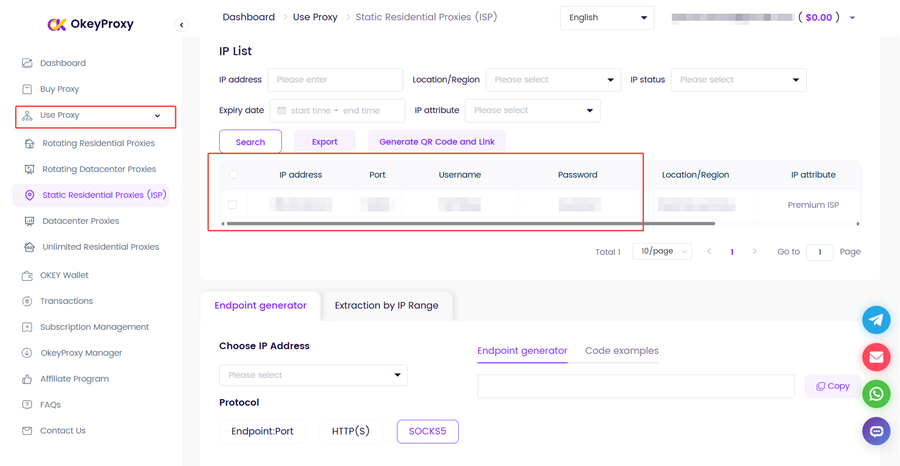
Before configuring Shadowrocket, you need valid proxy server details. Log in to your OkeyProxy dashboard, navigate to the Use Proxy section, and obtain your server address, port number, encryption method, and authentication credentials. Keep this information handy — you will need it in the next steps.
Step 2: Download Shadowrocket
Download Shadowrocket from the App Store.
Step 3: Add a Proxy Server
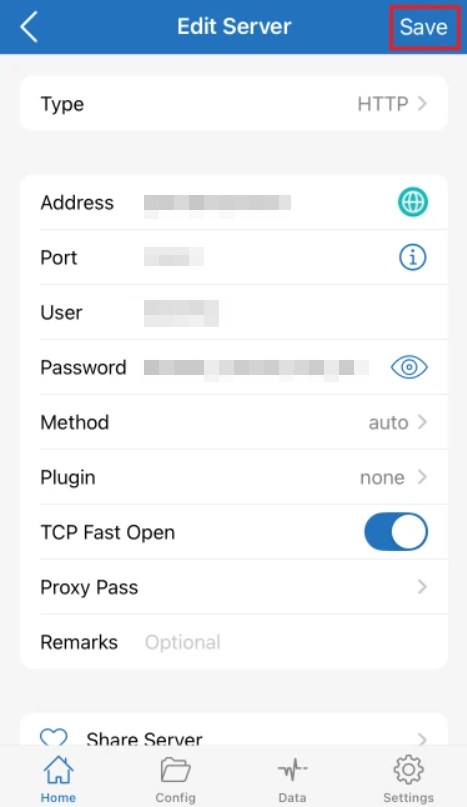
Open the app and tap the « + » icon in the top-right corner to add a new server. Enter the proxy details obtained from your OkeyProxy dashboard — including the protocol type (e.g., Shadowsocks, SOCKS5, HTTP), server address, port, encryption method, and password — then tap Save.
Step 4: Configure Global Routing
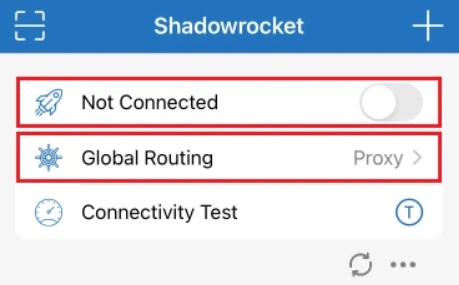
On the Home screen, tap Global Routing and set it to Proxy to ensure all traffic is routed through the proxy server. Alternatively, select Config if you want to apply rule-based routing for more granular control.
Step 5: Connect
Toggle the switch on the main screen to connect. If this is your first time, iOS will prompt you to allow VPN configuration — tap Allow and enter your device passcode to confirm. Once connected, you can tap Connectivity Test to verify the connection is working properly.
How to Set Up Shadowrocket on Android
Shadowrocket is not officially available on the Google Play Store. To achieve similar functionality on Android, Clash is a recommended open-source alternative that supports protocols like Shadowsocks, VMess, Trojan, and more.

Step 1: Get Your Proxy Credentials from OkeyProxy
Log in to your OkeyProxy dashboard and retrieve your proxy server details, including the server address, port, protocol type, and authentication credentials.
Step 2: Download Clash
Download Clash from a trusted source or its official GitHub repository. Install the APK file by enabling « Install from Unknown Sources » in your Android security settings if prompted.
Step 3: Add a Proxy Server
Tap the Proxies tab, then tap the « + » button to add a new proxy. Select the protocol (e.g., Shadowsocks, VMess) and enter the server details from your OkeyProxy dashboard.
Step 4: Connect
Once configured, activate Clash by toggling the switch at the top of the app interface.
How to Set Up Shadowrocket on Mac
Shadowrocket is available on the Mac App Store for Apple Silicon (M1/M2) Macs running macOS Ventura or later. For Intel-based Macs, V2RayX is a reliable alternative supporting Shadowsocks and V2Ray protocols.
Step 1: Get Your Proxy Credentials from OkeyProxy
Log in to your OkeyProxy dashboard and copy your proxy server address, port, protocol, and authentication details.
Step 2: Download the Application
For Apple Silicon Macs: Search for Shadowrocket in the Mac App Store and install it directly.
For Intel Macs: Visit the V2RayX GitHub page, download the latest release, open the .dmg file, and drag V2RayX to your Applications folder.
Step 3: Add a New Proxy Configuration
Open the application and tap the « + » button to add a new configuration. Enter the proxy details from your OkeyProxy dashboard, including protocol type (e.g., Shadowsocks or V2Ray), server address, port, encryption method, and authentication credentials.
Step 4: Connect
Click Start (V2RayX) or toggle the switch (Shadowrocket for Mac) to activate the proxy connection.
How to Set Up Shadowrocket on Windows
Since Shadowrocket is not available for Windows, Shadowsocks is the most widely used alternative. It operates as a SOCKS5 proxy and supports tunneling HTTP and HTTPS traffic.

Step 1: Get Your Proxy Credentials from OkeyProxy
Log in to your OkeyProxy dashboard and note your server address, port, encryption method, and password.
Step 2: Download Shadowsocks
Go to the Shadowsocks GitHub repository or its official website and download the Windows client.
Step 3: Add a Proxy Server
After launching the application, click on the Servers tab and add a new server. Enter the details from your OkeyProxy dashboard, including the server address, port, encryption method, and password.
Step 4: Connect
Click the Connect button to establish the proxy connection.
Troubleshooting Common Issues on Shadowrocket
- Connection Failed: Double-check that your server address, port, and credentials are entered correctly, and confirm that your internet connection is active. Also verify that the correct protocol type is selected in your server settings.
- Slow Speed: Try switching to a different server or changing the protocol type. Choosing a proxy provider with a large, high-quality IP pool — like OkeyProxy — can significantly improve speed and stability.
- DNS Leak: If your real IP address is still exposed while connected, go to the Shadowrocket Home screen, open Global Routing, and set it to Proxy mode. This ensures all DNS requests are routed through the proxy, protecting your privacy.
- Authentication Failed: Re-enter your username and password from the OkeyProxy dashboard, making sure there are no extra spaces before or after the credentials.
- App Crashes: Make sure you are running the latest version of the app. Reinstall if the issue persists.
Use a Stable Proxy to Get the Best Out of Shadowrocket
Many Shadowrocket issues come down to the quality of the proxy server itself — not the app. Choosing a proxy provider with stable, residential IPs dramatically reduces connection errors, slow speeds, and blocks.
OkeyProxy is a professional proxy service trusted by users worldwide, offering access to over 150 million real residential IPs across more than 200 countries. With high-speed connections, low latency, and strong stability, OkeyProxy pairs seamlessly with Shadowrocket and its alternatives to deliver reliable, anonymous browsing — whether for bypassing geo-restrictions, protecting privacy, or accessing global content.
🎁 Exclusive Free Trial for New Users
New to OkeyProxy? Register your account today and contact our online support to claim your exclusive welcome offer:
- 1 GB Free Trial of Rotating Residential Proxies — access a pool of 150M+ real IPs
- 1 IP Free Trial of Static Residential Proxies — stable, dedicated IPs for long-session use
⚠️ This offer is available to new users only. Don’t miss your chance to test OkeyProxy risk-free before committing to a plan.
FAQ about Shadowrocket
-
Is Shadowrocket a VPN?
No. Shadowrocket is not a VPN itself, but a rule-based proxy utility client that supports various proxy protocols including Shadowsocks, VMess, and others. By routing your internet traffic through proxy servers, it can provide privacy and security benefits similar to a VPN, but it is not a VPN service in and of itself.
-
Is Shadowrocket Safe?
Yes. Shadowrocket is a legitimate application and is generally considered safe when downloaded from a reputable source such as the Apple App Store. However, the safety of your connection depends largely on the proxy servers you configure it with. Always use reliable and trustworthy proxy providers, such as OkeyProxy, to ensure a secure experience.
-
What is Shadowrocket Used For?
Shadowrocket is used to manage and configure proxy settings, helping users route their internet traffic through various proxy types such as Shadowsocks and VMess. Common use cases include enhancing online privacy, bypassing censorship, and accessing geo-restricted content.
-
How to Get Shadowrocket for Free?
Shadowrocket is a paid app on the Apple App Store (currently priced at $2.99), so obtaining it for free through official channels is not possible. If cost is a concern, you can watch for occasional promotions, or explore the free alternatives mentioned in this guide for Android, Mac, and Windows.
-
Does Shadowrocket Work in China?
Yes, Shadowrocket can work in China, but its effectiveness depends on the proxy servers and protocols you use. Many websites and services are blocked by China’s Great Firewall, and using Shadowrocket with a well-configured Shadowsocks or VMess proxy can help bypass these restrictions. Note that the Chinese government actively monitors and blocks VPN and proxy traffic, so choosing a provider with stable, high-quality residential IPs — like OkeyProxy — is essential for consistent performance.
Summary
As a powerful tool for managing proxies and enhancing internet privacy, Shadowrocket is an excellent choice whether you are using iOS, Android, Mac, or Windows. This guide has covered everything from initial setup to troubleshooting, along with platform-specific alternatives. For the best experience, pair Shadowrocket with a high-quality proxy provider like OkeyProxy to ensure fast, stable, and anonymous connections across all your devices.