
In an era where web applications are becoming increasingly complex, having visibility into the data flowing between your browser and the server is no longer just a luxury—it’s a necessity. Whether you are debugging a cryptic API error, testing the security of a web portal, or building an automated data pipeline, you need a tool that is fast, lightweight, and completely under your control. Enter the Proxypy Web Proxy.
Often referred to in developer circles as proxy.py, this high-performance framework has carved out a niche as the “Swiss Army Knife” of Python-based networking tools. But what makes it stand out in a sea of proxy solutions like Squid or Nginx? In this guide, we will break down everything from its core architecture to advanced deployment strategies, including how to overcome its inherent limitations by integrating professional residential proxy networks.
What Exactly is Proxypy Web Proxy?
The term Proxypy Web Proxy most commonly refers to proxy.py, a high-performance, lightweight, and highly customizable HTTP/HTTPS proxy server framework written entirely in Python. Created by Abhinav Singh and maintained as an open-source project on GitHub (with over 3,500 stars), proxy.py is designed to give developers a programmable entry point into the web traffic stream, without the heavy footprint of enterprise-grade solutions.
Unlike many other proxy tools that come bloated with unnecessary features or heavy dependencies, proxy.py was built with a clear goal: providing a pluggable, zero-dependency foundation for network monitoring, traffic control, and application development, testing, and debugging. Because it is written entirely in Python, it integrates seamlessly into the modern developer’s workflow, making it a favorite for local testing, network monitoring, CI/CD pipelines, and even automated quality assurance (QA) processes.
Beyond being a forward proxy, proxy.py is simultaneously a proxy server framework, a web server framework, a PubSub framework, and a work acceptor and executor framework—all in one package. It can also function as an alternative to tools like Ngrok or FRP for local tunnel scenarios.
Having established what it is, let’s take a look under the hood to see how this tool actually handles your data packets.
How the Proxypy Web Proxy Works: Under the Hood
The operational logic of the proxypy web proxy is elegantly simple yet incredibly powerful. It acts as a transparent or explicit intermediary between a client (like your Chrome browser or a Python script) and the destination server (like Google.com).
The Request/Response Lifecycle
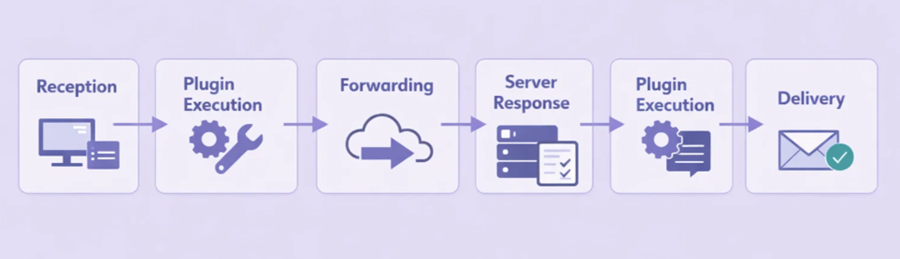
When a client sends an HTTP request through proxy.py, the following sequence occurs:
- Reception: proxy.py accepts the incoming connection from the client on the configured port (default
::1:8899, equivalent to IPv4127.0.0.1:8899). - Plugin Execution (Pre-request): Before the request is forwarded, any active plugins are triggered via the
before_upstream_connectionyhandle_client_requestlifecycle hooks. You could, for example, change theUsuario-Agenteheader or block certain domains entirely here. - Forwarding: The proxy forwards the (potentially modified) request to the target server. By default, proxy.py starts one worker process per available CPU core, distributing connections automatically.
- Server Response: The target server processes the request and sends data back to the proxy.
- Plugin Execution (Post-response): proxy.py receives the response and allows plugins to inspect or modify it via the
handle_upstream_chunkhook before the client sees it (for example, injecting a script or stripping a tracking header). - Delivery: The final response is delivered to the client.
For standard HTTP traffic, the proxy can read and edit every byte. For HTTPS, it uses a technique called TLS Interception (when configured with the appropriate CA certificates), allowing it to decrypt and re-encrypt traffic so the data remains fully readable for debugging purposes. This mechanism is the foundation for its most impressive capabilities.
Core Features of the Proxypy Web Proxy
Why choose this over other solutions? The proxypy web proxy is packed with features that cater specifically to the needs of modern software engineering, security research, and network monitoring.
1. High Performance and Lightweight Architecture
proxy.py is designed for efficiency from the ground up. It uses Python’s multiprocessing capabilities to distribute client connections across all available CPU cores—the number of worker processes defaults to the number of CPU cores on the machine, and is fully configurable via the --num-workers flag. Most importantly, it is zero-dependency: no third-party libraries need to be installed. A standard Python 3.6+ environment is all it takes, making it ideal for Docker containers, CI/CD environments, and constrained systems.
2. Pluggable Framework for Infinite Customization
The soul of proxy.py is its plugin system, built around the HttpProxyBasePlugin base class. In proxy.py, everything is a plugin. You can write your own Python classes to hook into the full request/response lifecycle, including before_upstream_connection, handle_client_request, handle_upstream_chunk, on_upstream_connection_close, and more. Common use cases include filtering specific URLs or domains, injecting custom authentication headers, caching responses to save bandwidth, logging traffic to a database, mocking API responses for testing, and implementing custom DNS resolution logic. Plugins are loaded at startup via the --plugins flag or can be passed as fully-qualified file paths.
3. TLS Interception and Man-in-the-Middle (MitM) Capabilities
This is a game-changer for security researchers and QA engineers. By acting as a Man-in-the-Middle, the proxy can decrypt HTTPS traffic using dynamically generated certificates signed by a local CA you control. This is essential for debugging mobile apps or web applications that rely on encrypted APIs where you need to see the JSON payload to understand a bug. TLS interception can also be conditionally enabled per-request using the do_intercept plugin hook, giving you fine-grained control over which traffic is decrypted.
4. Built-in Web Server, Reverse Proxy, and Dashboard
Beyond being a forward proxy, proxy.py can also function as a programmable HTTP(S) web server (enabled via --enable-web-server), a reverse proxy server (enabled via --enable-reverse-proxy), and a static file server (enabled via --enable-static-server). It even includes an optional web-based dashboard (--enable-dashboard) that lets you monitor all connections in real-time through a clean visual interface at http://localhost:8899/dashboard/.
5. Asynchronous, Non-blocking Performance
By leveraging Python’s asyncio in threadless mode (the default on Python 3.8+ for macOS and Linux), the proxypy web proxy can handle thousands of concurrent connections without blocking. Under this execution model, acceptor processes delegate incoming client connections to worker processes without spawning a new thread per connection, resulting in significantly lower memory overhead. For environments where threadless mode is not supported, a traditional --threaded mode is also available.
6. DNS-over-HTTPS (DoH) Support
proxy.py includes built-in support for DNS-over-HTTPS, allowing all DNS lookups to be performed over encrypted HTTPS connections. This prevents DNS leaks and protects against DNS spoofing attacks, making it a solid choice for privacy-sensitive deployments. The built-in DnsOverHttpsPlugin uses Cloudflare’s 1.1.1.1 resolver by default, and the resolve_dns hook in HttpProxyBasePlugin makes it straightforward to implement your own custom DNS resolver.
7. SSH Tunnel Support (Ngrok/FRP Alternative)
proxy.py includes a --tunnel-* family of flags that let you expose your local proxy through an SSH tunnel to a remote server—making it a self-hosted alternative to services like Ngrok or FRP. This is especially useful for webhook testing, exposing local development servers, or remotely debugging APIs without relying on third-party tunnel providers.
8. Chrome DevTools Integration
With the --enable-devtools flag, proxy.py can expose a DevTools WebSocket endpoint. This allows you to connect the Chrome DevTools frontend directly to proxy.py and inspect traffic with a familiar UI, bridging the gap between a raw proxy and a full browser debugging suite.
9. Cross-Platform Support
proxy.py runs natively on Windows, macOS, and Linux. Docker images are also officially published (abhinavsingh/proxy.py:latest), with multi-platform support for both linux/amd64 y linux/arm64. This makes it trivially deployable on everything from Raspberry Pi to cloud VMs.
| Característica | Beneficio |
|---|---|
| Zero Dependencies | Easy deployment in CI/CD pipelines and Docker containers. |
| TLS Interception | Full visibility into encrypted HTTPS traffic for debugging. |
| Multi-core Scaling | Handles heavy loads by distributing across all CPU cores. |
| Threadless asyncio Mode | High concurrency with minimal memory overhead. |
| DNS-over-HTTPS | Encrypted DNS lookups to prevent leaks and spoofing. |
| SSH Tunnel Support | Self-hosted Ngrok/FRP alternative for local exposure. |
| Chrome DevTools Integration | Inspect traffic with a familiar browser debugging UI. |
| Cross-Platform | Runs on Windows, macOS, Linux, and Docker (amd64 & arm64). |
With such a robust feature set, you might be wondering if this tool is the right fit for your specific role. Let’s look at who benefits the most.
Who Should Use the Proxypy Web Proxy?
While anyone interested in networking can benefit from it, four specific groups find the proxypy web proxy indispensable:
- Developers and QA Engineers: It is the perfect tool for mocking API responses. If you want to see how your app handles a 500 Server Error, you can write a small plugin that returns that error code without ever hitting the real upstream server. It also integrates cleanly into automated test suites.
- Security Researchers: For penetration testing and vulnerability assessment, having a fully scriptable proxy is vital for discovering how applications handle data. TLS interception and the MitM capability allow researchers to analyze encrypted traffic in detail.
- Privacy-Conscious Power Users: Advanced users leverage the plugin system to strip tracking pixels, remove advertising headers, and block telemetry endpoints at the network level before they ever reach the browser.
- Students and Educators: Because the source code is clean, well-documented, and written in Python, it serves as an excellent educational resource for understanding how the HTTP/HTTPS protocol works in practice. The extensive examples directory in the GitHub repository is particularly valuable for learning.
Now that we’ve covered the “what” and the “who,” let’s move on to the “how.” Setting up the proxy is surprisingly fast.
Quick Start: Deploy Your Proxypy Web Proxy in Minutes
Follow these steps to get your own proxy instance up and running on your local machine.
Step 1: Check Python Version
Ensure you have Python 3.6 or higher installed. You can verify this by running:
python --versionStep 2: Install via pip
The easiest way to get the proxypy web proxy is through the Python Package Index:
pip install proxy.pyStep 3: Run the Proxy
Start the server with the default configuration. By default, it will listen on ::1:8899 (IPv6 loopback, equivalent to 127.0.0.1:8899 on IPv4).
proxy --enable-dashboardTo start with a specific number of worker processes, use:
proxy --enable-dashboard --num-workers 4Step 4: Configure Your Client
Go to your browser’s network settings (or your OS proxy settings) and set the HTTP Proxy to 127.0.0.1 and the Port to 8899. All browser traffic will now flow through proxy.py.
Step 5: Monitor Traffic
Abra su navegador y vaya a http://localhost:8899/dashboard/. You can now observe every request and response in real-time through the built-in dashboard.
Step 6: Add a Custom Plugin for Advanced Control
The real power of proxy.py emerges when you write your own plugins. Plugins extend HttpProxyBasePlugin and can hook into any stage of the request/response lifecycle. Here is a practical example: a plugin that blocks all requests to a specific domain and adds a custom header to every other outgoing request.
Create a file named my_plugin.py:
from typing import Optional
from proxy.http.proxy import HttpProxyBasePlugin
from proxy.http.parser import HttpParser
from proxy.http.exception import HttpRequestRejected
from proxy.common.constants import CRLF

BLOCKED_DOMAINS = [b'ads.example.com', b'tracker.example.com']
CUSTOM_HEADER = b'X-Forwarded-By'
CUSTOM_VALUE = b'proxypy-custom'

class BlockAndTagPlugin(HttpProxyBasePlugin):
    """Blocks specific domains and injects a custom header on all other requests."""

    def before_upstream_connection(
        self, request: HttpParser
    ) -> Optional[HttpParser]:
        # Block requests to domains in the blocklist
        if request.host in BLOCKED_DOMAINS:
            raise HttpRequestRejected(
                status_code=403,
                reason=b'Blocked by proxypy plugin',
            )
        return request

    def handle_client_request(
        self, request: HttpParser
    ) -> Optional[HttpParser]:
        # Inject a custom header into every allowed outgoing request
        request.add_header(CUSTOM_HEADER, CUSTOM_VALUE)
        return request
Then launch proxy.py with your plugin loaded. Make sure the file is discoverable via PYTHONPATH:
PYTHONPATH=/path/to/your/plugin/directory proxy \
  --enable-dashboard \
  --plugins my_plugin.BlockAndTagPlugin
You can stack multiple plugins by passing comma-separated class paths to --plugins. For example, you could load one plugin for logging, one for header injection, and one for domain filtering simultaneously—each staying small, focused, and independently testable.
Descargo de responsabilidad: Please use the proxypy web proxy responsibly. Intercepting and decrypting HTTPS traffic should only be performed on devices you own or have explicit written permission to test. Always respect user privacy and comply with all applicable local laws and regulations.
Tips for Maximizing Security and Utility
Running a proxy is a power-user move, but it requires basic hygiene to keep your data and network safe. Here are our top recommendations:
- Stick to HTTPS: Even when routing through a local proxy, ensure the websites you visit use HTTPS. The proxy does not make an unencrypted site secure; it simply passes the data.
- Clear Your Cookies: If you are using the proxy to test different user sessions, clear your browser cookies frequently to avoid unintended session bleed between tests.
- Use Authentication for Network-Accessible Instances: If you configure proxy.py to listen on a public or LAN-facing interface rather than localhost, always enable authentication using the
--auth-pluginflag or a custom auth plugin to prevent unauthorized use of your proxy. - Keep Plugins Small and Focused: One plugin for logging, one for header modification, one for domain filtering. This principle of separation makes plugins individually testable and far easier to debug when something goes wrong.
- Pin Your CA Certificate: When using TLS interception, keep your generated CA certificate and private key secure. Anyone with access to your CA key can sign certificates and intercept your HTTPS traffic.
While proxy.py is incredibly flexible, it does have one significant limitation that most users encounter as they scale. Let’s address that directly.
Limitations and Best Practices: Single IP vs. Global Scale
The primary limitation of a standard proxypy web proxy setup is the “Single IP Problem.” Whether you are running it on your laptop or a cloud VPS, every request leaving the proxy carries that machine’s specific IP address.
For local debugging, this is perfectly fine. But if you are using proxy.py for automated web scraping, market research, or SEO monitoring at scale, sending thousands of requests from a single IP address will get you blocked by target servers almost immediately. Sites like Google, Amazon, and LinkedIn use sophisticated anti-bot systems that flag and ban IP addresses—especially data center IPs—exhibiting repetitive or high-volume traffic patterns.
The Professional Solution: proxy.py + OkeyProxy Integration
To solve the single-IP bottleneck, experienced developers adopt a professional integration strategy. They keep proxy.py as the “Brain”—the control layer where plugins handle logic, header manipulation, and traffic filtering—while using an upstream residential proxy network as the “Body” that actually egresses traffic to the internet.
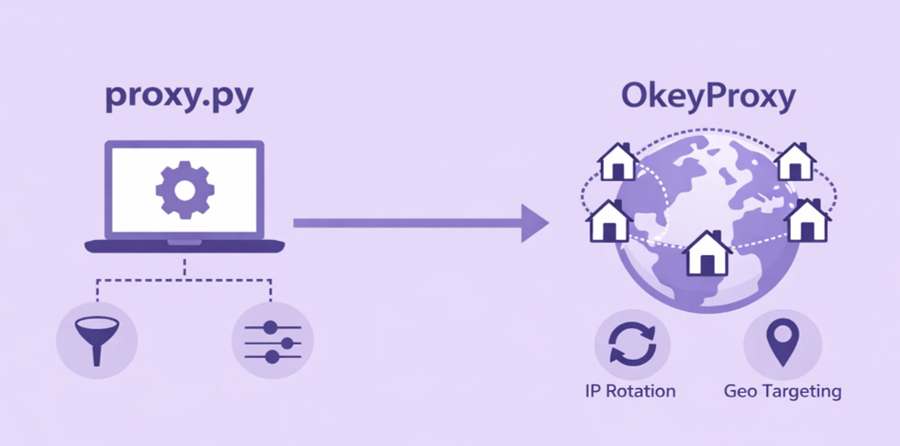
By configuring OkeyProxy as the upstream provider, your traffic flow looks like this:
Your App → proxy.py (Logic / Filtering / Header Injection) → OkeyProxy (150M+ Residential IPs) → Target Website
Why This Combination is Highly Effective:
- IP Diversity: OkeyProxy provides access to más de 150 millones de IP residenciales reales across 200+ countries. Traffic appears to originate from real home users, not from automated scripts or data centers.
- Bypass Geo-blocking: Use proxy.py plugins to selectively route specific traffic through OkeyProxy nodes in Germany, the US, Japan, or any other target region.
- Avoid Rate Limits: Because OkeyProxy can rotate IPs on each request, you significantly reduce the likelihood of hitting 429 Too Many Requests errors.
- Scale to Production: proxy.py provides the customization and control layer; OkeyProxy provides the infrastructure needed to handle production-grade request volumes.
Frequently Asked Questions About proxy.py
What Python version is required for proxy.py?
proxy.py requires Python 3.6 or higher. Threadless (asyncio-based) execution mode is the default on Python 3.8+ for macOS and Linux. On Windows or Python versions below 3.8, threaded mode is the default, though threadless mode can be enabled experimentally with the --threadless flag.
What is the default port proxy.py listens on?
By default, proxy.py listens on port 8899 and binds to the IPv6 loopback address ::1, which is equivalent to 127.0.0.1 on IPv4. The port can be changed with the --port flag, and the bind address can be changed with the --hostname flag.
Can proxy.py handle HTTPS traffic?
Yes. proxy.py supports full TLS interception of HTTPS traffic when you provide a CA certificate and signing key via the --ca-key-file, --ca-cert-filey --ca-signing-key-file flags. Without these flags, HTTPS connections are tunneled opaquely via the CONNECT method.
Is proxy.py suitable for production use?
proxy.py can be used in production environments for internal network monitoring, API gateway scenarios, and controlled testing infrastructure. For high-traffic, public-facing deployments, review the official documentation on production hardening and ensure proper authentication and access controls are in place.
Final Thoughts on the Proxypy Web Proxy
En proxypy web proxy is an essential tool for any developer who wants to truly understand, monitor, and manipulate web traffic. Its zero-dependency architecture, powerful plugin system built on HttpProxyBasePlugin, and broad feature set—spanning TLS interception, DNS-over-HTTPS, SSH tunneling, and Chrome DevTools integration—make it one of the most capable Python networking tools available today.
However, as your projects move from the local machine to the global web, remember that your egress IP address is your digital fingerprint. By combining the programmable intelligence of proxy.py with the vast, trusted residential network of OkeyProxy, you create a system that is both flexible and resilient at scale. Whether you are building the next generation of data pipelines or hardening your company’s web application through rigorous testing, this combination represents the professional standard for 2026.