A todos nos ha pasado: Lleva semanas buscando el producto perfecto, o tal vez es un vendedor profesional que se prepara para una actualización masiva del inventario. Haces clic en "Añadir al carrito" o "Guardar cambios" y, en lugar de una confirmación, te aparece la imagen de un lindo perro y el frustrante mensaje: "Lo sentimos, algo ha ido mal por nuestra parte". 🐾
Tanto si eres un comprador ocasional como un gran vendedor, este error es un muro digital. Resulta especialmente angustioso en momentos de gran tensión, como el Prime Day o una edición limitada de la PS6. Aunque los perros son adorables, el fallo técnico subyacente no lo es. Si ves esto repetidamente, rara vez es solo "culpa de Amazon", a menudo es una señal de que tu entorno de red, reputación IP o huella digital del navegador ha activado las sofisticadas alarmas de seguridad de Amazon.
¿Qué es el error "Amazon lamenta un error"?
El error "Sorry, Something Went Wrong on Our End" es el mensaje genérico de error de Amazon. Aunque pueda parecer un simple "ups" por parte de Amazon, este error es algo más que un fallo técnico. A menudo, te saluda la imagen de un simpático perro, razón por la cual esta página de error se conoce cariñosamente (o quizás frustrantemente) como la página de los "Perros de Amazon" dentro de la comunidad del comercio electrónico.
La lógica detrás del perro
Aunque el mensaje indica que el problema está en Amazon, la cuestión suele tener muchos más matices. Amazon emplea uno de los cortafuegos de aplicaciones web (WAF) más avanzados del mundo para detectar y bloquear actividades sospechosas. Esto es lo que realmente puede estar pasando cuando te encuentras con el perro:
- Solicitud de rechazo: Es posible que el servidor de Amazon haya recibido tu solicitud, pero la haya marcado como "malformada" o "sospechosa", provocando el error. Esto puede deberse a varias razones, como cabeceras incorrectas, parámetros de solicitud no válidos o patrones de tráfico inusuales.
- Activador de seguridad: Si tu perfil de conexión (que incluye tu dirección IP y la huella digital de tu navegador) se asemeja mucho a patrones asociados a bots o actores maliciosos, los sistemas de seguridad de Amazon lo marcarán e impedirán que sigas accediendo. Esto puede ocurrir incluso si navegas con normalidad, especialmente si utilizas una VPN, un proxy o una IP marcada.
- Retraso o sobrecarga del servidor: En ocasiones, el problema puede deberse a un retraso o sobrecarga real del servidor local de Amazon. Sin embargo, dada la robusta infraestructura AWS de Amazon, esto es bastante raro y suele ocurrir solo durante eventos de gran tráfico como el Prime Day o el Black Friday.
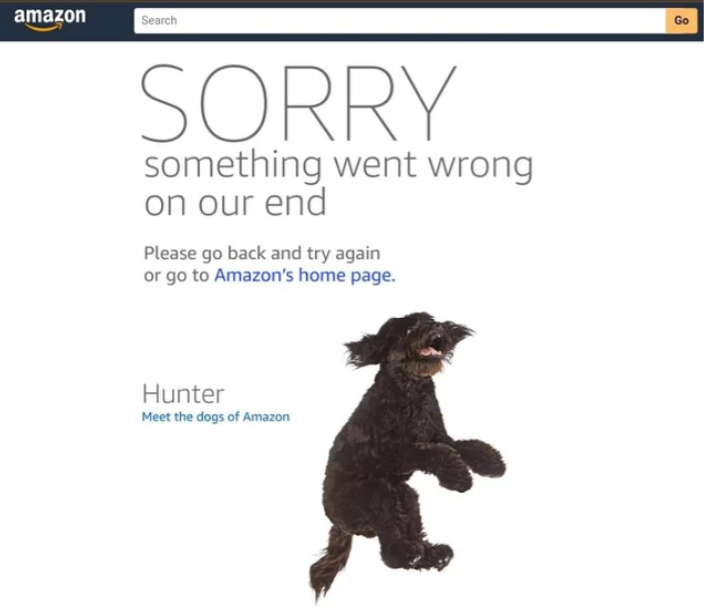
Causas comunes del error "Amazon lamenta un error".
Para resolver este problema, es crucial identificar primero la causa. Estas son las principales razones por las que podrías estar viendo continuamente los temidos cachorros en Amazon:
1. Sobrecarga del servidor de Amazon
Durante eventos de ventas masivas o periodos de mucho tráfico (como el Prime Day), incluso la potente infraestructura de Amazon puede experimentar sobrecargas temporales. Sin embargo, si otros pueden acceder a Amazon y tú no, no es probable que se trate de un problema del servidor. En estos casos, es probable que el problema esté en tu cuenta.
2. Conexión de red inestable
Una conexión a Internet "nerviosa" o inestable puede dar lugar a paquetes de datos incompletos, haciendo que los sistemas de seguridad de Amazon marquen la conexión como sospechosa. Esta interrupción puede provocar el error "Algo ha ido mal" debido al envío incompleto de datos.
3. Restricciones regionales
Algunos productos o funciones de Amazon sólo son accesibles en determinadas regiones. Por ejemplo, si intentas acceder a una oferta exclusiva para el Reino Unido desde una IP estadounidense, es posible que no aparezca un simple mensaje "No disponible", sino el error más genérico "Algo ha ido mal". Amazon bloqueará el acceso a determinados contenidos en función de la geolocalización.
4. Frecuencia excesiva de solicitudes
Las solicitudes frecuentes, como actualizar la página varias veces en un periodo corto (por ejemplo, 20 veces en un minuto) o tener muchas pestañas de Amazon abiertas, pueden hacer saltar las alarmas. Este comportamiento puede parecer similar al de ataques DDoS o bots de web scraping, lo que puede llevar a Amazon a limitar o bloquear tu acceso.
5. Cookies o extensiones obsoletas
Las cookies antiguas y los datos almacenados en caché pueden entrar en conflicto con el código actualizado del sitio web de Amazon, provocando errores. Además, las extensiones del navegador, como Price Trackers o Auto-refresh, pueden activar los escudos anti-bot de Amazon y provocar el temido mensaje de error.
6. Reputación y marcado de IP (el "culpable silencioso")
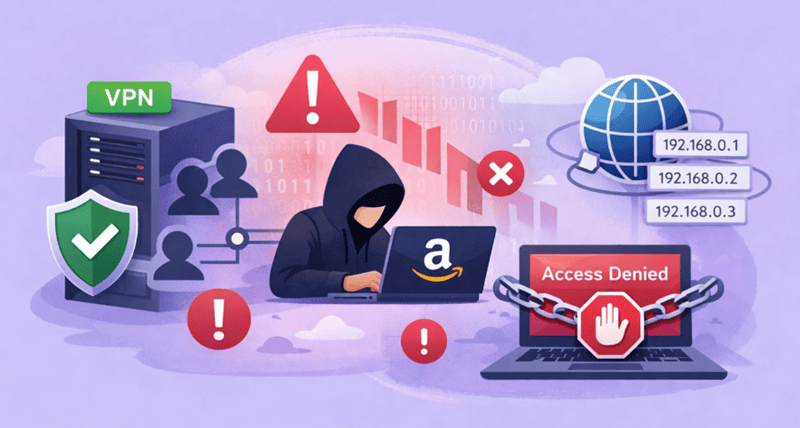
Si utilizas una VPN barata o un servicio proxy de baja calidad, puede que estés compartiendo una dirección IP con cientos o miles de usuarios. Si uno solo de esos usuarios intenta hacer scraping de Amazon, todo el grupo de IPs puede quedar marcado, lo que provocaría el bloqueo o la restricción de tu conexión.
7. Huella digital del navegador
Amazon rastrea la huella digital de tu navegador, que incluye factores como el renderizado del lienzo, las fuentes y la versión del sistema operativo. Si la huella digital de tu navegador no coincide con tu dirección IP (por ejemplo, estás navegando con una IP del Reino Unido, pero tu zona horaria está configurada en Pekín), el sistema de seguridad de Amazon marcará tu sesión como sospechosa y mostrará la página de error.
8. URL no válida
Este problema suele pasarse por alto, especialmente cuando los usuarios hacen clic en enlaces de blogs externos, sitios de ofertas o herramientas de terceros. Estos enlaces pueden apuntar a páginas de productos caducadas, puntos finales obsoletos o URL malformadas. En lugar de mostrar un error claro de "Página no encontrada", Amazon a veces responde con el mensaje genérico "Lo sentimos, algo ha ido mal" cuando no puede resolver correctamente la solicitud.
9. Versión anticuada del navegador o de la aplicación
Utilizar un navegador obsoleto o una versión antigua de la aplicación de Amazon puede provocar problemas de compatibilidad con los scripts y API modernos de Amazon. Cuando el software no puede procesar correctamente las cabeceras de seguridad o JavaScript necesarias, Amazon puede interpretar la solicitud como incompleta o malformada, lo que da lugar a la misma página de error.
10. Problemas de pago o de cuenta
Aunque se trata con menos frecuencia, los problemas a nivel de cuenta también pueden desencadenar este error, especialmente durante el proceso de pago o las actualizaciones de cuenta. Las tarjetas de crédito caducadas, los métodos de pago no verificados o los indicadores de cuenta no resueltos pueden hacer que Amazon bloquee silenciosamente el flujo de la transacción, mostrando el error genérico en lugar de una advertencia de pago detallada.
Cómo solucionar el error "Algo ha ido mal" de Amazon (paso a paso)
Si sigues viendo el mensaje "Amazon, lo sentimos, algo ha ido mal", no te asustes. En la mayoría de los casos, el problema puede resolverse siguiendo los pasos que se indican a continuación, desde soluciones rápidas hasta soluciones avanzadas.
Paso 1: Comprobaciones básicas (soluciones rápidas que resuelven la mayoría de los casos)
Antes de entrar en cambios técnicos, descarte las causas obvias.
Comprobar el estado del servidor de Amazon
Utiliza herramientas como DownDetector para confirmar si Amazon está experimentando un outage regional o global. Si muchos usuarios informan de problemas al mismo tiempo, la mejor solución es simplemente esperar.
Compruebe su red y actualícela
Reinicia el router o cambia de red (Wi-Fi ↔ punto de acceso móvil). Una nueva asignación de IP de tu proveedor de Internet puede resolver al instante los problemas temporales de enrutamiento.
Borrar caché y cookies
Las cookies antiguas de Amazon pueden entrar en conflicto con el código actualizado del sitio. Borra la caché del navegador y las cookies relacionadas con Amazon para forzar una sesión limpia.
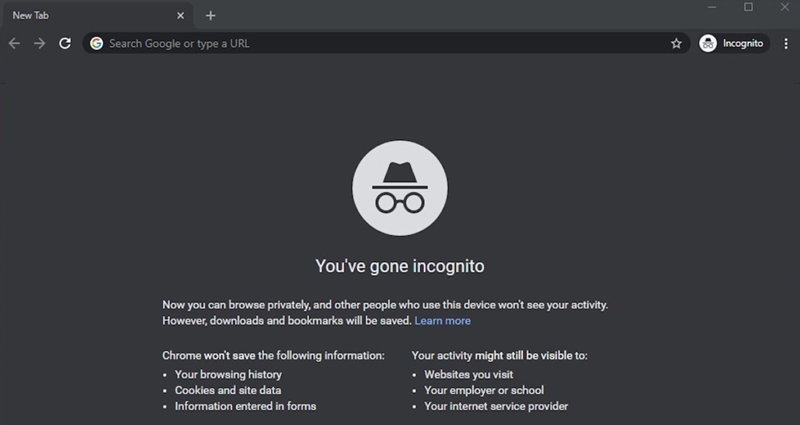
Pruebe el modo Incógnito / Privado
El modo incógnito desactiva las extensiones y utiliza un entorno de cookies nuevo.
Si Amazon funciona aquí, es probable que el problema esté causado por una extensión o por datos almacenados en el navegador.
Paso 2: Reducir comportamientos sospechosos y solucionar problemas de compatibilidad
Amazon supervisa de forma agresiva los patrones de uso anómalos.
Frecuencia de solicitud inferior
Cierre las pestañas innecesarias de Amazon, detenga las herramientas de actualización automática y evite actualizar páginas repetidamente en poco tiempo.
Actualizar o cambiar de navegador o aplicación
Asegúrate de que tu navegador o la aplicación de Amazon están totalmente actualizados.
Si el problema persiste, prueba con otro navegador (por ejemplo, cambia de Chrome a Firefox) para descartar conflictos de compatibilidad.
Verificar los datos de pago y de la cuenta
Durante el pago, las tarjetas caducadas, los métodos de pago no verificados o las advertencias de cuenta pueden activar silenciosamente la página de error en lugar de un mensaje de pago claro.
Paso 3: Solucionar problemas de URL, región y localización
Estos problemas son comunes, pero a menudo se pasan por alto.
Pruebe con una URL de Amazon diferente o limpia
Si ha hecho clic en un enlace de un sitio de terceros, es posible que la URL esté obsoleta o no sea válida.
En su lugar, navegue manualmente al producto o sección directamente desde la página de inicio de Amazon.
Utilice un proxy localizado para los sitios regionales de Amazon
Si accede a Amazon UK, DE o JP desde otro país, utilice un proxy que coincida con la región de destino.
Las ubicaciones IP no coincidentes suelen activar los filtros de seguridad de Amazon.
💡 Consejo profesional: Utilice la red global de OkeyProxy para cambiar instantáneamente entre Más de 200 países, asegurándote de que tu IP siempre coincide con la de tu mercado Amazon de destino para evitar bloqueos regionales. 🌍✨
Paso 4: Huella digital del navegador y optimización de la privacidad (usuarios avanzados)
Para vendedores, usuarios de automatización o compradores frecuentes:
Personaliza la huella digital de tu navegador
Asegúrese de que su zona horaria, idioma, sistema operativo y ubicación IP son coherentes.
Los navegadores antidetección como AdsPower o Dolphin ayudan a alinear estas señales y reducir el riesgo.
Paso 5: Póngase en contacto con el servicio de atención al cliente de Amazon (último recurso)
Si nada de lo anterior funciona, el problema puede ser específico de la cuenta.
- Iniciar sesión desde un dispositivo o red limpios
- Contactar directamente con el Servicio de Atención al Cliente de Amazon
- Pregunte si su cuenta, método de pago o actividad reciente están restringidos
Esto es especialmente importante si el error aparece sólo durante el proceso de pago o los cambios de cuenta.
Solución avanzada de problemas para usuarios avanzados y vendedores
Si eres un profesional -dirigiendo un negocio de dropshipping, extrayendo datos de precios o gestionando varias cuentas de vendedor- el consejo básico de "actualizar y borrar cookies" no funcionará.
Por qué falla su configuración actual
Muchos usuarios piensan que una simple VPN o un proxy de centro de datos es suficiente. No lo es. El sistema de seguridad de Amazon está diseñado para identificar y bloquear rangos de IP de centros de datos (como los de AWS o proveedores de VPN baratas). Cuando los usas, no estás "escondido"; estás literalmente agitando una bandera roja que dice "¡Soy un usuario automatizado!".
Proxies para centros de datos frente a proxies residenciales
Para Amazon, el tipo de IP que utilices es la diferencia entre el éxito y una "Página Perro" permanente.
| Característica | Centro de datos Proxy | Representación residencial |
|---|---|---|
| Fuente IP | Servidores secundarios / Nube | Inicio real ISP |
| Puntuación de confianza | 🔴 Bajo (marcado como Bot) | 🟢 Alto (Visto como humano) |
| Éxito en Amazon | 20% - 40% | 99.9% |
| Estabilidad | Alta velocidad, pero fácilmente bloqueable | Estable e imita el comportamiento real de los usuarios |
| Riesgo de detección | Inmediato "Algo salió mal" | Completamente sigiloso |
Cómo OkeyProxy elimina los errores de Amazon 🛡️
OkeyProxy proporciona el "patrón oro" para las operaciones de Amazon. Al utilizar nuestro Rotación de apoderados residencialesse le asigna una dirección IP de la casa de una persona real.
- Evitar los escudos WAF: Como nuestros más de 150M de IPs son residenciales, el Web Application Firewall de Amazon trata tu solicitud como la de cualquier otro comprador.
- Acceso localizado: ¿Necesitas ver el dashboard de Amazon DE desde USA? Cambia la ubicación de tu OkeyProxy a "Alemania" y accede al sitio sin bloqueos regionales.
- Persistencia de la sesión: Nuestra Proxies residenciales estáticos permiten a los vendedores mantener la misma IP limpia durante meses, lo que evita los "saltos de IP" que provocan bucles de verificación de cuentas.
Buenas prácticas para evitar futuros errores de Amazon
Para evitar encontrarse con el error "Lo sentimos, algo ha ido mal" en el futuro, siga estas prácticas recomendadas que no sólo solucionarán el problema, sino que evitarán que se repita.
- Evite utilizar VPN gratuitas: Las VPN gratuitas pueden parecer una solución rentable, pero a menudo conllevan peligros ocultos. Estos servicios tienden a vender tus datos y a utilizar IP compartidas y "sucias" que ya están en la lista negra de Amazon. Elige siempre un proveedor de VPN o proxy fiable y de alta calidad para garantizar un acceso ininterrumpido.
- Alinee la huella digital de su navegador con su IP: Asegúrate de que la configuración de tu navegador coincide con tu ubicación IP para una navegación fluida. Por ejemplo, si utilizas una IP de OkeyProxy en Nueva York, asegúrate de configurar el idioma de tu navegador como en-US y ajusta tu zona horaria a EST. Los datos incoherentes pueden activar las medidas de seguridad de Amazon y provocar errores.
- Caliente sus cuentas gradualmente: Evite lanzarse directamente a realizar compras de gran valor con una cuenta nueva. El sistema de puntuación de riesgo de "Nuevo usuario" de Amazon es muy sensible y puede marcarte si de repente haces una compra grande, especialmente si no has acumulado un historial de actividad normal. Empiece haciendo compras más pequeñas y aumente gradualmente su actividad.
- Rotación inteligente de IP: Al raspar datos o realizar operaciones masivas, el uso de Rotación de apoderados residenciales le ayuda a evitar la detección y los bloqueos. Para la gestión de cuentas y el uso a largo plazo, confíe en los proxies residenciales estáticos para mantener una IP estable, que Amazon reconoce como actividad legítima del usuario.
Conclusión
El error "Amazon lamenta que algo haya ido mal" es un síntoma de un problema mayor: Amazon ya no confía en tu identidad digital. Tanto si se trata de un conflicto con el navegador como de una IP marcada como "sospechosa", necesitas un entorno limpio y profesional para volver a trabajar.
Borrando la caché, gestionando la huella digital del navegador y, lo que es más importante, cambiando a los proxies residenciales de alta confianza de OkeyProxy, puede evitar a los "perros de Amazon" y volver a lo que importa: comprar y vender.
No deje que un error "Algo ha ido mal" detenga su negocio. Consigue ahora IPs residenciales de OkeyProxy ¡y experimenta Amazon sin límites!