Imagine you are settling in for a long flight or arriving at your hotel in a foreign country, ready to unwind with your favorite curated playlist, only to find a message stating that the content is unavailable in your region. Or perhaps you are a data analyst trying to track global music trends, but your connection is constantly throttled. These “digital roadblocks” are a common frustration for millions of music lovers and professionals alike. Fortunately, there is a reliable solution that restores your digital freedom: the proxy server for Spotify.
In this comprehensive guide, we will dive deep into the world of Spotify proxies. We will explain exactly how these tools work, the critical differences between various proxy protocols like HTTP and SOCKS5, and provide a step-by-step tutorial on how to set up your connection in just a few minutes. Whether you are looking to bypass geographic filters, protect your privacy, or conduct high-level market research, this article provides the technical roadmap you need to keep the music playing without interruption.
What is a Spotify Proxy Server?
To understand the necessity of a Spotify proxy server, we must first look at the sheer scale of the platform. According to the latest data from Backlinko, as of February 2026, Spotify has reached a staggering 713 million monthly active users, which includes 281 million premium subscribers. Dominating the music streaming industry with a 31.7% market share, Spotify is the undisputed king of audio content. However, with such a massive global footprint comes complex licensing agreements that vary from one country to another, leading to regional content blocks.
A spotify proxy server acts as a secure intermediary between your device and Spotify’s servers. When you connect through a proxy, your internet traffic is routed through a different IP address, effectively “masking” your true physical location. For instance, if you are traveling in a region where certain albums are restricted, you can use a proxy server located in your home country. The Spotify server sees the proxy’s IP address instead of yours, assuming you are in a supported region and granting you full access to your library. It is a vital tool for maintaining a seamless, global listening experience.
Why Use a Proxy Server for Spotify?
While unblocking content is the most famous reason to use a proxy, the benefits extend far beyond just bypassing a regional lock. Depending on your needs—whether you are an individual listener or a business professional—a proxy can solve several technical and privacy challenges.
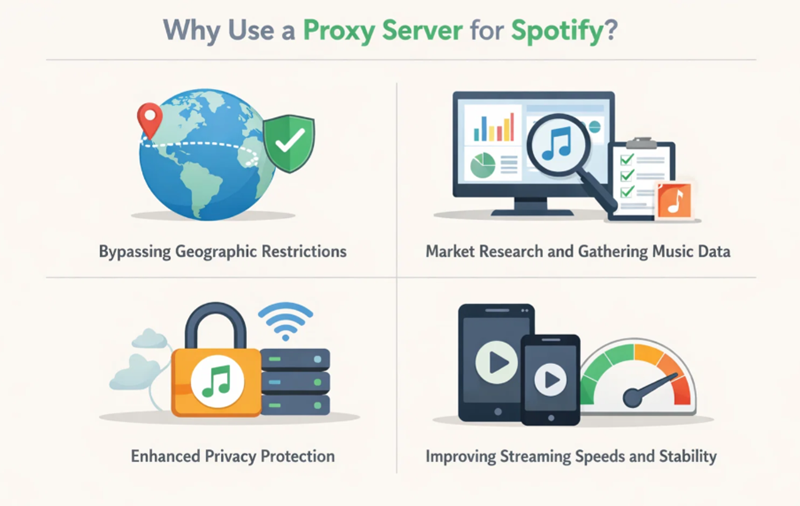
Bypassing Geographic Restrictions
The primary use case for a proxy server for Spotify is overcoming “geo-fencing.” Despite Spotify’s global reach, certain songs, podcasts, or even entire albums are restricted to specific markets due to local laws or licensing rights. For example, an artist might release an exclusive track only for the US market. If you are a fan located in Europe or Asia, you would normally be excluded. By utilizing a US-based proxy, you can access these regional exclusives as if you were sitting in a coffee shop in New York.
Market Research and Gathering Music Data
For music industry analysts and marketing firms, Spotify is a goldmine of data. Understanding which tracks are trending in Tokyo versus London is essential for planning tours or ad campaigns. However, scraping this data manually is impossible, and automated scripts often get blocked after a few requests. A reliable spotify proxy server allows web scrapers to send requests from multiple IP addresses, staying below the platform’s detection thresholds and ensuring that researchers can gather high-quality data without being flagged as a bot.
Enhanced Privacy Protection
Every time you stream music, you leave a digital footprint that includes your IP address and browsing habits. In an era where data privacy is a top priority, many users prefer to hide their real IP address from third-party trackers and even the ISP (Internet Service Provider). A proxy adds an extra layer of anonymity, making it much harder for advertisers or malicious actors to track your online activities based on your streaming behavior.
Improving Streaming Speeds and Stability
It might sound counterintuitive that adding an extra “stop” in your connection could speed it up, but it is often true. Some ISPs intentionally throttle high-bandwidth traffic like music or video streaming. By using a high-quality proxy, you can sometimes bypass these throttled routes. Additionally, if you choose a proxy server that is physically closer to Spotify’s data centers than you are, you can reduce latency and eliminate the dreaded buffering symbol.
The Best Proxy Types for Spotify
Not all proxies are built for streaming. Choosing the wrong type can result in slow speeds, poor audio quality, or an immediate account block. Below are the most effective categories to consider.
SOCKS5 Proxies: The Performance Leader
For streaming media, SOCKS5 is the recommended protocol. Unlike standard HTTP proxies, SOCKS5 is more “lightweight” and does not rewrite data headers, which reduces the chance of errors. Most importantly, it supports UDP (User Datagram Protocol), which is the technology Spotify uses to deliver high-quality audio streams smoothly. If you want a lag-free experience, SOCKS5 is your best bet.
HTTP/HTTPS Proxies
These are the most common proxies and work well for accessing the Spotify web player. While they are highly compatible with almost every browser, they are slightly more prone to detection than SOCKS5 because they “announce” themselves as proxies more clearly in the data packet headers.
Technical Analysis: HTTP vs. SOCKS5
While HTTP proxies are limited to interpreting web pages, SOCKS5 operates at a lower level. This means SOCKS5 can handle any type of traffic—be it the Spotify app, a web browser, or a specialized data-scraping tool. For the Spotify desktop application, SOCKS5 is significantly more reliable.
Residential Proxies: The Most Trusted Choice
Residential proxies use IP addresses provided by real Internet Service Providers (ISPs) to actual homes. To Spotify, a connection from a residential IP looks like a normal person listening at home. These are almost impossible to block. In contrast, Datacenter IPs come from large server farms; Spotify often flags these as “suspicious” because regular users don’t live in data centers.
Rotating Proxies for Continuous Access
If you are scraping music data or managing multiple accounts, Вращающиеся прокси-серверы are essential. These automatically change your IP address at set intervals. If one IP gets flagged, the system simply switches you to a fresh one from a pool of millions. Having access to a massive IP pool is the key to maintaining 24/7 uptime without interruptions.
Professional Recommendation: OkeyProxy
If you are looking for a Лучший провайдер HTTP и SOCKS5 прокси-серверов, look no further than OkeyProxy. OkeyProxy offers over 150 million жилищные доверенности that are optimized for high-speed streaming and data extraction. Their infrastructure meets your every proxy need, providing the stability and global coverage required for a flawless Spotify experience.
👉 Get High-Speed Spotify Proxies from OkeyProxy Today!
Мобильные прокси-серверы
Mobile proxies route your traffic through 4G or 5G cellular networks. These are the “stealthiest” of all proxies. Since thousands of users often share the same mobile IP, platforms like Spotify are very reluctant to block them, as they risk blocking legitimate mobile customers. These are perfect for highly restricted network environments.
How to Set Up a Spotify Proxy (Step-by-Step Guide)
Setting up your proxy is a straightforward process, but it varies depending on whether you are using a desktop computer or a mobile device. Follow these steps to get connected safely.
Setting Up on Desktop (Windows/Mac)
- Step 1: Preparation – Before configuring the proxy, ensure you have the latest version of the Spotify desktop app installed. Log in to your account and go to the home screen.
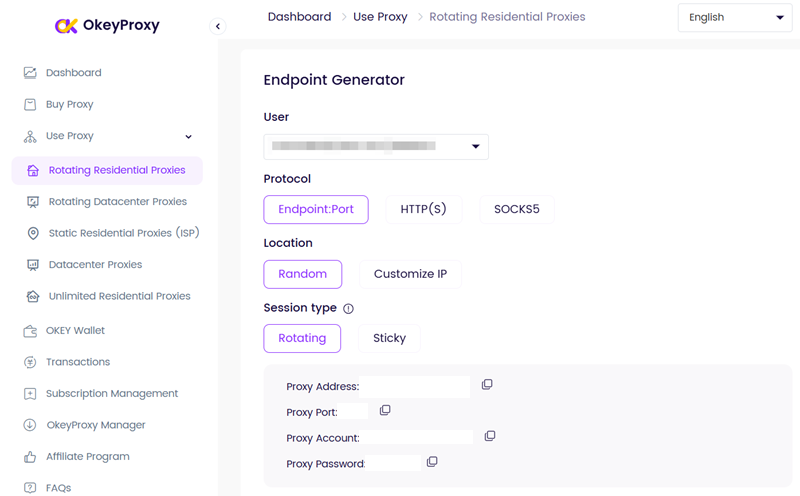
- Step 2: Get Your Credentials – Visit the OkeyProxy website, click the “Sign Up” button in the top-right corner to complete your account registration, then log in to your personal dashboard to purchase and obtain proxy details (IP, port, protocol type, username/password). Tip: We highly recommend selecting SOCKS5 for the protocol type to ensure the best streaming performance.

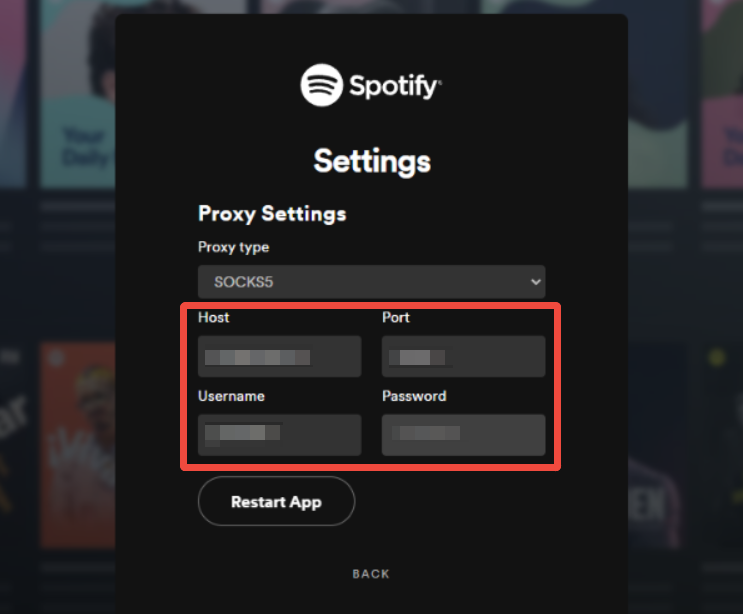
- Step 3: Configure Spotify – Launch the Spotify app and tap the Настройки option at the bottom of the sign-in screen. Select “SOCKS5” (or HTTP) from the dropdown menu, then enter your OkeyProxy IP and Port. Enter your username and password in the authentication fields.

- Step 4: Restart and Test – Once Spotify reopens, play any song. If it plays immediately without a “connecting” delay, your spotify proxy server is working perfectly!
Setting Up on Mobile (iOS/Android)
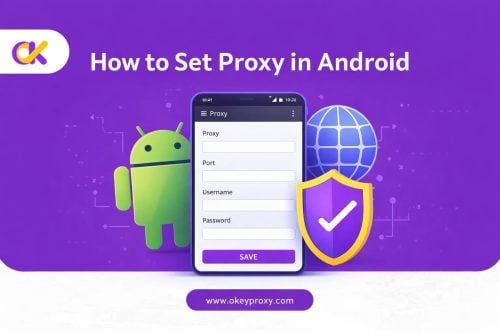
The Spotify mobile app does not have a dedicated proxy menu like the desktop version. Instead, it “inherits” the settings from your phone’s Wi-Fi configuration. To set this up, go to your phone’s Wi-Fi settings, select your current network, and look for “Configure Proxy.” Enter your OkeyProxy details there. For a more detailed walkthrough on mobile configuration, you can refer to the OkeyProxy Setup Tutorial.
Important Precautions When Using a Spotify Proxy
While using a proxy is a powerful solution, you should follow certain “best practices” to ensure your account remains safe and your data stays private.
- Avoid “Free” Proxies: Free proxies are often operated by malicious actors looking to steal login credentials. Furthermore, they are usually overcrowded, leading to constant buffering and low-quality audio. If you value your account and your ears, stick to a paid, professional provider.
- Use Proper Authentication: Always ensure your proxy supports username/password authentication. “Open” proxies are easily detected by Spotify’s security systems and are usually blocked within hours.
- Match Your Location: For the best results, try to match your proxy’s geographic location with the country registered on your Spotify account. Large discrepancies between your IP location and your account home can sometimes trigger security alerts.
- Use Mobile Proxies for Strict Networks: If you are trying to listen to Spotify on a highly restricted corporate or school network, use LTE/4G Mobile Proxies. These are significantly harder for firewalls to detect and block compared to datacenter IPs.
Troubleshooting: Common Spotify Proxy Errors
Even with a good setup, you might occasionally run into technical hiccups. Here are the most common errors and how to fix them quickly.
① Spotify Error Code 17
The Problem: This error usually indicates a location mismatch or a connection timeout. It often prevents the app from loading any content at all.
The Solution: Ensure your proxy server is set to a country that Spotify supports. If you are using a US account, use a US proxy. Also, try toggling your proxy off and back on to refresh the connection.
② Spotify Error Code 30
The Problem: This is an authentication or DNS error. It means Spotify can see the proxy but can’t “get past” it, usually due to incorrect login details.
The Solution: Double-check your IP, Port, Username, and Password in the Spotify settings. A single extra space or a typo in the password will trigger this error. Also, ensure you have selected the correct protocol (SOCKS5 vs HTTP).
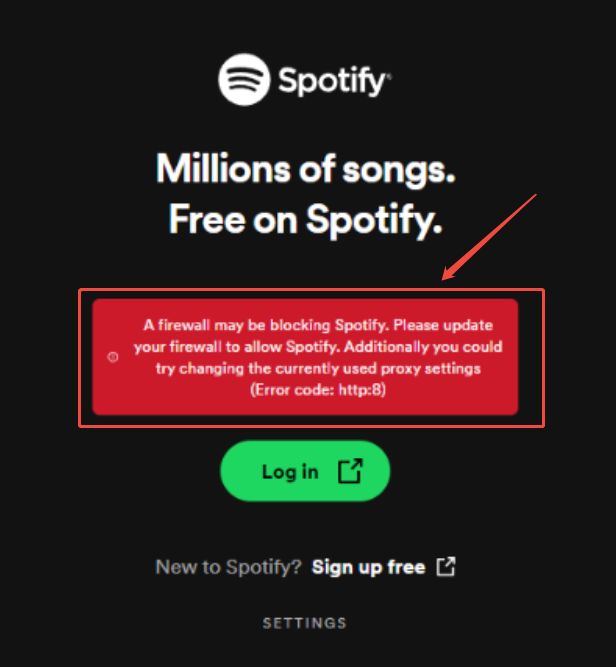
③ “A Firewall May Be Blocking Spotify” Error
The Problem: This error occurs when your local computer’s security software is preventing Spotify from reaching the internet via the proxy.
The Solution: Add the Spotify application to your Windows or macOS Firewall “Exceptions” list. Ensure that both the app and the proxy port are allowed to send and receive data.
Ethics and Terms of Service
It is important to remember that while using a proxy server for Spotify is entirely legal, it does sit in a grey area regarding the platform’s Terms of Service (TOS). Spotify’s agreements generally discourage users from bypassing regional restrictions to access content not licensed for their current location.
We strongly advise against using proxies for “stream farming” or automated botting to artificially inflate play counts, as this is a direct violation of Spotify’s policies and will likely result in a permanent account ban. Use technology to enhance your listening experience, not to manipulate the platform.
Заключение
In 2026, music is a global language that shouldn’t be limited by borders or network restrictions. A proxy server for Spotify is more than just a workaround; it is a tool for digital empowerment. Whether you are a traveler who wants to stay connected to home, a student trying to focus in a restricted dorm, or a professional researcher, the right proxy setup ensures your music never stops.
By choosing a high-performance protocol like SOCKS5 and a trusted provider like OkeyProxy, you can enjoy high-fidelity audio with total privacy and zero buffering. Don’t let geographic boundaries define your playlist. Set up your spotify proxy server today and experience the world of audio without limits.