In the modern era of data-driven decision-making, the choice between data formats can significantly impact the performance, scalability, and cost-efficiency of your application. Whether you are building a high-speed web application, conducting deep data analysis, or executing large-scale web scraping projects, you will inevitably face the JSON vs CSV dilemma. While both formats are designed to store and exchange information, they serve fundamentally different architectural purposes. In this comprehensive guide, we explore the technical nuances of both formats, their specific use cases, and how to decide which one is best for your project.
Quick Comparison: JSON vs CSV at a Glance
If you are looking for a quick answer to decide which format fits your current task, the comparison table below highlights the core technical differences between JSON and CSV.
| Caraterística | JSON (JavaScript Object Notation) | CSV (Comma-Separated Values) |
|---|---|---|
| Data Structure | Hierarchical / Nested | Flat / Tabular |
| Readability | High (developer-friendly, self-describing keys) | High (non-tech / Excel-friendly for tabular data) |
| File Size | Larger (key-name repeated per record) | Minimal (stores values only, no repeated keys) |
| Parsing Speed | Fast (browser-native; slower for deep nesting) | Very Fast (simple line-by-line streaming) |
| Data Types | String, Number, Boolean, Array, Object, Null | Plain text / String only (type inference required) |
| Nesting Support | Yes — unlimited depth | No — strictly two-dimensional |
| Streaming / Line-by-Line Read | Possible with NDJSON; complex with standard JSON | Native — process row by row without loading full file |
| Schema Flexibility | High — add new fields without breaking old consumers | Low — column order changes can break legacy systems |
| Industry Standard Use Cases | REST APIs, NoSQL databases, config files | Data warehousing, financial reports, ML datasets |
While the table offers a high-level summary, the real choice depends on how your data is structured and how it needs to be consumed. The following sections explore each format’s internal mechanics in detail.
What Is JSON? The Champion of Modern Web
JSON (JavaScript Object Notation) is a lightweight, text-based data interchange format that has become the backbone of modern web communication. Originally derived from JavaScript syntax, it is now language-independent, with parsers available in virtually every programming language.
Structure and Data Types
JSON uses a hierarchical structure built from key-value pairs and ordered arrays. This allows it to represent complex, multi-level relationships within a single document. A single JSON object can contain a user’s profile, their list of recent purchases, and their nested address details — all organized cleanly together.
Native data types supported by JSON:
- String — Text wrapped in double quotes:
"New York" - Number — Integer or floating-point:
42,3.14 - Boolean —
trueoufalse - Array — Ordered list of values:
["Admin", "Editor"] - Object — Unordered key-value pairs:
{"city": "New York"} - Null — Explicit absence of value:
nulo
JSON Data Example
{
  "user_id": 101,
  "name": "John Doe",
  "is_active": true,
  "roles": ["Admin", "Editor"],
  "address": {
    "city": "New York",
    "zip": "10001"
  },
  "last_login": null
}
Vantagens do JSON
JSON’s greatest strength is its flexibility and self-describing nature. Because keys accompany every value, a developer can read a JSON file and immediately understand what each piece of data represents — no external schema required. It is the default format for REST APIs, NoSQL databases such as MongoDB and CouchDB, and nearly all modern web frameworks.
JSON also supports schema evolution gracefully: you can add a new field to a JSON response and older clients that do not recognize the field will simply ignore it, avoiding breaking changes.
Limitações do JSON
JSON’s flexibility comes with a redundancy cost. In a file with 100,000 records, every key — such as "user_id" ou "email" — is repeated 100,000 times. This structural overhead makes JSON files typically 1.5× to 3× larger than equivalent CSV files. Parsing deeply nested structures can also be slower and more memory-intensive, since the parser must build an in-memory object tree before any data can be accessed.
Best use cases: REST API responses, configuration files, NoSQL database storage, complex multi-layered data, and any scenario where data schema may change over time.
What Is CSV? The King of Bulk Data
CSV (Comma-Separated Values) is one of the oldest and simplest data formats. It represents data in a flat, tabular structure, exactly like a spreadsheet row or a database table. Each line in a CSV file corresponds to one record, and each record consists of fields separated by a delimiter — typically a comma, although tabs (\t), pipes (|), and semicolons (;) are also common.
Structure and Data Types
CSV is strictly two-dimensional: rows and columns, nothing more. It has no built-in data type system — every field is technically a string. If a column named price contains the value 19.99, the reading application must explicitly cast it to a float; otherwise it remains a string. This lack of type enforcement is one of CSV’s most common sources of data quality bugs in production pipelines.
CSV Data Example
user_id,name,is_active,city,zip
101,John Doe,true,New York,10001
102,Jane Smith,false,Los Angeles,90001
103,Bob Chen,true,"San Francisco",94102
Nota: Values containing commas must be wrapped in double quotes (e.g., "San Francisco, CA"), which is a common source of parsing errors when not handled correctly.
Vantagens do CSV
CSV is the undisputed standard for bulk data processing. Because column headers appear only once (on the first line), there is zero structural overhead per row. A CSV can also be streamed line by line, meaning a 10 GB file can be processed record by record without ever loading the entire file into memory — a critical advantage for large-scale data pipelines.
CSV’s universal compatibility is another major strength: it can be opened directly in Microsoft Excel, Google Sheets, LibreOffice Calc, and virtually every database import tool, BI platform, and data science library (pandas, R’s readr, Spark) with zero configuration.
Limitações do CSV
CSV’s simplicity becomes a liability when data does not fit neatly into a grid. If a user has multiple phone numbers or a product has multiple tags, you must either create multiple columns (phone_1, phone_2) or duplicate the entire row per value — both approaches are inefficient and hard to maintain. CSV also has no mechanism for expressing missing values versus empty strings, and has no support for comments or metadata.
Best use cases: Historical data archiving, exporting datasets for machine learning training, financial reports, ETL pipelines, and high-speed data warehouse ingestion where data is flat and uniform.
JSON vs CSV: Examining the Main Differences
Data Structure and Type Safety
JSON is designed for depth; CSV is designed for width. JSON natively distinguishes between the integer 5, the float 5.0, the string "5", the boolean true, and a nulo value. This type awareness significantly reduces data corruption risks during API communication or database ingestion. CSV, being type-agnostic, requires a pre-defined schema or manual parsing rules to ensure a price column is not accidentally treated as a date — a real-world bug that causes production incidents more often than developers expect.
Readability and Tooling
For a developer debugging an API response, JSON is far easier to read because the keys provide immediate context for every value. For a data analyst or business stakeholder, CSV is the preferred format: it opens directly in Excel or Google Sheets for immediate visualization and pivot analysis, with no special tooling required. JSON generally requires a dedicated viewer, IDE plugin, or code to be human-readable at scale.
File Size and Bandwidth
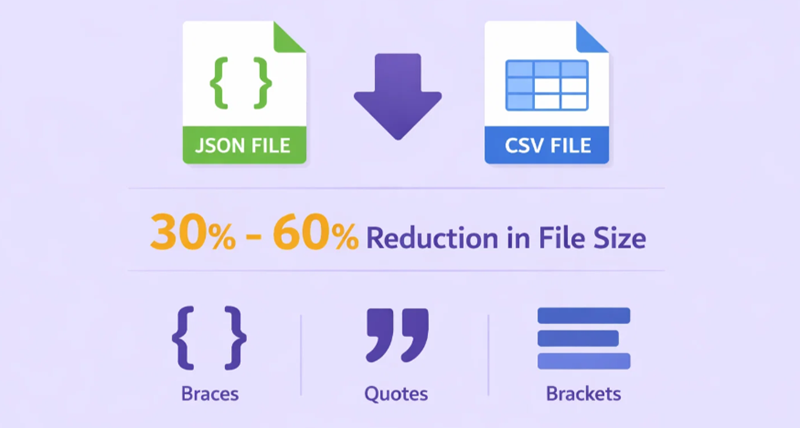
In terms of raw file size, CSV almost always wins. A typical dataset converted from JSON to CSV can see a 30% to 60% reduction in file size, due to the elimination of repeated key names and structural characters such as braces, brackets, and quotation marks. However, both formats compress exceptionally well. When gzipped, the size difference narrows to roughly 10% to 20%, because zip algorithms efficiently handle the whitespace and key repetition characteristic of JSON. For high-traffic APIs where every byte counts, this compression insight is worth factoring into architecture decisions.
Schema Flexibility
JSON excels in agile environments where the data schema evolves frequently. Adding a new field to a JSON object does not break clients that do not yet recognize it. In CSV, adding a column mid-file — or even changing column order — can silently break downstream systems that rely on positional indexing, causing the wrong data to populate the wrong field without any error being raised.
Streaming and Memory Efficiency
Standard JSON requires a parser to build a complete in-memory object tree, which means the entire file typically must be read before data can be accessed. The NDJSON (Newline-Delimited JSON) format addresses this by placing one JSON object per line, enabling streaming. CSV, by contrast, natively supports line-by-line streaming with no special format — making it significantly more memory-efficient for processing files in the gigabyte range.
Rule of Thumb: Utilização JSON for communication — APIs, config files, and complex structured data. Use CSV for storage and analysis — bulk datasets, reports, and machine learning input. When in doubt, ask: “Does my data have nesting?” If yes, choose JSON. If no, CSV is almost certainly faster and smaller.
How to Choose: A Practical Decision Guide
Use the following decision tree to select the right format for your specific scenario:
- Does your data have nested or hierarchical structures?
- Yes → Use JSON. CSV cannot represent nesting without lossy flattening.
- No → Continue to step 2.
- Will non-technical users need to open or edit this data directly?
- Yes → Use CSV. It opens in Excel and Google Sheets without any additional tooling.
- No → Continue to step 3.
- Is this data being exchanged via an API or web service?
- Yes → Use JSON. It is the de facto standard for REST APIs and web integrations.
- No → Continue to step 4.
- Is the dataset very large (hundreds of MB or more) and primarily flat?
- Yes → Use CSV. Its streaming capability and compact size make it dramatically more efficient at scale.
- No → Either format works. Choose JSON if schema flexibility matters, or CSV for simplicity.
Can JSON and CSV Be Used Together?
In a sophisticated data pipeline, you do not have to choose just one format. Many data engineers use JSON for initial data collection — scraping APIs or capturing raw event streams — and then “flatten” that data into CSV for long-term storage, reporting, or machine learning training. This hybrid approach leverages the strength of each format at the appropriate stage of the pipeline.
A common pattern is:
- Ingest: Collect raw data as JSON (preserves all metadata, nested fields, and data types).
- Transform: Flatten and clean the JSON into a tabular schema.
- Store & Analyze: Write the cleaned data as CSV for data warehouse ingestion, ML training, or distribution to analysts.
Conversion Examples: JSON ↔ CSV in Practice
Converting between the two formats requires understanding how their structures map to each other — and where that mapping becomes lossy or ambiguous.
JSON to CSV: Flattening Nested Objects (Python)
The most common challenge when converting JSON to CSV is handling nested objects. The standard approach is to “flatten” nested keys using dot notation (e.g., address.city). Python’s pandas library provides json_normalize() specifically for this purpose.
Input JSON (users.json):
[
  {
    "user_id": 101,
    "name": "John Doe",
    "is_active": true,
    "address": { "city": "New York", "zip": "10001" }
  },
  {
    "user_id": 102,
    "name": "Jane Smith",
    "is_active": false,
    "address": { "city": "Los Angeles", "zip": "90001" }
  }
]
Python conversion using pandas:
import pandas as pd
import json

with open("users.json", "r") as f:
    data = json.load(f)

# json_normalize flattens nested objects automatically.
# Nested key "address.city" becomes column "address.city" in CSV.
df = pd.json_normalize(data)
df.to_csv("users.csv", index=False)
print(df.to_string())
Output CSV (users.csv):
user_id,name,is_active,address.city,address.zip
101,John Doe,True,New York,10001
102,Jane Smith,False,Los Angeles,90001
Notice how the nested address object is flattened into two separate columns: address.city e address.zip. The dot-notation convention makes it clear that these columns originated from the same nested object, which is important for reverse conversion later.
JSON to CSV: Handling Arrays (The One-to-Many Problem)
Arrays in JSON present a structural mismatch with CSV’s flat rows. When a JSON record contains a list (e.g., a user’s multiple orders), you must decide between two strategies: expand (one row per array item) or join (concatenate array values into a single cell).
Input JSON with arrays:
[
  {
    "user_id": 101,
    "name": "John Doe",
    "orders": [
      { "order_id": "A1", "amount": 59.99 },
      { "order_id": "A2", "amount": 120.00 }
    ]
  },
  {
    "user_id": 102,
    "name": "Jane Smith",
    "orders": [
      { "order_id": "B1", "amount": 34.50 }
    ]
  }
]
Strategy 1 — Expand (one row per order):
import pandas as pd, json

with open("orders.json") as f:
    data = json.load(f)

rows = []
for user in data:
    for order in user["orders"]:
        rows.append({
            "user_id":  user["user_id"],
            "name":     user["name"],
            "order_id": order["order_id"],
            "amount":   order["amount"]
        })

pd.DataFrame(rows).to_csv("orders_expanded.csv", index=False)
Output (expanded):
user_id,name,order_id,amount
101,John Doe,A1,59.99
101,John Doe,A2,120.0
102,Jane Smith,B1,34.5
Strategy 2 — Join (flatten array into a single cell):
rows = []
for user in data:
    order_ids = ";".join(o["order_id"] for o in user["orders"])
    amounts   = ";".join(str(o["amount"]) for o in user["orders"])
    rows.append({
        "user_id":   user["user_id"],
        "name":      user["name"],
        "order_ids": order_ids,
        "amounts":   amounts
    })

pd.DataFrame(rows).to_csv("orders_joined.csv", index=False)
Output (joined):
user_id,name,order_ids,amounts
101,John Doe,A1;A2,59.99;120.0
102,Jane Smith,B1,34.5
Utilizar o expand strategy when downstream tools need to filter or aggregate by individual array items. Use the join strategy when you simply need to preserve the data for archival and the array items will not be queried individually.
CSV to JSON: Nesting Flat Data (Python)
Converting CSV back to JSON is generally more straightforward, but requires decisions about data typing (converting numeric strings to actual numbers) and optionally re-building any nested structure.
Input CSV (users.csv):
user_id,name,is_active,address.city,address.zip
101,John Doe,True,New York,10001
102,Jane Smith,False,Los Angeles,90001
Python conversion — flat CSV to JSON array:
import csv, json

rows = []
with open("users.csv", newline="") as f:
    reader = csv.DictReader(f)
    for row in reader:
        # Cast types explicitly — CSV has no type system
        row["user_id"]   = int(row["user_id"])
        row["is_active"] = row["is_active"].lower() == "true"
        rows.append(row)

with open("users_output.json", "w") as f:
    json.dump(rows, f, indent=2)
Output JSON:
[
  {
    "user_id": 101,
    "name": "John Doe",
    "is_active": true,
    "address.city": "New York",
    "address.zip": "10001"
  },
  ...
]
Note that the dot-notation column names (address.city) are preserved as flat keys in the output JSON. To fully reconstruct the original nested structure, you would need an additional step to re-nest those keys, which requires custom logic or a library like unflatten-dict.
CSV to JSON: Using Node.js
In a Node.js environment, the csv-parse library provides a clean, streaming-friendly approach to CSV-to-JSON conversion:
// Install: npm install csv-parse
const { parse } = require("csv-parse");
const fs = require("fs");

const results = [];
fs.createReadStream("users.csv")
  .pipe(parse({ columns: true, cast: true })) // cast: true auto-converts numbers and booleans
  .on("data", (row) => results.push(row))
  .on("end", () => {
    fs.writeFileSync("users_output.json", JSON.stringify(results, null, 2));
    console.log(`Converted ${results.length} records to JSON.`);
  });
O cast: true option in csv-parse automatically converts numeric strings to numbers and the strings "true"/"false" to booleans — handling one of CSV’s most common pain points with a single configuration flag.
Performance and File Size: Real-World Numbers
Understanding the performance characteristics of each format helps you make architecture decisions that scale.
File Size Comparison
Because JSON repeats every field name for every record, raw file sizes are substantially larger than their CSV equivalents. For a dataset of 100,000 user records with fields such as user_id, name, emaile address, a typical size comparison looks like this:
| Formato | Raw Size | Gzipped Size |
|---|---|---|
| JSON | ~45 MB | ~8 MB |
| CSV | ~18 MB | ~6 MB |
| Size difference | ~60% larger for JSON | ~25% larger for JSON |
The key takeaway: always compress data in transit. The practical size advantage of CSV narrows dramatically once gzip compression is applied, which is already standard for HTTP API responses and most cloud storage transfers.
Parsing Speed
CSV parsing is inherently faster because of its simpler structure — a CSV parser needs only to split each line on a delimiter. JSON parsing requires a full lexer and recursive descent to handle nested objects and arrays. In benchmarks using Python’s pandas library, reading a flat 1 GB CSV file is typically 2× to 4× faster and uses significantly less peak memory than reading an equivalent JSON file, because CSV supports true line-by-line streaming while standard JSON does not. For deeply nested JSON structures, the memory overhead can be even more pronounced.
NDJSON (one JSON object per line) bridges this gap for write-heavy streaming workloads, enabling JSON to be processed row by row at speeds approaching CSV.
Alternatives to JSON and CSV
While the JSON vs CSV debate covers the most common use cases, other formats may be more appropriate for specialized requirements:
- XML (Extensible Markup Language): Like JSON, it supports hierarchical structures. It is more verbose but supports complex schema validation (XSD, DTD) and namespaces. Still widely used in enterprise banking, healthcare (HL7, FHIR), and government systems where strict data contracts are required.
- YAML (YAML Ain’t Markup Language): Primarily used for configuration files (Kubernetes, CI/CD pipelines). More human-readable than JSON, supports comments, but is not suitable for high-volume data transfer.
- Apache Parquet: A columnar binary format optimized for analytical queries and big data (Spark, Hive, Athena). Dramatically faster and smaller than CSV for read-heavy analytical workloads on hundreds of millions of rows.
- Apache Avro: A row-oriented binary serialization format used in high-throughput event streaming (Apache Kafka). Stores data with an embedded schema in a compact binary format — much faster and smaller than both JSON and CSV for real-time data pipelines.
- Protocol Buffers (Protobuf): Google’s binary serialization format. Offers the smallest file sizes and fastest serialization/deserialization of any common format, at the cost of human readability. Used internally at Google and increasingly in microservices architectures.
- NDJSON (Newline-Delimited JSON): One JSON object per line. Combines JSON’s structural richness with CSV’s streaming friendliness. Preferred for log files, real-time data pipelines, and scraping output when downstream systems expect JSON but large file sizes are a concern.
How OkeyProxy Empowers Your Data Strategy
Whether you are collecting JSON from a modern API or scraping large CSV datasets from a public data repository, the success of your project depends on reliable, uninterrupted access to that data. Target websites and APIs frequently implement rate limits, IP bans, and geo-blocks that can halt your data collection pipeline entirely.

By integrating OkeyProxy into your data pipeline, you can strengthen both your JSON and CSV workflows in several concrete ways:
- Bypass API Rate Limits: When scraping JSON responses from high-security APIs, OkeyProxy’s 150M+ rotating residential proxies make your requests appear to originate from real end users across diverse locations, preventing IP-based throttling and bans.
- Access Geo-Restricted Data: Need a CSV of regional product pricing from European or Southeast Asian markets? OkeyProxy lets you route requests through specific country endpoints to access localized data that would otherwise be blocked based on your server’s IP geolocation.
Recommended pipeline pattern: Capture raw scraped data as JSON (to preserve all metadata, nested fields, and original data types) using OkeyProxy, then run a Python transformation script to filter, flatten, and write the clean data as a compact CSV for your final report or data warehouse ingestion.
Perguntas mais frequentes
Is JSON better than CSV for large datasets?
Not necessarily. For large, flat datasets (tens of millions of rows with uniform structure), CSV is typically faster to parse, smaller in size, and easier to stream line-by-line. JSON becomes the better choice when the dataset contains nested objects or arrays that cannot be represented cleanly in a two-dimensional table, or when the data will be consumed directly by a web API or NoSQL database.
Can I convert JSON to CSV without losing data?
Only if your JSON data is flat and tabular to begin with. Nested objects can be flattened using dot-notation columns, but arrays present a fundamental structural mismatch: you must either expand them into multiple rows (duplicating parent fields) or join them into a single cell (losing individual-item queryability). Some information loss or structural distortion is unavoidable when the source JSON is deeply nested.
Which format is better for machine learning?
CSV is the dominant format for feeding data into machine learning training pipelines. Libraries like pandas, scikit-learn, and TensorFlow Data all treat CSV as a first-class input format. CSV’s flat, typed-per-column structure maps directly to the feature matrix expected by most ML algorithms. JSON is more common for model input/output during inference (especially in API-served models), where request and response payloads are structured objects rather than bulk tabular data.
Does JSON or CSV work better with APIs?
JSON is the overwhelming standard for REST API communication. Over 90% of modern public APIs use JSON as their primary exchange format. CSV can technically be returned by APIs (useful for bulk data export endpoints), but it lacks the structural richness needed to represent typical API resource objects, error details, pagination metadata, and nested relationships.
What is NDJSON and when should I use it?
NDJSON (Newline-Delimited JSON) is a variant where each line of the file is a valid, self-contained JSON object. This enables line-by-line streaming — the primary advantage of CSV — while retaining JSON’s type system and nesting support. It is the preferred format for log files, real-time event streams (Kafka, Kinesis), and large scraping output where individual records need to be processed independently without loading the entire file into memory.
Which format should I use for web scraping output?
Use JSON when scraping data with complex, irregular, or nested structures (e.g., product pages with variable attributes, nested reviews, or multi-level categories). Use CSV when scraping uniform, tabular data (e.g., price lists, job postings with consistent fields, or financial data tables) that will be loaded directly into a spreadsheet or database. For large-scale scraping pipelines, NDJSON is often the best of both worlds.
Conclusão
In the final analysis of JSON vs CSV, there is no universal winner — only the right tool for each job. JSON is the champion of the modern web, providing the structural depth and type safety required for complex applications and APIs. CSV remains the king of bulk data processing, offering unmatched efficiency, streaming capability, and universal tooling compatibility for massive flat datasets. By understanding the performance characteristics, structural trade-offs, and conversion mechanics of each format — and by using high-performance data collection tools like OkeyProxy to secure reliable access to your data sources — you can build a data architecture that is both robust and scalable for 2026 and beyond.