If you have ever tried to bypass a school firewall, scrape data from a website, or wondered how giant platforms like Netflix handle millions of viewers at once, you have already encountered a proxy. But here is where most people get tripped up: What is the actual difference between a forward proxy and a reverse proxy? While both act as “middlemen” in a network, they serve completely different masters. In plain English, one protects tu (the user), while the other protects the website (the server). In this guide, we strip away the technical jargon and explain exactly how these two technologies work, why they matter, and which one you actually need for your specific situation.
The Core Concept: What Is a Proxy?
Before we divide them into “forward” and “reverse,” let’s define the word procurador. A proxy is simply an intermediary server that sits between a client (like your laptop) and a server (like Google’s database). Instead of your browser talking directly to a website, it talks to the proxy, and the proxy talks to the website on your behalf.
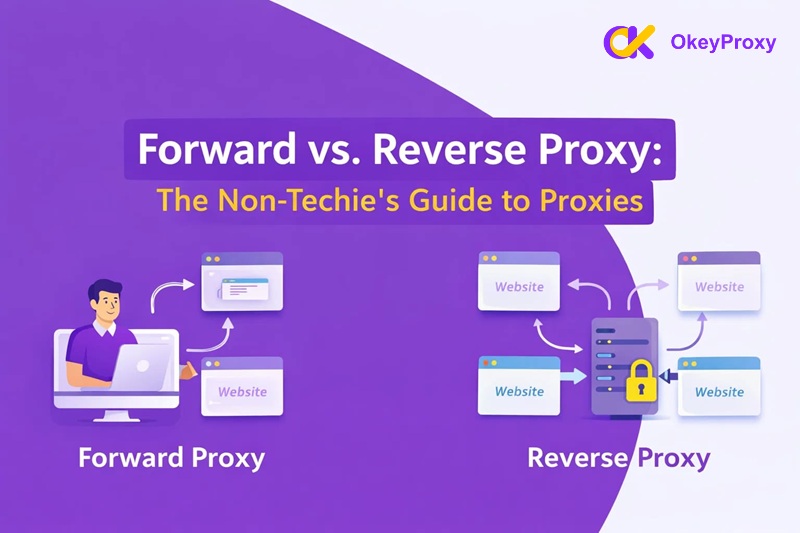
The confusion usually comes from the direction of the traffic. Think of it like a physical wall with a window. If the wall is there to hide the people inside looking out, it is a forward proxy. If the wall is there to protect the building from people outside trying to get in, it is a reverse proxy. Let’s break each one down.
Quick Memory Trick
Ask yourself: “Who is the proxy trying to protect?”
→ Protecting the user browsing the internet = Forward Proxy
→ Protecting the server receiving visitors = Reverse Proxy
1. Forward Proxy: Your Private “Shopping Agent” (Outbound)
A Forward Proxy (often just called “a proxy”) sits in front of the client. Its job is to manage outbound traffic — requests leaving your device and heading out to the internet. When you use a forward proxy, the website sees the proxy’s IP address instead of yours. It is essentially a representative that goes out into the open internet to fetch information for you.

How It Works in Real Life
Imagine you want to buy a limited-edition item from a store, but the store has banned your neighbourhood from entering. You hire a “shopping agent” who lives in a different city. They go to the store, buy the item, and deliver it to you. The store only ever deals with the agent — they have no idea you were the one who wanted the item. This is exactly what a forward proxy does for your browser.
One important detail: the user usually knows they are using a forward proxy. You configure it yourself in your browser or device settings. The websites you visit, however, have no idea who you really are.
Types of Forward Proxies
Not all forward proxies are built the same. The most common way to categorise them is by their source — where they get their IP addresses from:
- Procurações residenciais: These use IP addresses assigned by Internet Service Providers (ISPs) to real homeowners. Because they look like standard home users, they are incredibly difficult to detect or block.Nota: Fornecedores como OkeyProxy excel here, offering mais de 150 milhões de IPs residenciais that allow users to browse with high trust and minimal risk of being flagged as a bot.
- Proxies de centro de dados: These IPs come from large server hubs (like AWS or Azure). They are fast and affordable, but because they originate from data centres rather than homes, many websites can identify them as non-human traffic and may choose to block them.
- Proxies móveis: These use IP addresses assigned to mobile devices by cellular carriers. They are the hardest type to block because they rotate naturally and appear as ordinary smartphone users.
Common Use Cases for Forward Proxies
- Anonymity and Privacy: Hiding your real IP address so websites cannot track your physical location or browsing habits.
- Ultrapassar as restrições geográficas: Accessing content that is only available in certain countries (for example, watching a UK-only streaming show from outside the UK).
- Raspagem da Web: Using a pool of rotating proxies — such as those offered by OkeyProxy — to gather data from websites without getting your main IP address blocked for sending too many automated requests.
- Filtragem de conteúdos: Schools and offices use forward proxies to block employees or students from reaching certain websites like social media or gaming platforms. The proxy intercepts every outbound request and checks it against a blocklist.
2. Reverse Proxy: The “Grand Hotel Receptionist” (Inbound)
A Reverse Proxy sits in front of a web server. Its job is to manage inbound requests arriving from the internet. When you visit a major website, you are almost certainly not talking directly to their main database — you are talking to their reverse proxy. The reverse proxy then decides which internal server should handle your request and sends the response back to you.

How It Works in Real Life
Think of a busy five-star hotel. You do not walk directly into the kitchen to order a sandwich, and you do not walk into the laundry room to ask for fresh towels. You go to the Front Desk (the Reverse Proxy). You tell the receptionist what you need, and they coordinate with the appropriate department to take care of it. You, the guest, never see the “back of house.” You only ever interact with the front desk.
Crucially, the user (visitor) has no idea a reverse proxy is even there. It is completely invisible. You type in a web address, and the reverse proxy silently handles everything behind the scenes.
Key Functions of a Reverse Proxy
- Load Balancing: If 10 million people visit a site at once, a single server would crash. The reverse proxy distributes those visitors across dozens or hundreds of different servers so that no single one is overwhelmed. This is one of the main reasons large platforms like Netflix or Amazon stay online even during peak hours.
- Security and DDoS Protection: By sitting in front of the real servers, the reverse proxy acts as a “shield.” If a hacker attempts to flood the site with fake traffic (a DDoS attack), they hit the proxy — not the precious data stored on the backend servers. The real servers’ IP addresses remain hidden from the outside world.
- SSL Termination: Encrypting and decrypting secure connections (HTTPS) consumes significant processing power. A reverse proxy can handle all of that “security handshake” work, freeing the backend servers to focus on actually loading content.
- Caching: If thousands of users are all requesting the same homepage image, the reverse proxy saves a copy of that image and serves it directly from memory, rather than asking the main server to retrieve it every single time. This makes websites significantly faster.
Forward vs Reverse Proxy: The Major Differences
Now that we have looked at both, let’s compare them directly. The key question to ask is always: Who is the proxy trying to help?
| Caraterística | Forward Proxy (Outbound) | Reverse Proxy (Inbound) |
|---|---|---|
| Primary Purpose | Protects and serves the Client (you, the user) | Protects and serves the Servidor (the website) |
| Traffic Direction | Outbound — from your device out to the internet | Inbound — from the internet into the website’s servers |
| Whose IP Is Hidden | Hides the client’s IP address from websites | Hides the server’s IP address from the public |
| User Awareness | The user knows they are using it (configured manually) | The user has no idea it is even there |
| Configuração | Must be set up on each individual device or browser | Set up once on the server side; no client configuration needed |
| Main Benefits | Privacy, access control, geo-unblocking, web scraping | Load balancing, DDoS protection, SSL termination, caching |
| Example Tools | OkeyProxy, Squid, ShadowSocks | Nginx, HAProxy, Cloudflare |
Common Tools for Each Architecture
Forward Proxy Tools:
- OkeyProxy: The top choice for residential IP rotation. Ideal for bypassing regional blocks and large-scale automated data collection.
- Squid: A classic, open-source caching proxy widely used in corporate environments for web filtering and bandwidth management.
- ShadowSocks: A high-performance, encrypted SOCKS5 proxy commonly used to bypass internet censorship in restricted regions.
Reverse Proxy Tools:
- Nginx: The world’s most popular web server, which also functions as a powerful reverse proxy and load balancer. Used by companies of all sizes.
- HAProxy: Known for its exceptional reliability and performance when distributing very high volumes of traffic across many servers.
- Cloudflare: Technically a CDN (Content Delivery Network), but it functions as a massive global reverse proxy, providing security, speed, and uptime guarantees to millions of websites.
When Should You Use a Forward Proxy vs. a Reverse Proxy?
Still not sure which one you need? Here are three practical scenarios:
Scenario A: You are a data scientist or researcher.
Objetivo: You need to collect thousands of product listings from an e-commerce website for a research project, but the site blocks you after just a few dozen requests.
Solução: You need a Forward Proxy — specifically a residential one like OkeyProxy. You want to hide your identity so the website thinks many different real people are visiting, rather than a single automated bot.
Scenario B: You are a business owner with a growing website.
Objetivo: Your website is slowing down because too many people are visiting at once, and you are worried about hackers targeting your database.
Solução: You need a Reverse Proxy. You want to shield the server’s identity and distribute incoming traffic across multiple servers so nothing crashes — and so attackers cannot reach your actual infrastructure.
Scenario C: You are an IT manager for a school.
Objetivo: You want to ensure students are not playing games or visiting inappropriate sites while connected to the school Wi-Fi.
Solução: You need a Forward Proxy. You want to intercept traffic leaving the school’s computers and check every request against a blocklist before it reaches the open internet.
Can They Work Together?
Absolutely — and in most large organisations, they do. A forward proxy and a reverse proxy are not rivals; they operate on opposite ends of the same network and solve completely different problems.
For example, a large company might use a Forward Proxy to control what its employees can access on the internet (outbound traffic), while its customer-facing website uses a Reverse Proxy like Cloudflare or Nginx to handle millions of incoming visitors safely and quickly (inbound traffic). The two systems run independently and never interfere with each other.
Think of it this way: the forward proxy is the security guard checking everyone who leaves the building, while the reverse proxy is the receptionist managing everyone who arrives.
What About “Transparent Proxies”?
You may occasionally hear this term. A transparent proxy is simply a type of forward proxy that intercepts traffic without requiring any configuration on the user’s device — the user has no idea it is there. Airports and hotels often use transparent proxies to filter traffic on their public Wi-Fi networks. It is not a third separate category; it is just a forward proxy that operates invisibly.
Final Thoughts: Forward vs Reverse Proxy
The difference between a forward proxy e um reverse proxy really comes down to one question: who are you trying to protect?
If you are looking outward toward the internet and want to stay anonymous, bypass restrictions, or control what your network’s users can access — you need a forward proxy.
If you are a website owner looking inward and want to keep your servers fast, resilient, and protected from the outside world — you need a reverse proxy.
Understanding these fundamentals is essential for navigating the modern web. Whether you are using a tool like OkeyProxy to maintain your online privacy, or setting up Nginx to scale a new application, knowing the direction of your traffic is always the first step toward a faster, safer, and more efficient network.