
Scrolling, posting, running a business, chasing that « influencer » title 🌐 — for many of us, Instagram is woven into daily life. Whether it’s personal enjoyment, promoting products, or generating real income, the platform plays a pivotal role. But things take a serious turn the moment you’re hit with an Instagram IP ban. Suddenly you’re locked out, your activity is blocked, and if Instagram is central to your livelihood, that’s genuinely alarming. 😰 Don’t panic — this guide breaks down exactly why IP bans happen and how residential proxies can help you swap your IP and regain access fast.
What Is an IP Address?
Before the fix, let’s cover the basics. Think of your IP address as a virtual license plate 🚗 assigned by your Internet Service Provider (ISP). Every device online has a unique IP address, and it carries clues about who you are and roughly where you’re connecting from.
How Does Instagram Track Your IP?
When you connect to Instagram, your device performs a « handshake » with the server — sharing your IP address, much like introducing yourself in real life. Instagram uses that IP to estimate your location and monitor your activity on the platform. Even if you never tag a location, the algorithm can still infer your approximate whereabouts from your interactions and the location data embedded in your photos. 📍
What Types of Instagram Bans and Blocks Exist?
To keep its community in check, Instagram continuously monitors user behavior for spammy or suspicious patterns. This is exactly where trouble starts for many users — because « banned » isn’t one single thing. There are several tiers.
Instagram IP Ban
This is the most serious ban ⚠️ — it blocks access to the app or website from any device using the flagged IP address. Instagram typically triggers this when it suspects automated behavior, such as excessive following, liking, or commenting in a short window.
Shadowban
A shadowban is an unofficial, quieter restriction. Your account looks fine on the surface, but your reach and engagement quietly tank, and your posts stop showing up to new audiences.
Action Block
With an action block, Instagram temporarily disables specific actions — liking, commenting, or messaging — for a set cooldown period.
Recommended Proxy Supplier: OkeyProxy — a Top 5 Socks5 proxy provider with 150M+ residential proxies across 200+ countries, offering clean IPs built specifically to get Instagram unblocked.
👉 Get a free trial of Residential Proxy now and see the difference for yourself!
Common Causes of an Instagram IP Ban 🔍
Knowing why the ban happened is the first step to actually fixing it. Here are the usual triggers:
- Excessive automation: Using bots or third-party tools to mass-follow, mass-like, or mass-comment in patterns that don’t look human. For a deeper dive, check out what counts as Instagram automated behavior.
- Too many actions too fast: Following dozens of accounts or spamming comments within minutes trips Instagram’s anti-spam systems almost instantly.
- Flagged or free open proxies: Many free proxies are already blacklisted from being overused and abused by countless other users.
- Running multiple accounts on one IP: Without proxy isolation, several accounts sharing one network can get flagged as a « bot farm, » dragging every linked account down together.
- Community Guidelines violations: Posting restricted content, copyright infringement, or getting reported by other users repeatedly.
- Abnormal scraping activity: High-frequency, automated data requests in a short burst are a classic trigger for risk-control systems.
How to Tell If You’ve Been IP Banned ✅
Not sure if that’s really what’s happening to you? Work through this checklist:
- Clear your browser cookies. If you get logged out and can still browse Instagram as a guest, an IP ban is likely.
- Try logging in from a browser you’ve never used before.
- Switch devices or networks (mobile data instead of Wi-Fi, for example). If everything works fine on a different network, that confirms the problem is tied to your IP, not your account.
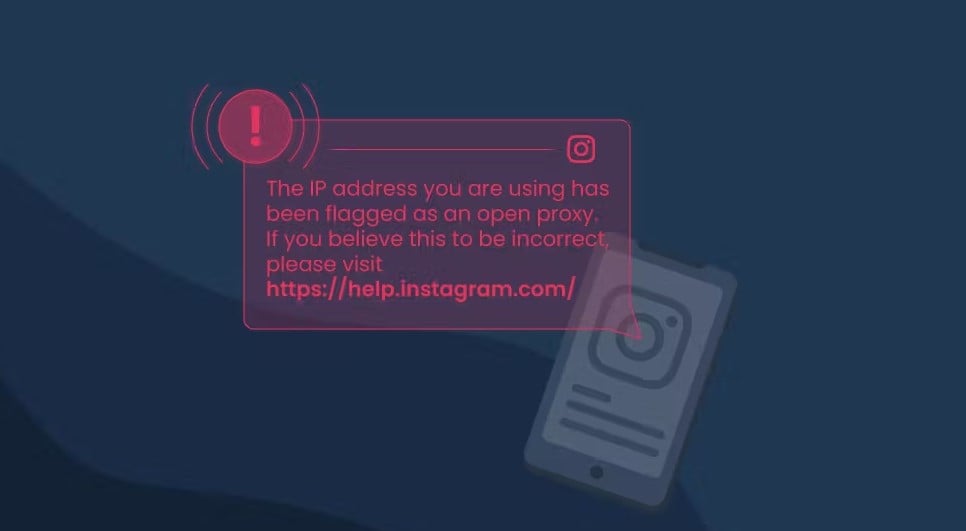
- Watch for Instagram’s own message: sometimes it will directly tell you your IP address has been flagged as an open proxy.
- Other common red flags: your feed won’t load, you hit repeated login errors, every Instagram account on that device fails at once, or you keep seeing generic error messages.
If several of these match your situation, you’re most likely dealing with an IP ban — but there’s a fix. 💪
How Long Does an Instagram IP Ban Last? ⏳
Duration depends entirely on the severity of the violation:
- Minor/temporary blocks: Usually resolve within 24–48 hours, typically caused by a short burst of unusually high activity.
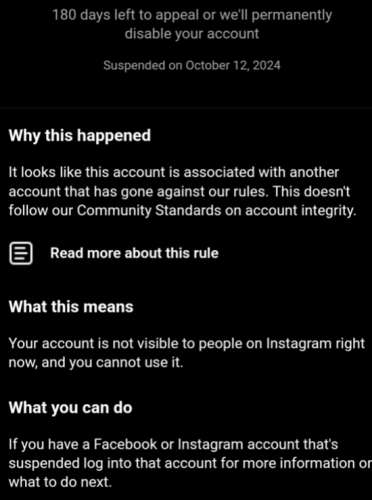
- Full account suspension: You’ll be locked out completely and shown a message with suspension details. This can last up to 180 days, and you must file an appeal within that window or your account will be permanently disabled. ⚠️ Important nuance: the 180 days is really a data-retention/deletion countdown, not a guarantee your account comes back on its own — the window that actually matters most is typically the first ~30 days after you get the notice, so appeal as early as possible.
- Permanent ban: Reserved for continuous, severe violations (mass following, mass liking, spamming). Once the IP is fully blacklisted, appeals rarely succeed.
How to Fix an Instagram IP Ban: 7 Practical Steps 🛠️
The instinct is to panic — don’t. Work through these steps in order and most cases resolve quickly:
- Switch networks first. Try mobile data instead of Wi-Fi, or connect to a different network entirely, to see if you can log in. This is the fastest way to self-diagnose.
- Restart your router. Most home internet connections use dynamic IPs — a restart can trigger your ISP to assign you a brand-new IP address.
- Clear your device cache and data. Wipe app cache, browser cookies, and history, then log back in. This sometimes bypasses device-fingerprint related flags.
- Contact Instagram Support. If you believe the ban is unjust, use the « Tell us » option on the « Action Blocked » notification, or go to Settings > Help > Report a Problem.
- Change your IP address. This is the most direct fix. Using an Instagram proxy — especially a residential one — instantly swaps in a clean, real household IP that bypasses the block.
- Wait out the cooldown. For minor restrictions, access often returns automatically within hours or a few days if you reduce activity in the meantime.
- Account unrecoverable? Consider starting fresh. If repeated appeals fail and the account is permanently disabled, this guide walks through it step by step: how to make a new Instagram account after being banned, so you avoid repeating the same mistakes.
One caveat: changing your IP only solves the immediate problem. If the underlying behavior that triggered the ban doesn’t change, Instagram’s detection systems can flag you again. For a lasting fix, you need to address the root cause too. 👇
How to Prevent Future Instagram IP Bans 🛡️
Prevention beats putting out fires every time. Here’s how to stay off Instagram’s radar:
- Use quality residential proxies. Instagram proxies sit between your device and the internet, masking your real IP so suspicious behavior is much harder to detect. Unlike datacenter proxies, residential proxies come from real household devices, so the connection reads as genuinely human — and gets flagged far less often.
- Make automation behave like a human. If you’re using automation tools, build in realistic cool-down periods that mimic natural usage patterns.
- Don’t overdo it on a new account. A fresh business page that immediately starts liking and following aggressively looks suspicious right away. Post gradually and build up activity like a real, organic user would.
- Isolate every account with its own IP. If you’re managing multiple Instagram accounts, give each one a dedicated, stable residential IP so one flagged account doesn’t take the others down with it.
Beyond Unbanning: More Ways Residential Proxies Power Your Instagram Growth 🚀
Getting unbanned is just the start. Residential proxies open up a lot more for Instagram operations:
Access geo-restricted content from around the world. 🌍
Manage multiple accounts safely, reaching different audiences without triggering cross-account bans.
Boost success rates for Instagram scraping, with far fewer CAPTCHA interruptions and smoother data collection.
One last reminder: free proxies might look tempting, but they’re heavily abused by countless other users, which makes them unstable, unreliable, and a real risk to your personal data. It pays to prioritize security over saving a few dollars. 🔒
Recommended Proxy Supplier: OkeyProxy — 200+ countries covered, a pool of 150M+ real residential IPs, stable Socks5 support, and a reliable choice for anyone serious about Instagram operations.
👉 Claim the Residential Proxy Trial now!
Summary
Facing an Instagram IP ban? Don’t panic. 🙌 Start with the basics — switch networks, restart your router — then bring in residential proxies to swap your IP and get back to posting stories, Reels, and updates in no time. Now that you understand why bans happen and exactly how to handle them, you can apply that knowledge to run a safer, more stable Instagram presence going forward. ✨