In the world of cybersecurity and advanced web navigation, certain search strings act as skeleton keys to vast amounts of exposed data. One such string is the Google Dork inurl:clash/proxies. To the uninitiated, it looks like technical gibberish. To a developer or network engineer, it is a direct path to live Clash proxy configurations — sometimes intentionally shared, but far more often accidentally exposed.
Whether you are a developer testing your network’s security posture, a marketer who needs to bypass regional restrictions, or a privacy-focused user exploring your options, understanding this search term — and its implications — is essential. This guide breaks down what Clash proxies are, why this specific dork is trending, the real risks of using scavenged nodes, and why a professional solution is almost always the right call for any serious use case.
What Is a “Clash Proxy”?
Clash is a cross-platform, rule-based tunnel application written in Go. Unlike a basic VPN that sends all traffic through a single pipe regardless of destination, Clash uses a declarative YAML configuration file to make per-connection routing decisions. You can instruct it to send social media traffic through a US node, route banking traffic directly, and block ad domains entirely — all simultaneously and without touching the application layer.
This granularity is why Clash has become the de facto standard for users who need serious control over their internet traffic, from network engineers and security researchers to digital marketers running large-scale scraping operations.
The Anatomy of a Clash Configuration File
A Clash configuration file (config.yaml) is divided into several functional sections. The mandataires section is what Google indexes when a server is misconfigured. Each entry in this section defines a single outbound node and typically contains:
- name: A human-readable label for the node (e.g., “US-LA-01”).
- type: The proxy protocol — Shadowsocks (
ss), VMess, VLESS, Trojan, SOCKS5, HTTP, Snell, TUIC, Hysteria2, or WireGuard. - server / port: The IP address or domain and the port of the remote server.
- cipher / uuid / password: Authentication credentials, which vary by protocol.
- tls / sni / network: Transport layer options (e.g., WebSocket, gRPC, HTTP/2) and TLS settings for obfuscation.
A minimal Shadowsocks node entry looks like this:
proxies:
  - name: "SG-01"
    type: ss
    server: 203.0.113.45
    port: 8388
    cipher: chacha20-ietf-poly1305
    password: "your-password"
    udp: true
A more modern VLESS+Reality node entry (resistant to deep packet inspection) looks like this:
proxies:
  - name: "US-VLESS-Reality"
    type: vless
    server: example.com
    port: 443
    uuid: "your-uuid-here"
    network: tcp
    tls: true
    client-fingerprint: chrome
    reality-opts:
      public-key: "your-public-key"
      short-id: "your-short-id"
When a server hosting these files has directory listing enabled, no authentication, and no robots.txt exclusion, search engines index the full content — making it discoverable to anyone who knows the right query.
Supported Protocols at a Glance
Clash (and particularly its actively maintained fork, Clash Meta / Mihomo) supports a wide range of proxy protocols. Understanding the differences matters when evaluating the safety of any node you find:
| Protocole | Obfuscation | Notes |
|---|---|---|
| Shadowsocks (SS) | Modéré | Lightweight, widely supported. Easily fingerprinted without plugins. |
| ShadowsocksR (SSR) | Modéré | Adds protocol obfuscation; largely superseded by newer options. |
| VMess | Bon | V2Ray’s original protocol. More detectable than VLESS when misconfigured. |
| VLESS | Excellent | Successor to VMess. Pairs with XTLS/Reality for TLS fingerprint mimicry. |
| Trojan | Excellent | Disguises traffic as HTTPS. Hard to detect at the transport layer. |
| Snell | Bon | Surge’s proprietary lightweight protocol. |
| Hysteria2 | Bon | QUIC-based; high throughput over lossy networks. |
| TUIC | Bon | Lightweight QUIC proxy; low latency, UDP-native. |
| WireGuard | Modéré | VPN protocol natively supported in Clash Meta. |
Proxy Groups: The Real Power of Clash
While the mandataires section defines available nodes, the proxy-groups section is what makes Clash genuinely powerful. A proxy group is a logical collection of nodes with a specific selection policy. This is the feature that separates Clash from a basic SOCKS5 client.
Clash supports five proxy group types:
- select: Manual selection. The user picks which node to use from a dropdown in the GUI.
- url-test: Clash automatically benchmarks all nodes by latency and picks the fastest one. You specify a test URL and an interval.
- fallback: Clash tests nodes in order and uses the first available one. Ideal for high-availability setups.
- load-balance: Distributes traffic across multiple nodes, either round-robin or via consistent hashing.
- relay: Chains traffic through multiple nodes sequentially — useful for multi-hop anonymization.
A practical example combining these group types:
proxy-groups:
  - name: "🚀 Auto-Select"
    type: url-test
    proxies: [US-01, SG-01, JP-01]
    url: "http://www.gstatic.com/generate_204"
    interval: 300

  - name: "🎬 Streaming"
    type: select
    proxies: [US-01, US-Streaming-02, 🚀 Auto-Select]

  - name: "🛡 Fallback"
    type: fallback
    proxies: [US-01, SG-01, DIRECT]
    url: "http://www.gstatic.com/generate_204"
    interval: 60
Pair these groups with a rules section, and Clash routes each connection to the right group automatically — no manual intervention needed.
proxy-providers: The Subscription Mechanism Behind the Dork
Les proxy-providers feature is the direct technical reason why inurl:clash/proxies returns results at all. Instead of hardcoding every node in a config file, users can point Clash to a remote URL that serves a YAML file containing just the mandataires block. Clash fetches this “subscription” periodically and refreshes its node list automatically.
proxy-providers:
  MyProvider:
    type: http
    url: "https://example.com/clash/proxies"   # <-- this URL pattern gets indexed
    interval: 3600
    path: ./providers/my-provider.yaml
    health-check:
      enable: true
      interval: 600
      url: http://www.gstatic.com/generate_204
When a provider’s backend server is misconfigured — no authentication, no robots.txt, directory listing on — Google indexes the raw YAML at that URL. The path pattern /clash/proxies is common enough that a single dork surfaces thousands of such endpoints.
The Clash Ecosystem in 2026: Forks & Clients
The original Clash repository was archived by its author in late 2023. The ecosystem has since consolidated around community forks, the most important being Clash Meta (now officially renamed Mihomo). Clash Meta maintains full backward compatibility with Clash config files while adding support for newer protocols (VLESS+Reality, Hysteria2, TUIC) and features (TUN mode, enhanced DNS, process rules).
Common GUI clients built on top of Mihomo include Clash Verge Rev (Windows/macOS, actively maintained), FlClash (cross-platform), Stash (iOS), and Clash Meta for Android. All of these use the same YAML config format, which means any subscription URL following the /clash/proxies pattern is compatible across clients.
When evaluating nodes found via the dork, check that the protocol listed in the YAML is actually supported by the version of the Clash core you are running. Older Clash Premium builds, for example, do not support VLESS or Hysteria2.
Decoding the Search: inurl:clash/proxies
Typing inurl:clash/proxies into Google is a form of “Google Dorking” — using advanced search operators to locate specific URL patterns. The inurl: operator restricts results to pages where that string appears in the URL itself.
Because the proxy-providers feature popularized the convention of hosting subscription content at paths like /clash/proxies, /api/clash/proxiesou /sub?target=clash, this dork surfaces a large number of live endpoints — some serving publicly shared free nodes, many others serving private subscription configs that were never meant to be public.
The dork became a recurring “cheat code” in Telegram groups and proxy forums, where users share it to find free nodes without paying for a subscription service. The problem — as detailed in the next section — is that free has a very different meaning here.
Remarque : The presence of a URL in Google’s index does not mean it was intended to be public. A significant portion of results are private subscription links leaked by misconfiguration.
Refining the Dork
Users looking for nodes in specific regions often combine the base dork with additional operators:
inurl:clash/proxies intext:trojan— filters for configs containing Trojan nodesinurl:clash/proxies intext:US— looks for US-labeled nodesinurl:/sub?target=clash— finds subscription conversion endpoints (often powered by subconverter)
These refinements narrow results but do not address the underlying security problem with using unknown nodes.
Where “Free” Nodes Come From
Beyond the Google Dork itself, scavenged nodes typically originate from a few organized sources:
- Aggregator sites (e.g., proxypool.link): These services crawl the open web for exposed Clash subscription endpoints and re-serve them filtered by country code. A query like
proxypool.link/clash/proxies?c=DEreturns all German-exit nodes the crawler has found. Node quality and safety are entirely unknown. - GitHub repositories: Searches for “clash proxy list” or “free clash nodes” on GitHub surface repositories that publish fresh YAML files daily, scraped from social media, Telegram channels, and other aggregators.
- Telegram channels and proxy forums: Platforms like BlackHatWorld or dedicated Telegram groups share nodes that have not yet been indexed by search engines, giving them a short window of usability before they are flooded and burned.
In all cases, the source of the underlying node infrastructure is anonymous. You have no way to vet the operator.
Security Risks: Why “Free” Can Be Expensive
Grabbing a node from an inurl:clash/proxies result and routing your traffic through it hands your data to a complete stranger. The risks are not theoretical.
① Man-in-the-Middle (MITM) Attacks
When you connect through a proxy, all your traffic passes through the operator’s server before reaching its destination. A malicious node operator can use SSL stripping to downgrade HTTPS connections, intercept login credentials, session cookies, API tokens, and private messages before they leave the node. This risk is highest on nodes using older protocols (Shadowsocks without plugins, plain SOCKS5) that provide weaker transport-layer guarantees.
② Traffic Logging and Surveillance
Even over HTTPS, a proxy operator can log the full domain name and timing of every request you make — revealing your browsing patterns, competitive research targets, and the accounts you manage. For a digital marketer or security researcher, this means handing your entire strategy to an unknown third party.
③ Deliberate Honeypots
Some publicly accessible nodes are intentionally left open and indexed to act as honeypots. The operators may inject malicious JavaScript into unencrypted responses, serve modified binaries in download requests, or silently enlist your connection in a botnet or DDoS attack. The node appearing fast and stable is not evidence of legitimacy.
④ Credential and Cookie Hijacking
If you use a leaked node while logged into any account — social media, cloud services, e-commerce platforms — a malicious operator can steal your session cookies. Unlike passwords, stolen session cookies bypass two-factor authentication entirely, since the server sees a valid authenticated session rather than a new login.
⑤ IP Reputation and Platform Bans
Public nodes are flooded within hours of being indexed. Thousands of users sharing the same exit IP triggers automated fraud detection on major platforms (Google, Meta, Amazon, Cloudflare). The IP is likely already on abuse blacklists, meaning your requests get CAPTCHAs, soft-blocks, or hard bans — the opposite of what you needed the proxy for in the first place.
Professional vs. Scavenged Nodes: A Comparison
The risks outlined above are not edge cases — they are the predictable outcome of routing traffic through infrastructure you know nothing about. The table below compares scavenged nodes against two legitimate alternatives: a professional residential proxy service and a self-hosted VPS. For any use case where reliability, IP reputation, or data privacy matters, the difference is not marginal.
| Fonctionnalité | Leaked Nodes (inurl:clash) | Professional (e.g., OkeyProxy) | Self-Hosted VPS |
|---|---|---|---|
| Sécurité | Extremely low (MITM, logging, honeypots) | High (encrypted, private, audited infrastructure) | Moderate (depends on your hardening) |
| Réputation IP | Often blacklisted or flagged | Clean IP résidentielles | Datacenter (easily fingerprinted) |
| Uptime / Stability | Unpredictable — nodes die within hours of being indexed | 99.9% SLA | High, but single point of failure |
| Couverture géographique | Random, unverifiable | 200+ pays, city-level targeting | Limited to VPS location |
| Soutien au protocole | Mixed; often outdated Shadowsocks | SOCKS5, HTTP(S), fully documented | Whatever you configure |
| Accountability | Aucun | KYC, ToS, support channel | You are the operator |
Pro Setup: Integrating OkeyProxy with Clash
If you want Clash’s rule-based routing combined with reliable, clean residential IPs, the correct approach is to supply your own verified credentials — not scavenge anonymous nodes. The following is a complete step-by-step walkthrough.
Step 1: Get Your Credentials from OkeyProxy
Log into the Tableau de bord OkeyProxy, navigate to the proxy settings panel, and generate a set of credentials. OkeyProxy supports two proxy protocols that Clash handles natively:
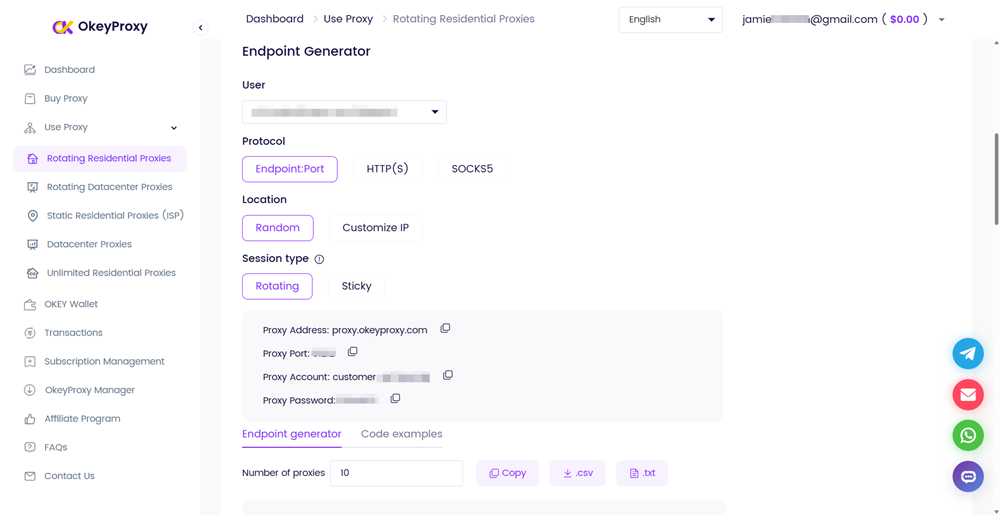
- SOCKS5 — supports both TCP and UDP traffic. Recommended for most use cases: browser automation, scraping tools that issue DNS queries, or any scenario where non-HTTP protocols are involved.
- HTTP / HTTPS — TCP only, no UDP. Simpler to configure and sufficient for pure web scraping, ad verification, or any workflow that only issues HTTP(S) requests.
Note down your assigned server, port, nom d'utilisateuret mot de passe for whichever protocol you choose.
Step 2: Add the Node to Your config.yaml
Open your Clash config.yaml and add an entry under the mandataires section. Use the block that matches your chosen protocol:
Option A — SOCKS5 (recommended):
proxies:
  - name: "OkeyProxy-US-Residential"
    type: socks5
    server: proxy.okeyproxy.com
    port: YOUR_PORT
    username: YOUR_USERNAME
    password: YOUR_PASSWORD
    udp: true
Option B — HTTP:
proxies:
  - name: "OkeyProxy-US-HTTP"
    type: http
    server: proxy.okeyproxy.com
    port: YOUR_PORT
    username: YOUR_USERNAME
    password: YOUR_PASSWORD
    tls: false
You can add both entries simultaneously and reference either one in different proxy groups if your workflow mixes HTTP and non-HTTP traffic.
Step 3: Create a Proxy Group
Add a proxy group that references the node you just defined. A select group lets you switch between OkeyProxy and a direct connection manually; swap it for url-test if you want Clash to pick the fastest available option automatically:
proxy-groups:
  - name: "Residential"
    type: select
    proxies:
      - OkeyProxy-US-Residential
      - DIRECT
Step 4: Add Routing Rules
Wire the proxy group into your rules section. Traffic matching a rule is sent to the specified group; everything else falls through to the default (MATCH):
rules:
  - DOMAIN-KEYWORD,target-site.com,Residential
  - DOMAIN-SUFFIX,data-source.io,Residential
  - GEOIP,US,DIRECT
  - MATCH,DIRECT
With this configuration, only traffic destined for your target domains routes through OkeyProxy’s residential IPs. General browsing and local traffic stay on your home connection. Accounts do not trigger security checks, scraped data remains private, and you are never sharing bandwidth with anonymous users.
Step 5: Reload and Verify
Save the file and reload Clash (most GUI clients have a “Reload Config” button, or restart the Clash service). Open the proxy group panel, confirm the OkeyProxy node appears and shows a latency figure after a connectivity test. Navigate to an IP-check site (e.g., ipinfo.io) while the Residential group is active to verify the exit IP matches the expected region.
Developer Protection: Prevent Your Config from Being Indexed
If you host a Clash subscription endpoint, misconfiguration is the root cause of every exposure that shows up in inurl:clash/proxies search results. The following checklist closes the most common gaps.
Security Checklist
- Disable directory listing: In Nginx, ensure
autoindex off;is set (it is the default, but verify). In Apache, confirm there is noOptions +Indexesdirective in scope. - Block crawlers with robots.txt: Add a rule to prevent indexing of your subscription paths.
User-agent: *
Disallow: /clash/
Disallow: /sub
Disallow: /api/
Note that robots.txt is a convention, not enforcement. Pair it with authentication.
- Require HTTP Basic Authentication: Even a simple username/password challenge on the subscription URL prevents Google from indexing the YAML content and stops casual scraping. In Nginx:
location /clash/ {
    auth_basic "Restricted";
    auth_basic_user_file /etc/nginx/.htpasswd;
}- Whitelist IPs: If only your own Clash clients need the subscription URL, restrict access to their static IP addresses at the server or firewall level. This eliminates the exposure entirely.
- Use token-based URLs: Append a long random token to the subscription path (e.g.,
/clash/proxies?token=a8f3b2...). This does not prevent indexing but makes the URL impractical to guess. - Audit with Google Search Console: Verify whether any of your subscription paths are already indexed. Use the URL Inspection tool and submit a removal request if needed.
Editor’s note: Run a Google Dork against your own domain periodically:
inurl:clash site:yourdomain.com. If results appear, act on the checklist above immediately.
Questions fréquemment posées
Is searching with Google Dorks like “inurl:clash/proxies” illegal?
Performing the search itself is generally legal — you are using a standard search engine feature. However, accessing private systems or using leaked credentials found through these searches can cross into unauthorized access under computer fraud statutes in most jurisdictions (e.g., the CFAA in the US, the Computer Misuse Act in the UK). The legal line is between reading a public search result and actually authenticating into a system using credentials found there.
Why do most nodes I find through this search fail to connect?
Google’s index has a significant lag — often days or weeks behind the live web. By the time a leaked subscription URL appears in search results, the original owner has typically rotated credentials, shut down the server due to traffic overload, or the node’s IP has been blacklisted by the destination platform. Nodes that do work are usually already saturated.
How can I tell if a Clash subscription link is safe to import?
You cannot verify safety from the URL alone. Use a proxy parser or a YAML viewer to inspect the content before importing. Red flags include: nodes pointing to residential IP ranges with no documented operator, self-signed certificates with skip-cert-verify: true, and VMess/VLESS entries with suspicious UUIDs shared across forums. The only reliable way to trust a node is to know and verify the operator — which means paying a reputable provider.
What is the difference between Clash and Clash Meta (Mihomo)?
The original Clash repository was archived in late 2023. Clash Meta — now officially renamed Mihomo — is a community fork that remains actively maintained. It is fully backward-compatible with existing Clash YAML configs and adds support for newer protocols (VLESS+Reality, Hysteria2, TUIC) and features (TUN mode, process matching, enhanced DNS). For any new setup in 2026 or later, use a Mihomo-based client.
Can I use OkeyProxy with Mihomo-based clients (Clash Verge Rev, Stash, FlClash)?
Yes. Any client that reads standard Clash YAML config files supports the SOCKS5 proxy type. The integration works identically across Clash for Windows, Clash Verge Rev, ClashX, Stash, and Clash Meta for Android. You add the node under mandataires, reference it in a proxy-groups entry, and apply routing rules as needed.
Conclusion
Les inurl:clash/proxies search query offers a revealing look at how many live proxy configurations are unintentionally exposed on the public web. It is a useful reminder of what poor server hygiene looks like in practice — and a cautionary tale about the gap between “accessible” and “safe.”
For casual curiosity or security research, understanding this dork is genuinely educational. For anyone considering actually routing production traffic through nodes found this way: the risks — MITM attacks, traffic logging, IP contamination, account compromise — far outweigh the cost of a legitimate proxy subscription.
The right approach is to use Clash or Mihomo for their routing power, and supply them with verified, clean residential IPs from a provider like OkeyProxy. Your data stays private, your IPs stay clean, and your infrastructure does not disappear the next time a server admin notices their subscription link in a Google search result.