The HTTP Error 407 (Proxy Authentication Required) is a status code indicating that the request was blocked by an intermediary proxy server because the client has not provided valid authentication credentials. Unlike a standard website login, this error signifies that the “middleman”—the proxy server through which your traffic is routed—requires proof of identity before it allows you to access the wider internet. As corporate networks and high-security residential proxies become more common, understanding how to navigate this digital handshake is essential for both casual browsing and automated data collection.
In this guide, we will explore the technical mechanics of the 407 status code, compare it with other similar errors like 401 and 403, and provide a comprehensive troubleshooting roadmap for both standard users and developers. Whether you are stuck behind a corporate firewall or a misconfigured script, the following steps will help you resolve the issue efficiently.
What Does HTTP Error 407 Actually Mean?
Les HTTP 407 Proxy Authentication Required status code indicates that the request has not been completed because it lacks valid authentication credentials for a proxy server located between the browser (the client) and the destination server hosting the requested resource.
When a proxy server receives a request that requires authentication, it returns a 407 response. This response must include a Proxy-Authenticate header, which provides information about the authentication method the client should use. The client can then resend the request with a Proxy-Authorization header containing the required credentials (usually a Base64-encoded username and password when using Basic authentication).
Technical Header Example
According to the standards outlined by MDN Web Docs, the exchange typically looks like this:
// Initial Client Request
GET /index.html HTTP/1.1
Host: www.example.com

// Proxy Server Response
HTTP/1.1 407 Proxy Authentication Required
Proxy-Authenticate: Basic realm="Access to the internal network"

// Client Re-request with credentials
GET /index.html HTTP/1.1
Host: www.example.com
Proxy-Authorization: Basic YWRtaW46cGFzc3dvcmQxMjM=
401 vs. 403 vs. 407: Understanding the Key Differences
It is easy to confuse these three status codes as they all involve access restrictions. However, they occur at different stages of the connection. Understanding where the block is happening is the first step toward a fix.
| Error Code | Title | Source of Block | Meaning |
|---|---|---|---|
| HTTP 401 | Unauthorized | Target Server | The destination website (e.g., Facebook, Amazon) needs you to log in. |
| HTTP 403 | Forbidden | Target Server | The server understands you, but refuses to give you access (even with a login). |
| HTTP 407 | Proxy Auth Required | Intermediary Proxy | The “middleman” server needs your proxy username/password to proceed. |
In summary: 401 and 403 are between you and the website; 407 is between you and the proxy server you are using to reach that website.
Common Causes of the 407 Proxy Authentication Error
Before diving into the fixes, it is helpful to understand why your request was flagged. Transitioning from a smooth connection to a 407 block usually stems from one of the following triggers:
- Missing or Incorrect Credentials: The most common cause. You either haven’t entered a username/password, or they were typed incorrectly.
- Network Configuration Mismatch: Your computer is trying to use a proxy that your local network doesn’t support or hasn’t authorized.
- Authentication Scheme Mismatch: The proxy wants “NTLM” or “Digest” authentication, but your browser is sending “Basic” authentication.
- Firewall or Antivirus Interference: Security software can sometimes strip the
Proxy-Authorizationheaders from your outgoing packets. - Browser Cache Issues: Your browser may be trying to use expired or cached credentials for a session that has already timed out.
- Proxy Server Misconfiguration: The server side might have “IP Whitelisting” enabled, but your current IP address has changed.
To resolve these issues, the first priority is ensuring that your credentials are accurate and that your browser’s proxy settings match your network’s requirements.
Step-by-Step Guide for Everyday Users to Fix HTTP Error 407
If you are seeing a 407 error during normal browsing, follow these steps in order. We have optimized this process to start with the easiest fixes before moving to deeper system changes.
Step 1: Refresh and Initial Check
First, refresh the page. Sometimes a temporary network glitch causes the authentication handshake to fail. If the error persists, open a known reliable site (like Google or Bing) to see if the block is universal or limited to a specific domain. If every site gives a 407, the issue is definitely with your proxy settings.
Step 2: Verify and Re-enter Credentials
Often, 407 errors occur because of a “fat-finger” typo.
- Close your browser and reopen it. This should trigger a new login pop-up.
- Carefully re-enter your nom d'utilisateur et mot de passe. Ensure there are no accidental spaces at the beginning or end of the fields.
- If you aren’t sure of your credentials, contact your network administrator or proxy provider immediately.
Step 3: Check System Proxy Settings
In many environments, your browser inherits settings from your Operating System.
- En chrome : Aller à
Settings > System > Open your computer's proxy settings. - Verify that the Host Address et Port are correct.
- Ensure “Use a proxy server” is toggled on only if you are intentionally using one. If you are at home and see this on, try turning it off.
Step 4: Environmental “Clean Up” (VPN & Antivirus)
Third-party software often modifies HTTP headers, which can break proxy authentication.
- Turn off VPNs: A VPN can sometimes conflict, leading to header stripping.
- Disable Web Filters: Temporarily turn off your Antivirus web shield or Ad-blockers. These tools can sometimes block the
Proxy-Authenticateheader, preventing your browser from knowing it needs to log in.
Step 5: Clear Cookies and DNS Cache
Expired authentication tokens can stay stuck in your browser.
- Clear your browser cookies and cache for the last 24 hours.
- Flush DNS: Open your command prompt (cmd) and type
ipconfig /flushdns. This clears out old routing information that might be pointing to a dead proxy gateway.
Editor’s Tip: If you are on a corporate laptop, your “Gateway Server” might be forcing all traffic through a specific path. If you move from the office to a home Wi-Fi and still see 407, your laptop is likely still trying to find the office proxy. Restarting the machine while connected to the new Wi-Fi is often the quickest fix.
Developer Zone: Troubleshooting 407 Errors in Scripts
For developers and system engineers, a 407 error is usually a sign that your automation script or scraper hasn’t been configured to handle the proxy’s specific authentication scheme.
1. Inspecting the Response Headers
Use a tool like cURL or Postman to see exactly what the proxy is asking for. Look for the Proxy-Authenticate header.
curl -v -x http://proxy-addr:port http://example.com
If the response includes Proxy-Authenticate: NTLM, your client or script must support the NTLM authentication scheme rather than relying only on Basic authentication.
2. Handling 407 in Automation Scripts
Most modern libraries handle proxy authentication via a specific format: http://user:password@proxy-address:port.
Python (Requests)
import requests

proxies = {

    "http": "http://user:[email protected]:8080",
    "https": "http://user:[email protected]:8080",
}
response = requests.get("http://example.com", proxies=proxies)
print(response.status_code)
Node.js (Puppeteer)
const puppeteer = require('puppeteer');

(async () => {
  const browser = await puppeteer.launch({
    args: ['--proxy-server=http://123.456.78.9:8080']
  });

  const page = await browser.newPage();
  await page.authenticate({ username: 'user', password: 'pass' });

  await page.goto('https://example.com');
  await browser.close();
})();
Using Premium Proxies (OkeyProxy) to Avoid 407 Errors
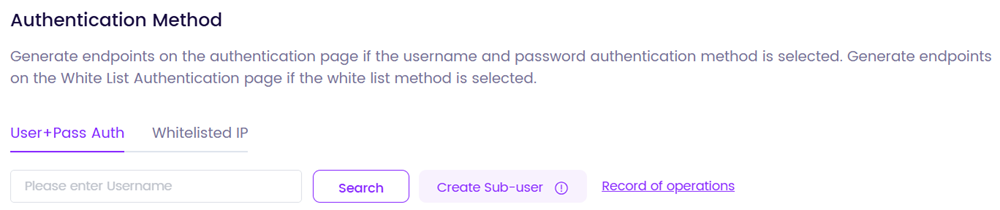
One of the biggest triggers of constant 407 errors is the use of “free” or low-quality proxy lists. These servers are often overloaded, misconfigured, or frequently change their authentication requirements without notice. OkeyProxy solves this by providing a professional-grade infrastructure that prioritizes uptime and ease of use. As a Top HTTP and SOCKS5 provider, OkeyProxy offers over 150 million PI résidentielles with 99.9% uptime. Their intuitive dashboard allows you to manage authentication via either Username/Password ou Liste blanche d'adresses IP, effectively eliminating the “credential mismatch” issues that cause 407 errors in complex scraping projects.
Best Practices to Avoid HTTP 407 in the Future
To ensure your network remains stable and your scripts run without interruption, adopt these habits:
- Use IP Whitelisting: Whenever possible, whitelist your server’s IP in your proxy dashboard. This removes the need for
user:passheaders entirely, bypassing the 407 handshake logic. - Credential Management: Use environment variables or password managers to store proxy credentials to avoid “hard-coding” typos into your applications.
- Implement Retry Logic: In your code, add a retry mechanism that specifically looks for 407 errors and attempts to re-authenticate or rotate to a new proxy.
- Monitor Proxy Health: Regularly check if your proxy provider’s gateway has changed. High-quality providers will notify you of port or address changes in advance.
Conclusion
HTTP Error 407 is a security gate, not a dead end. By understanding that 407 Proxy Authentication Required simply means your proxy server needs valid credentials, you can quickly diagnose the problem. For casual users, a simple check of system settings or a credential refresh usually does the trick. For developers, ensuring the correct headers and authentication methods are used in scripts is key. By pairing these troubleshooting steps with a reliable provider like OkeyProxy, you can ensure a seamless, uninterrupted browsing and data collection experience in 2026.